
Topic
This article explains how to use NinjaOne Billing to define your account codes and map them to your products and the corresponding codes in your accounting tool.
If you need to enable the NinjaOne Billing tool, refer to NinjaOne Billing: Getting Started with Professional Services Automation (PSA).
Environment
NinjaOne Billing
Description
Account codes in NinjaOne Billing allows you to configure the account to which each product should be mapped. To support this, we have created default accounts for each of the existing product types in NinjaOne and will maintain their mapping to accounts in your accounting tool.
This functionality changes the way you interact with product types in NinjaOne. We removed the dependency requiring a product type to determine the quantity calculation. Instead of using the product type, you will use a quantity source to specify what type of lookup you want to use for each product.
Index
First, enable NinjaOne's Billing tool. Learn how to here: NinjaOne Billing: Getting Started with Professional Services Automation (PSA).
Then, select a category to learn more:
- Define and Track Your Account Codes
- Use Account Codes With Products
- Edit or Delete Account Codes
- Additional Resources
Define and Track Your Account Codes
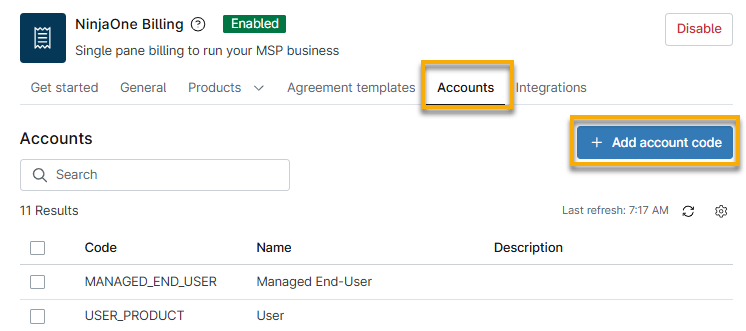
NinjaOne provides default accounts for your existing product types in NinjaOne, and these account codes are mapped to your accounting tool. To access them, open the Accounts tab on the NinjaOne Billing application page.
Create a Customized Account Code
To create a new, customized account code, perform the following steps:
- In NinjaOne, navigate to Administration → Apps → Installed → NinjaOne Billing.
- Open the Accounts tab.
- Click Add account code.
Use Account Codes With Products
You can select an account code when working with products in NinjaOne and set the quantity source to customize your billing process.
Billing agreements will use the quantity type to determine which products can be added to specific billing automations or orders.
Refer to NinjaOne Billing: Products to learn more.
Edit or Delete Account Codes
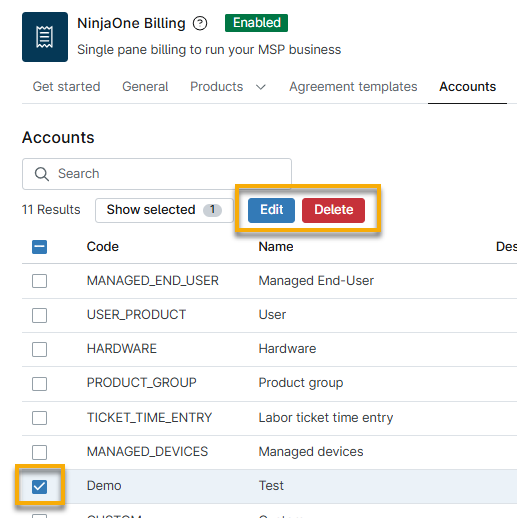
You cannot edit or delete default account codes. When editing, you can update the account code, name, and description.
To edit or delete a custom account code, select the checkbox next to the name, and then click Edit or Delete.
Additional Resources
Refer to NinjaOne Billing: Resource Catalog to view all related articles.