Topic
NinjaOne's release version 5.9 introduces the ability to share reports globally or with specific technician roles.
This feature affects both Summary Reports and Data Tables for system administrators and technicians with the "Full Access" Manage Reports account permission.
Environment
NinjaOne platform
Description
To share a report, either create a new report, copy, or edit an existing report.
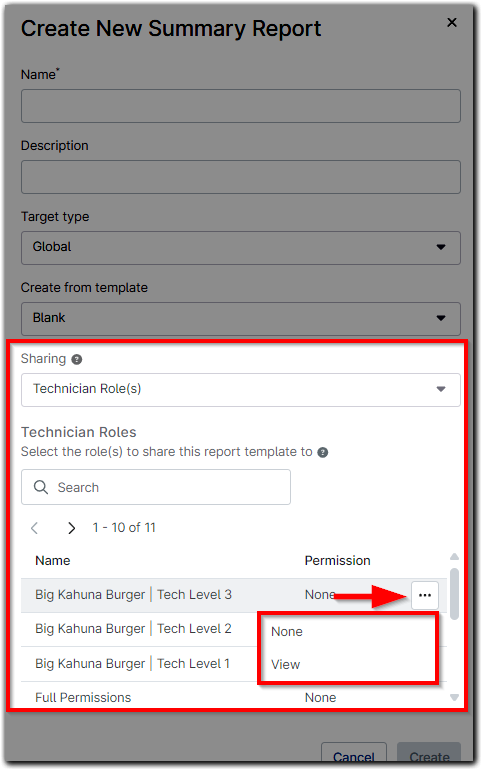
- When creating a new report, select an option from the Sharing dropdown.
- If you select "Technician Role(s)", additional criteria will display in the modal—hover your cursor over the role and click the ellipsis to change the Permission from "None" to "View."
- Only the roles to which a technician has access will display in the modal; system administrators will see all roles.
- The role must have the "Full Access" permission for Manage Reports.
- When editing a report, click the Sharing Settings button in the top right corner of the page.

- Important Note: The sharing status can only be changed from Self (Private) to either Global (Public) or Technician role. Once changed, the dropdown will turn gray to show that it is locked.
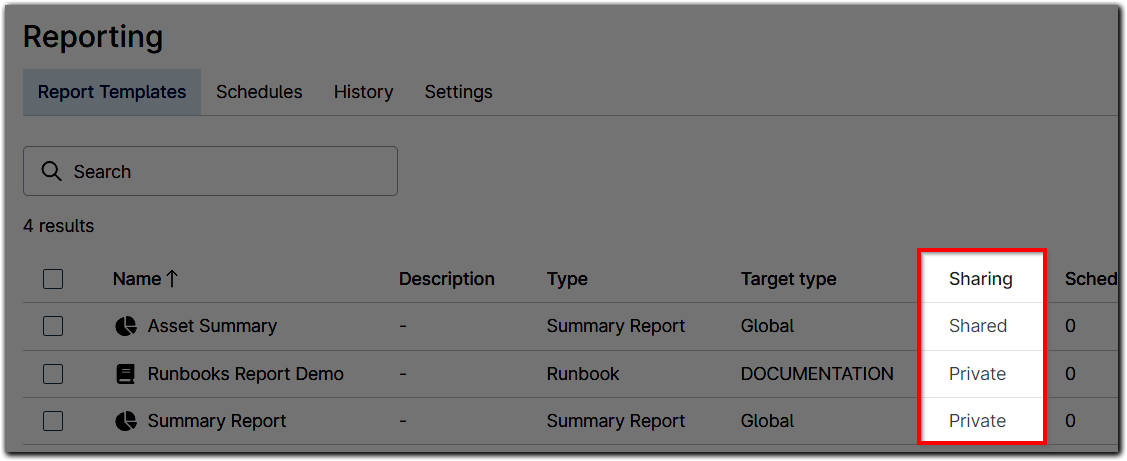
You can see whether a report is shared or private from the Reporting dashboard. Click the hyperlinked status in this column to view change options.