
Topic
This article discusses VSS writer alerts on successful backup jobs in NinjaOne Device Backup.
Environment
NinjaOne Device Backup
Description
NinjaOne Device Backup warns users if it detects VSS writer issues during a successful backup job.
About VSS Writer Errors
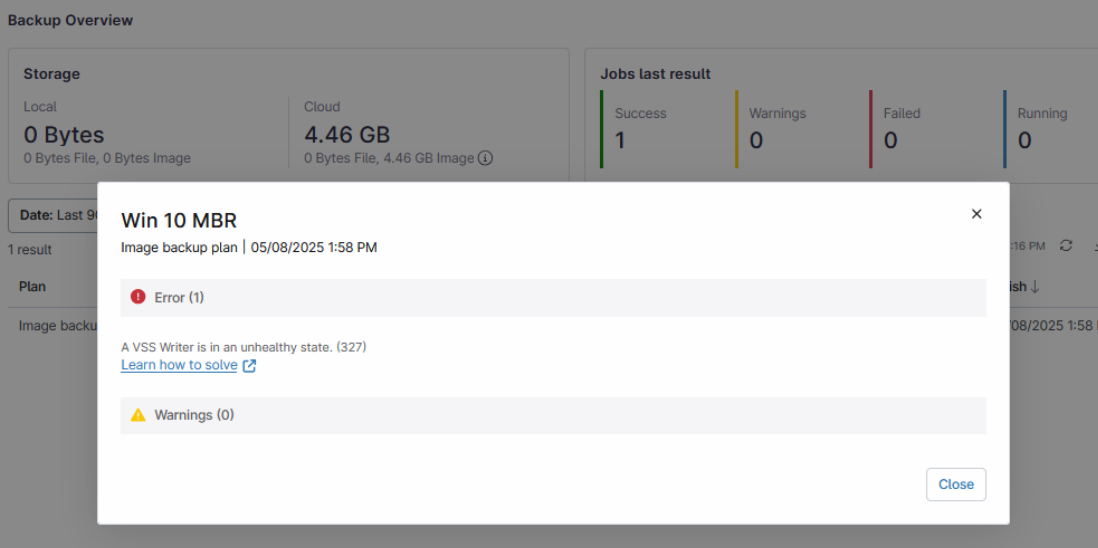
When NinjaOne Device Backup attempts to back up a Microsoft Windows disk, it creates a Volume Shadow Copy (VSS) snapshot for the volume. If any of the VSS writers associated with this backup encounter an error, the backup job may still complete, but the instability could lead to issues with restore consistency in the future. Figure 1 shows an example of how the error, "A VSS Writer is in an unhealthy state. (327)" would appear in the NinjaOne UI.
Troubleshooting Unstable VSS Writers
Rebooting the system can solve many unstable writer errors. If you cannot perform a reboot, or the writer remains unstable, restart its Windows service. A 132 Error message will display the VSS writer that is having a problem. For other types of VSS errors, that may not list the specific writers at fault, you can determine the writer as follows.
Open an administrative command prompt and type the following command:
vssadmin list writersThis command shows all the system's VSS writers, their current state (Stable or Failed), and any error codes generated when a writer is in a failed state. You can look up error codes and solutions in our NinjaOne Backup: Troubleshooting error codes article.

- Refer to the VSS writer in the following table and note the corresponding service.
| WSS Writer | Service Name | Related Service |
|---|---|---|
| ASR Writer | VSS | Volume Shadow Copy |
| BITS Writer | BITS | Background Intelligent Transfer Service |
| Certificate Authority | CertSvc | Active Directory Certificate Services |
| COM+ REGDB Writer | VSS | Volume Shadow Copy |
| DFS Replication Service Writer | DFSR | DFS Replication |
| DHCP Jet Writer | DHCPServer | DHCP Server |
| FRS Writer | NtFrs | File Replication |
| FSRM Writer | srmsvc | File Server Resource Manager |
| IIS Config Writer | AppHostSvc | Application Host Helper Service |
| IIS Metabase Writer | IISADMIN | IIS Admin Service |
| Microsoft Exchange Replica Writer | MSExchangeRepl | Microsoft Exchange Replication Service |
| Microsoft Exchange Writer | MSExchangeIS | Microsoft Exchange Information Store |
| Microsoft Hyper-V VSS Writer | vmms | Hyper-V Virtual Machine Management |
| MSMQ Writer (MSMQ) | MSMQ | Message Queuing |
| MSSearch Service Writer | WSearch | Windows Search |
| NPS VSS Writer | EventSystem | COM+ Event System |
| NTDS | NTDS | Active Directory Domain Services (also restarts DFS Replication) |
| OSearch VSS Writer | OSearch | Office SharePoint Server Search |
| OSearch14 VSS Writer | OSearch14 | SharePoint Server Search 14 |
| Registry Writer | VSS | Volume Shadow Copy |
| Shadow Copy Optimization Writer | VSS | Volume Shadow Copy |
| SMS Writer | SMS_SITE_VSS_WRITER | SMS_SITE_VSS_WRITER |
| SPSearch VSS Writer | SPSearch | Windows SharePoint Services Search |
| SPSearch4 VSS Writer | SPSearch4 | SharePoint Foundation Search V4 |
| SqlServerWriter | SQLWriter | SQL Server VSS Writer |
| System Writer | CryptSvc | Cryptographic Services |
| TermServLicensing | TermServLicensing | Remote Desktop Licensing |
| WDS VSS Writer | WDSServer | Windows Deployment Services Server |
| WIDWriter | WIDWriter | Windows Internal Database VSS Writer |
| WINS Jet Writer | WINS | Windows Internet Name Service (WINS) |
| WMI Writer | Winmgmt | Windows Management Instrumentation |
After you've determined which writers are at fault, you can restart them as follows.
- Press Ctrl + Alt + Delete, select Task Manager, then click the Services tab.
- Right-click the service that corresponds to the unstable VSS writer and select Restart.
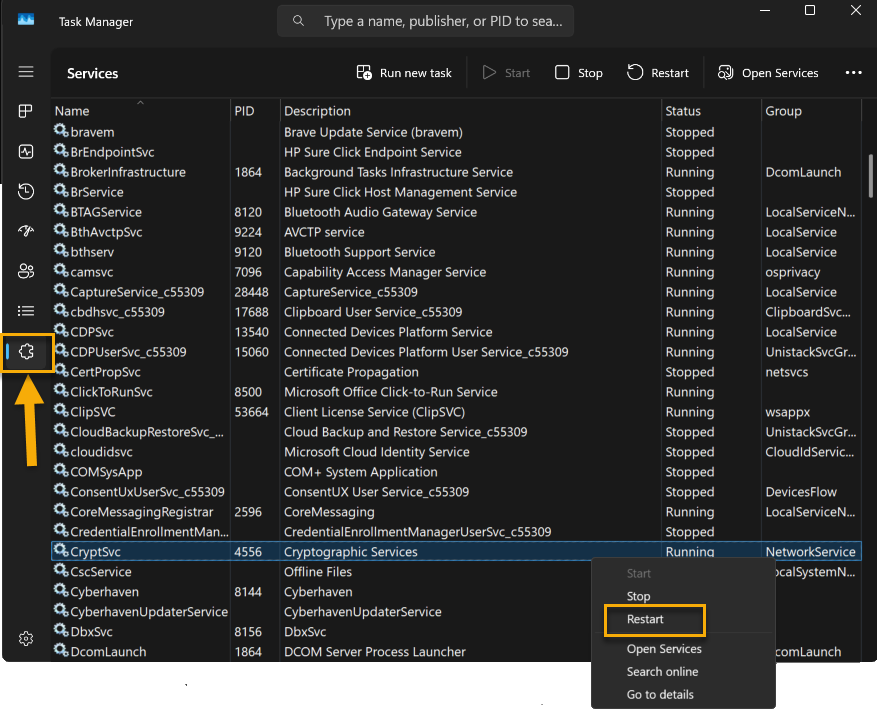
- After repairing the VSS writers, perform another backup and check if it completes without VSS writer instability. If the issue persists, you will need to troubleshoot your Windows machine.
Additional Resources
Refer to the following articles for more information: