
Topic
This article provides a list of scopes for the Application Programming Interface (API) key that are required to set up multi-tenancy for your CrowdStrike integration in NinjaOne.
Environment
- NinjaOne Integrations
- CrowdStrike Falcon
Description
NinjaOne leverages CrowdStrike Flight Control APIs to create a multi-tenancy structure for the integration. The API key requires a new set of scopes to enable this feature in NinjaOne.
The CrowdStrike API utilizes OAuth 2.0 for authentication. To learn more about CrowdStrike OAuth2-Based APIs, refer to Authorization APIs | CrowdStrike APIs | Documentation | Support and resources | Falcon (you must be logged in to CrowdStrike to access this external link).
Select a category to learn more:
Create an API Client
To use CrowdStrike API, you must generate an API Client. This will generate a temporary access token that grants access to specific APIs.
To create an API client, perform the following steps:
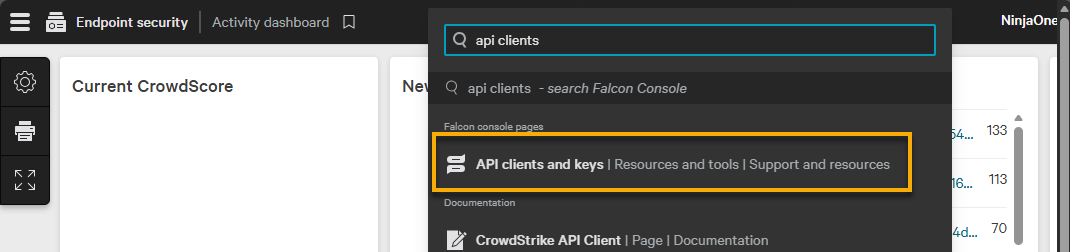
- Log in to your CrowdStrike Falcon account. Use the global search tool to find and navigate to the API clients and keys page.
- Click Create API client.

- Provide a unique identifier for the Client name field. For the Scope section, select the applicable checkbox to enable Read and Write access for the endpoints. At least one scope must be assigned. You can learn more about the scope provisioning in the following section of this article.
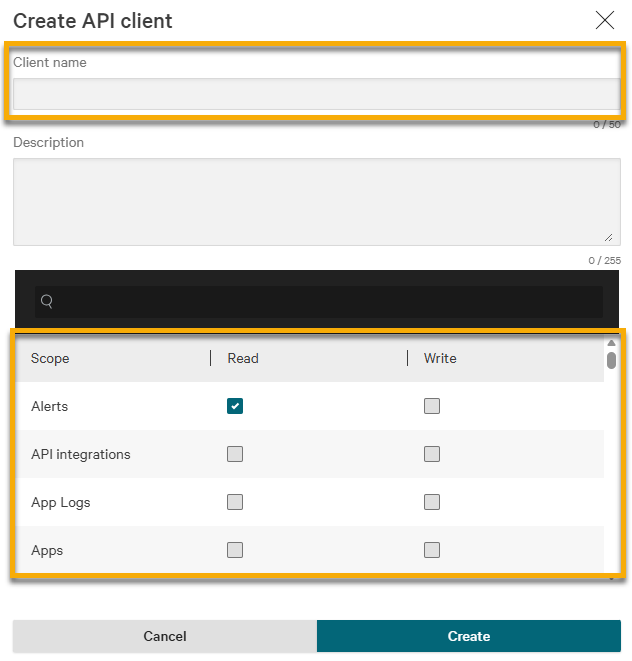
- Click Create to save the API client and generate the client ID and secret.
Provision the API Scopes
You must assign each API client one or more API scopes. Scopes allow access to specific CrowdStrike APIs and describe the actions that an API client can perform, such as "read" or "write." Use scopes to fine-tune permissions of your API clients. CrowdStrike applies the scopes to access tokens generated by the API client credentials, which grant access to only the endpoints authorized for use.
Minimum Scope Requirements
If you have not assigned the minimum number of scopes for an API Client, the integration may fail. At a minimum, ensure the following scopes are provisioned to the API Client.
The following table provides a list of credential scopes for multi-tenancy functionality, including partner credentials and Falcon Complete.
| Scope Name | Read Access | Write Access |
|---|---|---|
| Alerts | Required | |
| Hosts | Required | Required |
| Host groups | Required | Required |
| Sensor Download | Required | |
| Flight Control | Required | |
| Sensor Usage | Required |
Invalid Credential Scope Identifier
If CrowdStrike detects invalid credentials, it will create an activity with the identifier of the missing scope. The following table provides the identifier for each scope.
| Scope Name | Scope Identifier |
|---|---|
| Alerts | alerts |
| Hosts | devices |
| Sensor Download | sensor-installers |
| Host Group | host-group |
| Flight Control | mssp |
Additional Resources
Refer to NinjaOne and CrowdStrike: Multi-tenancy Integration to learn how to enable multi-tenancy for CrowdStrike in NinjaOne.