
Topic
This article describes the antivirus conditions you can manage in your NinjaOne policies.
Environment
NinjaOne Endpoint Management
Description
The Antivirus Health condition is triggered if antivirus software is missing, deactivated, or outdated, or if multiple antivirus software programs are installed, allowing technicians to set up health conditions accordingly.
This condition is dependent on the accuracy of the Windows Security Center. Some antivirus products may not report accurately or at all. Security Center is enabled by default on all workstations, but may not be enabled on servers.
At least one checkbox must be selected before the condition can be saved.
| Criteria | Description |
|---|---|
| Detect Multiple Antivirus Installed | When selected, this condition triggers when the Windows Security Center detects more than one antivirus reporting to it. When checked, this condition triggers and returns a list of the detected antiviruses. |
| Ignore Microsoft Defender Antivirus | Microsoft Defender Antivirus is often installed by default on most new Windows operating systems. When checked, all Microsoft Defender Antivirus-related information is dismissed and discounted. |
| Duration Detected | This is the amount of time between detection and the triggering of any sub-condition. |
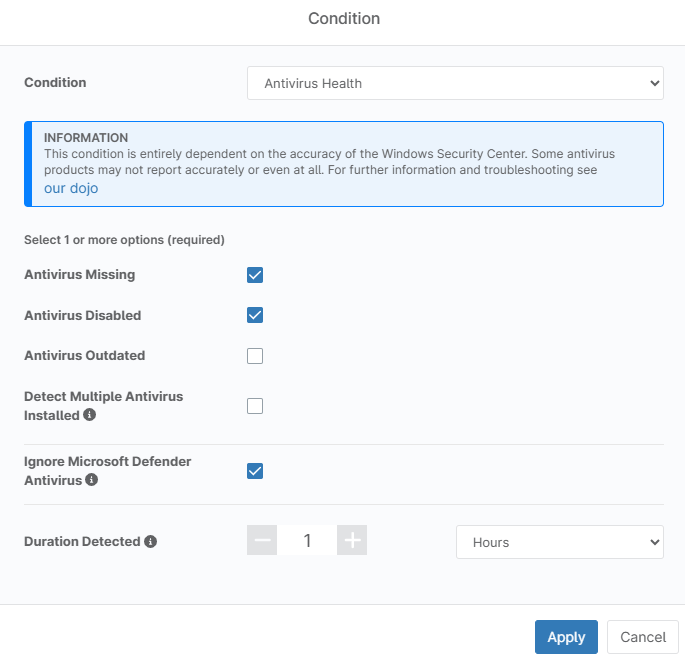
Figure 1: Antivirus Health condition configuration dialog
Other Antivirus Conditions
| Template Name | Condition | Process / Service / Source | Up / Down / Event IDs | Time / Text |
|---|---|---|---|---|
| Webroot: Process Down | Process | Webroot SecureAnywhere Core Service, Webroot SecureAnywhere Endpoint Protection, WRCoreService, WRSkyClient, WRSVC | Down | 3 Minutes |
| Webroot: Daemon Down | Daemon | WSDaemon | Down | 3 Minutes |
| Sophos: Service Down | Windows Service | Sophos Agent, Sophos Anti-Virus, Sophos AutoUpdate Service, Sophos Client Firewall, Sophos Client Firewall Manager, Sophos Device Control Service, Sophos Device Encryption Service, Sophos Endpoint Defense Service, Sophos Patch Agent, Sophos Web Control Service, Sophos Web Intelligence Service, Sophos Web Intelligence Update, Sophos Web Filter Service, Sophos Network Threat Protection, Sophos System Protection Service, Sophos Clean Service, HitmanPo.Alert Service, Sophos Live Query, Sophos Safestore Service | Down | 3 Minutes |
| ESET: Service Down | Windows Service | ekmEpfw, ehttpsrv, ekrn, efdeais, efdesrv, EraAgentSvc | Down | 3 Minutes |
| Windows Defender: Service Down | Windows Service | windefend, mpssvc, MsMpEng, Windows Defender Service | Down | 3 Minutes |
| Trend Micro: Apex One Service Down | Windows Service | CETASvc, Trend Micro Endpoint Basecamp, Trend Micro Web Service Communicator, TmCCSF, tmlisten, ntrtscan, TmWSCSvc | Down | 3 Minutes |
| Trend Micro: Worry-Free Business Security Service Down | Windows Service | PccNTMon, PccNT, TmListen, NTRtScan, TmPfw, TMBMSRV | Down | 3 Minutes |
| Trend Micro: Service Down | Daemon | com.trendmicro.icore.main | Down | 3 Minutes |
| Kaspersky: Service Down | Windows Service | soyuz, angara | Down | 3 Minutes |
| Broadcom (Symantec) Endpoint Protection: Service Down | Windows Service | snc64, DoScan, Smc, SepMasterService, ccSvcHst | Down | 3 Minutes |
| Broadcom (Symantec) Endpoint Protection Manager : Service Down | Windows Service | SemSvc, SemLaumchSvc | Down | 3 Minutes |
| AVG: Service Down | Windows Service | AVG Antivirus, avgIDSAgent, AvgWscReporter, AVG Secure Browser Elevation Service, avg8wd, avgadmsv, avgtcpsv | Down | 3 Minutes |
| MalwareBytes: Service Down | Windows Service | MBAMService, MBEndpointAgent, MBAMIService, mbMgmtSvc, MsMpSvc, MBAMScheduler | Down | 3 Minutes |
| VIPRE: Service Down | Windows Service | VipreNis, SBAMSvc, ViprePPLSvc | Down | 3 Minutes |
| Panda: Service Down | Windows Service | NanoServiceMain, PandaAgent, pselamsvc, PSUAService, Panda VPN Service | Down | 3 Minutes |
Additional Resources
To learn more about conditions in NinjaOne, refer to the following resources:
- Policies: Condition Configuration
- Policies: Condition Types Breakdown
- Policies: Conditions - Templates
If you are unable to view antivirus information in reports, refer to Reporting: Why does my Antivirus report show no information?