
Topic
This article explains how what device actions are available on the dashboard for macOS devices enrolled in NinjaOne Mobile Device Management (MDM).
Environment
- NinjaOne platform
- NinjaOne Apple MDM
- MacOS
Description
NinjaOne supports initiating specific actions for macOS devices that have been enrolled through our mobile device management (MDM) solution. If you have not already enrolled a macOS device through our MDM, you can learn more about how to do so at NinjaOne MDM: Enrolling macOS Devices.
Select a category to learn more:
MDM Device Actions for macOS
When you enroll a macOS device through NinjaOne's MDM tool, additional device actions will be available on the dashboards, Devices search page, and through the global search. An MDM-only macOS shows the same information on the Devices search page as an iOS device.
Available actions
- Reboot device
- Security actions
- Lock device
- Erase device (all content and settings)
- Install NinjaOne agent
- Disown device
- Shut down device
- Restart the device (if the agent is already installed)
- Delete the device (if the agent is already installed)
Device Dashboard Information for macOS
Overview
- If the device is enrolled in MDM but does not have an agent installed, the device dashboard Overview provides information similar to that of a typical iOS mobile device.
- If the device is enrolled in MDM and has the agent installed, the device dashboard Overview provides the following data and the information typically provided for Mac devices.
Last MDM Update
Encryption
Ownership
MDM Enrollment Date
Manufacturer
Model
Details
There are two submenus: Agent Details and MDM Details. Agent Details contains all information currently showing for a macOS agent device. MDM Details includes all of the same information collected for an iOS device.
The MDM Details look and feel similar to iOS and iPadOS, with a few updated fields specific to macOS.
If you enroll a device as an agent or MDM (but not both), the Details tab will only show the corresponding data.
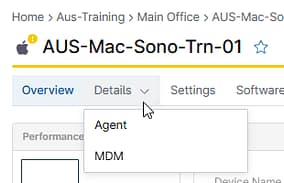
Figure 1: Agent and MDM details for macOS device
Additional Resources
Refer to the following resource(s) to learn more about NinjaOne MDM: NinjaOne MDM: Resource Catalog.