
Topic
This article explains how to delete or remove a device in NinjaOne.
Environment
NinjaOne Endpoint Management
Description
There are multiple methods for device removal in NinjaOne, either individually or in bulk.
When you delete a device from NinjaOne, NinjaOne will automatically uninstall the RMM agent if the device is online and remove all device information from the console. If the device is offline at the time of deletion, it will remain in the update queue until the device is back online, but it will not appear in the console. Once the device is online, NinjaOne will proceed to uninstall the agent.
If you are trying to remove a mobile device managed by our NinjaOne Mobile Device Management (MDM) tool, refer to Mobile Device Uninstall Management.
Select a category to learn more:
Delete a Single Device
You can delete a single device from the device dashboard in NinjaOne. To learn more about accessing and using dashboards, refer to NinjaOne Dashboards: Resource Catalog.
- Navigate to the device dashboard for the endpoint you want to delete from NinjaOne.
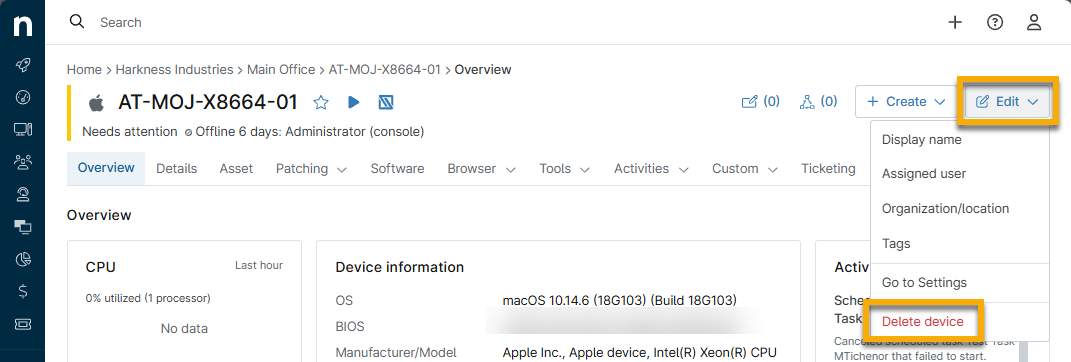
- Click Edit on the device dashboard and click Delete device.
Delete Multiple Devices
You can delete multiple devices in bulk from the Devices search page. The devices do not need to be the same type to perform this action.
- Click Devices in the navigation pane.
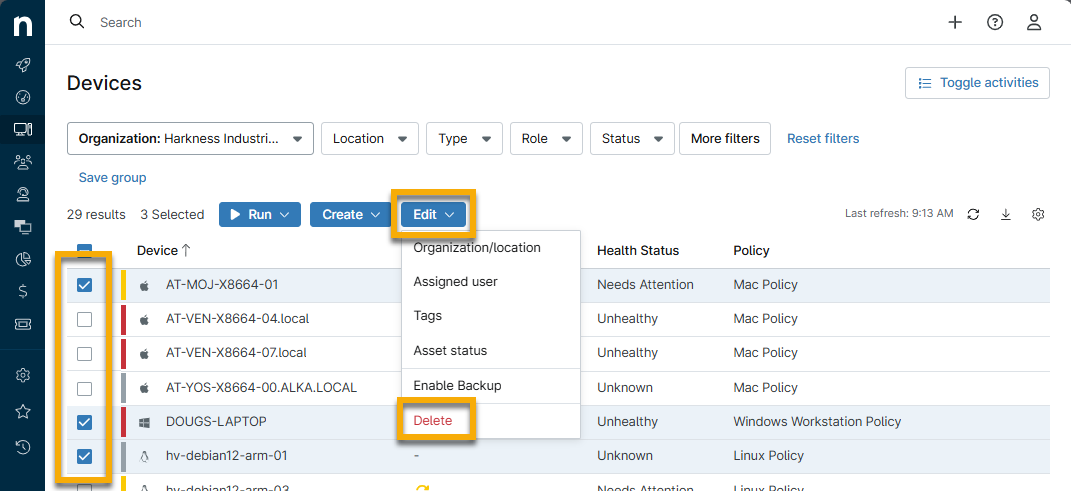
- Select all devices you wish to delete from NinjaOne.
- Click Edit and then click Delete.
- Enter the email you used to log in to confirm the action.
Removing Backup Data
If you use NinjaOne Device Backup, NinjaOne will prompt you to delete your backup data. NinjaOne can only remove locally stored backup data when NinjaOne Device Backup is installed, active, and the machine is online. When you remove an individual agent's backup data, NinjaOne will display a warning dialog that indicates the local storage location, if there is one. When removing multiple agents, Ninja One will display a warning, but no location. Document the storage location if you wish to remove the locally stored data manually later. For more information about deleting backup data, refer to: NinjaOne Device Backup: Deleting Backup Data.
Additional Resources
To learn more about managing your devices in NinjaOne, refer to: Device Enrollment & Management: Resource Catalog.