
Topic
This article explains your options for installing Webroot on Apple macOS devices version 10.13.14 and newer.
Environment
- NinjaOne Integrations
- Webroot
Description
During installation, Webroot requires the installation of a kernel extension in macOS.
Due to changes Apple made in macOS 10.13.4, this process now requires user approval or the utilization of some options in the articles linked below:
- Prepare for changes to kernel extensions in macOS High Sierra - Apple Support (external link)
- Prepare your institution for macOS High Sierra 10.13.4 - Apple Support (external link)
Here are the options to approve kernel extensions described in the referenced external articles:
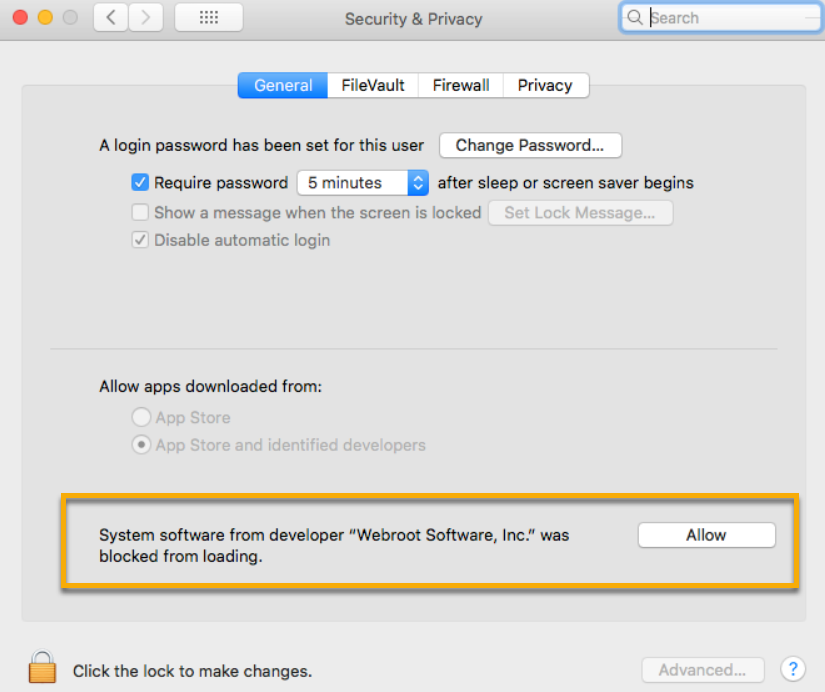
- During installation, you can navigate to System Preferences → Security and Privacy on your device, and select the option to approve the addition of the kernel extension Webroot is attempting to install.
- Use Mobile Device Management (MDM) to specify which kernel extensions can load without user consent.
Additionally, there are a couple of instances where kernel extensions can be installed without user approval in 10.13.4:
- Extensions that are replacing previously approved extensions, as in the case of a re-installation of Webroot.
- If you want to manage User Approved Kernel Extension Loading outside of MDM, start up from How to start up from macOS Recovery - Apple Support (external link) and use the
spctlcommand. Run the command by itself to get more information about how to use it.
If you do not use MDM to specify which kernel extensions can load without user consent, end users will see the following notification if NinjaOne attempts to install Webroot on macOS 10.13.4 or newer.
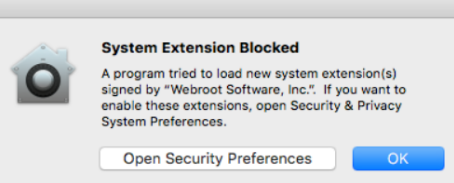
When end users encounter this notification, they should click Open Security Preferences and select Allow.
Additional Resources
Refer to Integrations and Third-Party Apps: Resource Catalog for a list of all third-party application user guides.