
Topic
This article answers frequently asked questions about scheduled tasks.
Environment
NinjaOne Endpoint Management
Index
Select a question to review the answer:
- What is the difference between scheduled scripts and scheduled tasks?
- What permissions does a NinjaOne user need to be granted in order to view or create scheduled tasks?
- Can you schedule tasks for Mac devices?
- If I select a group and an organization as a target for a scheduled task, and there are devices that belong to both the group and the organization in question, will the task be run twice on these devices?
- If I edit one of the custom scripts that I have used in a scheduled task, will the edits be applied to the script in the task? Or do I have to delete and re-add the script for the changes to be applied?
- What are the scheduling options for scheduled tasks?
- If I create a scheduled task to end after a single occurrence, can I "re-use" this task by modifying the occurrences?
- If I create a scheduled task with an end date, will the task automatically be deleted following the specified end date?
- What happens if a targeted device is offline when the scheduled task runs?
What is the difference between scheduled scripts and scheduled tasks?
Scheduled scripts and automations are run on all devices in a policy, while scheduled tasks are detached from policies and can be run against organizations, particular devices, or groups.
What permissions does a NinjaOne user need to be granted in order to view or create scheduled tasks?
Scheduled tasks are available for system administrators by default. You must grant access to technicians in their NinjaOne account at Permissions: Automation Library → Scheduled Tasks Administrator.
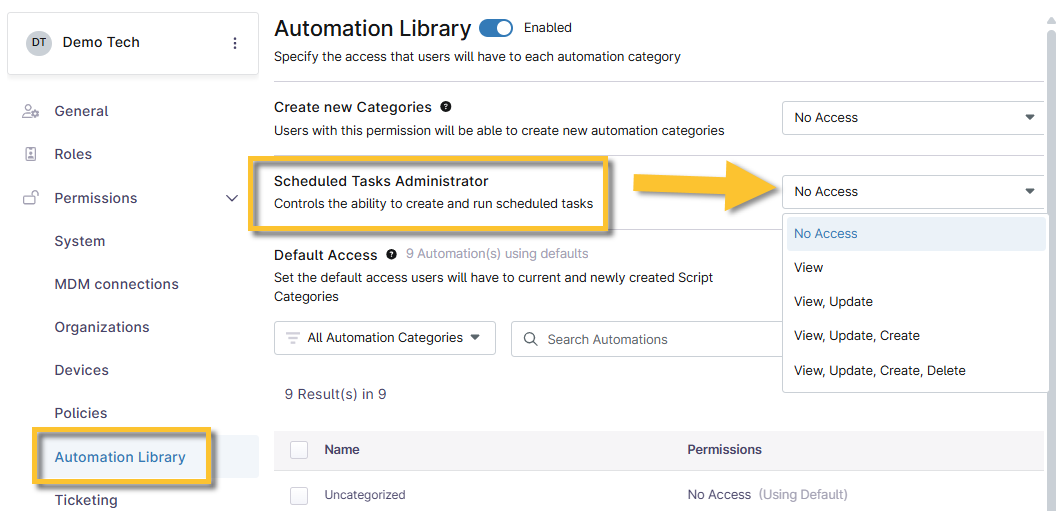
Figure 1: Automation Library permissions → Scheduled Tasks Administrator
Can you schedule tasks for macOS devices?
Yes, tasks can be scheduled for Apple macOS devices. However, the selected scripts for the task need to be compatible with the device type (scripts for Microsoft Windows devices will fail on macOS devices).
If I select a group and an organization as a target for a scheduled task, and there are devices that belong to both the group and the organization in question, will the task be run twice on these devices?
No. Even if a device appears more than once in the target list, the scheduled task will only run once.
If I edit one of the custom scripts that I have used in a scheduled task, will the edits be applied to the script in the task? Or do I need to delete and re-add the script for the changes to take effect?
Any edits made to a custom script will be automatically applied to scheduled tasks that reference the script.
What are the scheduling options for scheduled tasks?
Refer to NinjaOne Endpoint Management: Scheduled Tasks.
If I create a scheduled task to end after a single occurrence, can I "re-use" this task by modifying the occurrences?
You cannot reschedule tasks that were initially configured to stop after one occurrence. In this case, you won’t be able to reuse this task and apply a different schedule to it.
NinjaOne stores the job's Globally Unique Identifier (GUID) when a job is run, ensuring it will not execute again unless initially configured to do so. You must create a new task to run again.
If I create a scheduled task with an end date, will the task automatically be deleted following the specified end date?
After the end date, the task will still be listed at Administration → Tasks, but it will be in a dormant state (it will no longer run on the specified devices).
What happens if a targeted device is offline when the scheduled task runs?
NinjaOne skips applying the tasks to offline devices. If the task is set to run on a recurring schedule, it will execute on the device at the next scheduled date and time. Offline devices will not catch up on a missed scheduled task when they come online.
If I turn off the Allow Groups option in the Details tab, what target options will be available?
If you turn off the Allow Groups option, you can only reference the organization or device options for the target.
We will calculate the group membership at the time of executing this task. Only the devices that are members at that point in time will be considered as recipients of this task.