
Topic
This article answers frequently asked questions about using the Webroot integration through NinjaOne.
Environment
- NinjaOne integrated vendors
- Webroot
Questions
Select a question to view the answer:
- Why am I unable to view certain sites in my Webroot GSM console?
- Does my Webroot account have to be under NinjaOne billing to use it with the integration?
- How do I run a Webroot scan ad hoc on a device?
- How do I schedule a recurring Webroot scan?
- I want to match up my devices in NinjaOne with an existing site in Webroot. How can I do this?
- What are "sites" and "endpoint seats" in the Webroot GSM console, and how do I change these values?
- How do I edit the default policies in Webroot?
- Is Webroot compatible with the Surface Pro X?
- Is Webroot compatible with macOS running the ARM-based Apple M1 processor chip?
- Is Webroot compatible with Windows 11 devices?
- Are devices still protected if they are offline or unable to connect to NinjaOne?
- How do I uninstall Webroot agents that were inherited from a previous MSP?
- How can I uninstall the Webroot Business Endpoint Protection agent?
- What is Webroot's "Evasion Shield" feature?
Why am I unable to view certain sites in my Webroot GSM console?
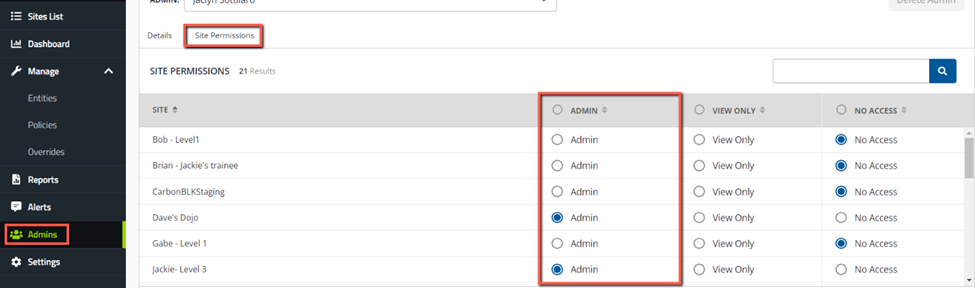
When the NinjaOne API user creates a new site in Webroot, it only has permission to grant itself admin access. To see your sites, you must grant admin access to your user (and any other users). To do so, log into your Webroot GSM console → Admins → select your user (or any other user that needs to see all sites) → Site Permissions → grant admin access to all sites.
Please note that in order to see the Admins tab, you must have a Webroot MSP Console.
Does my Webroot account have to be under NinjaOne billing to use it with the integration?
Yes. Webroot accounts must be under NinjaOne billing to be used with the integration. If you are unsure whether your existing Webroot account is under NinjaOne billing, contact your Account Manager.
For trial Webroot accounts, the trial must be created from within the NinjaOne portal. Refer to Webroot: Setup with a new account for more information about creating a trial from within NinjaOne.
How do I run a Webroot scan ad hoc on a device?
For Windows devices: From the NinjaOne console, navigate to the device in question and click the play button → Webroot.
You can also run a Webroot scan on multiple devices of the same device type from the Devices search page; simply check off the devices in question and click Run → Webroot. When running a scan on multiple devices, they must all be of the same device type (either Windows Workstations or Servers).
For macOS devices, you can run ad-hoc scans directly from within the Webroot GSM console.
How do I schedule a recurring Webroot scan?
You can schedule a Webroot scan directly from within the Webroot GSM console (external). For more information about scheduling a scan, refer to the Webroot GSM Admin Guide (external).
I want to match up my devices in NinjaOne with an existing site in Webroot. How can I do this?
The NinjaOne + Webroot integration works by name match. So, if you would like devices in NinjaOne to sync with an existing site in Webroot, you must ensure the name of the devices' organization in NinjaOne is a 100% match with the name of the Webroot site in question.
What are "sites" and "endpoint seats" in the Webroot GSM console, and how do I change these values?
The "Site Seats" value in the Webroot GSM console is for your reference only to identify how many seats each site will potentially use. This does not affect your Webroot billing or licensing.
To change the site seats for an organization, perform the following steps.
- Navigate to the Sites List tab in the Webroot GSM console and then click the site whose seats you wish to update.
- Select the Endpoint Protection tab and edit the number of site seats to your preference.
How do I edit the default policies in Webroot?
You cannot edit Webroot's default policies. To make changes, you will need to create a new policy with your custom settings.
Is Webroot compatible with the Surface Pro X?
No. Webroot does not currently support the ARM processor.
Is Webroot compatible with macOS running the ARM-based Apple M1 processor chip?
Yes, Webroot is compatible with macOS using the ARM-based M1 processor chip.
Is Webroot compatible with Windows 11 devices?
Yes, Webroot is compatible with the 64-bit version of Windows 11.
Are devices still protected if they are offline or unable to connect to NinjaOne?
Yes, devices are protected even when offline or when you are unable to connect to NinjaOne. Built-in security policies stop attacks when an endpoint is offline, with separate file execution policies applicable to local disk, USB, CD, and DVD drives.
How do I uninstall Webroot agents that were inherited from a previous MSP?
Refer to the second option in this article (external) from Webroot for more information about uninstalling Webroot agents that were inherited from a previous MSP.
How can I uninstall the Webroot Business Endpoint Protection agent?
This article (external) from Webroot goes over methods for uninstalling the Webroot Business Endpoint Protection agent from an endpoint and some information on when to use them.
What is Webroot's "Evasion Shield" feature?
Refer to this FAQ article (external) from Webroot for information about Webroot Evasion Shield.