
Topic
This article explains how to uninstall the SentinelOne agent from an endpoint.
Environment
- NinjaOne Integrations
- SentinelOne
Description
Access SentinelOne uninstall instructions at SentinelOne Singularity Operations Center (external link - login required). Some uninstall procedures require access to SentinelOne resources. You should perform these steps while you still have access to those resources.
We cannot provide support for third-party applications. If you no longer have access, you can use the solutions provided in this article or contact SentinelOne for assistance.
Index
Select a topic to continue:
- Uninstalling SentinelOne from the SentinelOne Platform (Preferred Method)
- Uninstalling SentinelOne Using a Passphrase
- Manually Uninstalling in Windows Safe Mode
- Additional Resources
Prerequisites
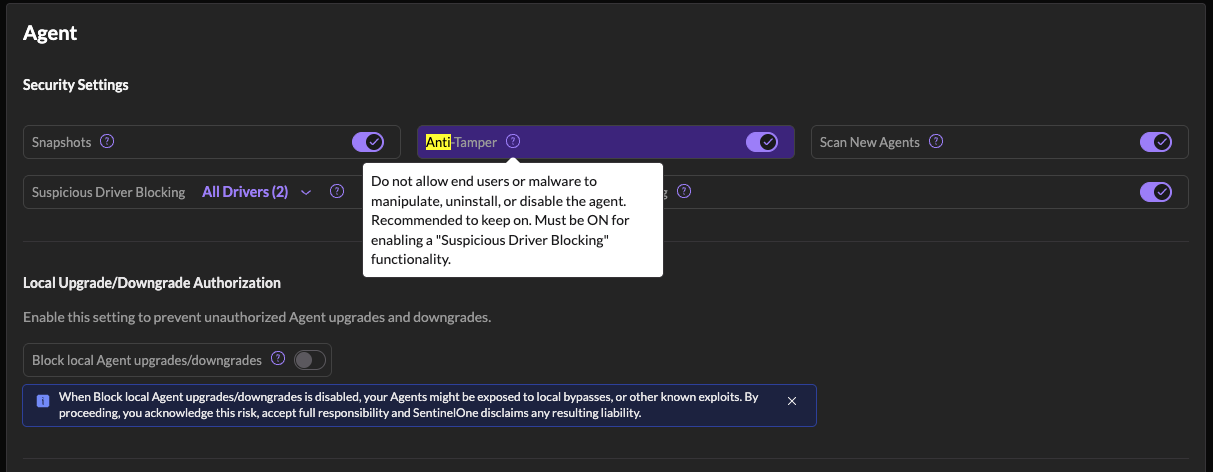
Before you can remove the SentinelOne agent, you'll need to deactivate the Anti-Tamper setting in SentinelOne Agent → Security Settings in the SentinelOne Management Console.
Uninstalling SentinelOne from the SentinelOne Platform (Preferred Method)
These steps will cause the endpoint to uninstall the antivirus.
- Log in to your SentinelOne account and navigate to Endpoints.
- Select the device to uninstall.
- Click Actions and select Uninstall.
The SentinelOne software should no longer be present on the endpoint.
If the preceding workflow was unsuccessful, proceed to the next section for alternative workflows. If your device is not connected to SentinelOne, use the Manually Uninstalling in Windows Safe Mode section of this article.
Uninstalling SentinelOne Using a Passphrase
This method works when the device is still connected to the SentinelOne platform.
- Log in to your SentinelOne account and navigate to Endpoints.
- Select the device to uninstall.
- Click Actions and select Show Passphrase.
- Copy the passphrase and open a command prompt with administrator-level privileges on the device.
- Enter the passphrase into the command prompt to run the uninstallation command.
- Use the following command to uninstall the agent:
C:> SentinelOneInstaller.exe -c -t <passphrase or site token>.
Manually Uninstalling in Windows Safe Mode
Use this method when the device is not connected to SentinelOne. To uninstall the SentinelOne agent in safe mode, follow these steps:
- If you have not already done so, download
SentinelOneInstaller.exefrom the SentinelOne Management Console to the endpoint. - Boot the endpoint device into safe mode.
- Open a command prompt with administrator-level privileges on the device.
- From the command prompt, navigate to where you downloaded the
SentinelOneInstaller.exefile. Run the command:
SentinelOneInstaller.exe -cSentinelOneInstaller_windows_64bit_v22_1_5_11025.exe -c- Wait for the uninstall to complete.
- Reboot the endpoint into normal mode.
Additional Resources
For more in-depth information about uninstalling SentinelOne, refer to SentinelOne Singularity Operations Center (external link - login required).