
This guide addresses questions regarding the differences in functionality and capability between supervised (company owned) and unsupervised (personally owned) Apple devices. For more information, please refer to the developer documentation at About Apple device supervision - Apple Support.
Table of Contents:
Overview:
Across all of their devices, Apple refers to the concept of "supervision" to designate the capabilities available for a company-owned, managed device compared to an employee-owned, managed device. This article will focus on some of the expected differences for devices running iOS or iPadOS.
Prior to enrolling iOS or iPadOS devices into NinjaOne MDM, you will enable
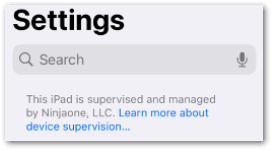
By contrast, an employee-owned device that is added via the APN QR (quick response) code will still be managed by NinjaOne MDM but will be in an unsupervised state. This state limits the amount of control NinjaOne MDM can take over an employee-owned device and provides the end user some additional flexibility.
Supervised Device Capabilities:
The following capabilities are available only on supervised devices:
Prevent end-user removal of the MDM profile.
Define a full-device network proxy.
Block specific applications from being installed by end user.
Reboot device remotely.
Restrict various device functionality, application installation, security/privacy tools, media, iCloud or Classroom tools. (The Restrictions section in the Apple policy provides some additional options compared with the unsupervised state.)
Prevent Activation Lock (blocked by default for supervised devices, and now manageable directly in ABM).
Behavior:
Global Behavior
Generally speaking, the behavior listed below will behave the same for both supervised and unsupervised devices. Please note that additional functionality may be added in future releases and based on feature requests.
- Passcode requirements.
Wi-Fi network management.
- Restrict or enable hardware functionality, application configuration, security features, media accessibility, iCloud usage, and/or Classroom features.
- Force install or block specific apps, allow user removal or enforce management at the policy level.
- Enable and configure location tracking.
- Device dashboard capabilities.
Erase device (fully wipe a device regardless of enrollment type).
Lock device.
- Location tracking.
- Activities and device details.
By Enrollment Type
The following managed capabilities are available on both supervised and unsupervised devices but behave differently depending on enrollment type:
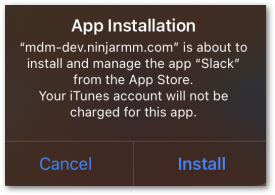
When installing an app through Apple Apps and Books integration, the installation will be completely automated in the backend for supervised devices. For unsupervised devices, device owners receive a prompt on the physical device that they must acknowledge for the installation to complete (see screenshot below for example).
On supervised devices, the Delete Device action will perform a device wipe. On unsupervised devices, the Delete Device action will remove the MDM profile and all configurations without wiping the device itself. For more information about deleting or erasing MDM devices, please see Mobile Device Uninstall Management.
As mentioned above, various device restrictions are only available on supervised devices. Use the filter in the Restrictions section of an iOS or iPadOS policy to see what is available for each enrollment type.