
Topic
This article explains how to map a NinjaOne organization to a ConnectWise company
Environment
- NinjaOne Integrations
- ConnectWise Manage
Description
NinjaOne and ConnectWise use different terms to refer to the same subject. The following table provides details.
| NinjaOne Term | ConnectWise Term |
|---|---|
| Organization | Company |
| Location | Site |
After enabling the app with your credentials, you can map NinjaOne organizations to ConnectWise companies. You can also map NinjaOne locations to ConnectWise sites. This mapping allows data to be synchronized between NinjaOne and ConnectWise.
You can map multiple NinjaOne organization locations to a single ConnectWise company site.
You must create the organizations in NinjaOne before attempting to map them to ConnectWise companies. NinjaOne will not create companies in ConnectWise, or vice versa (ConnectWise will not create organizations in NinjaOne).
To map a NinjaOne organization to a ConnectWise company, perform the following steps:
- Click Edit to the right of the Settings section in the NinjaOne ConnectWise integration app.
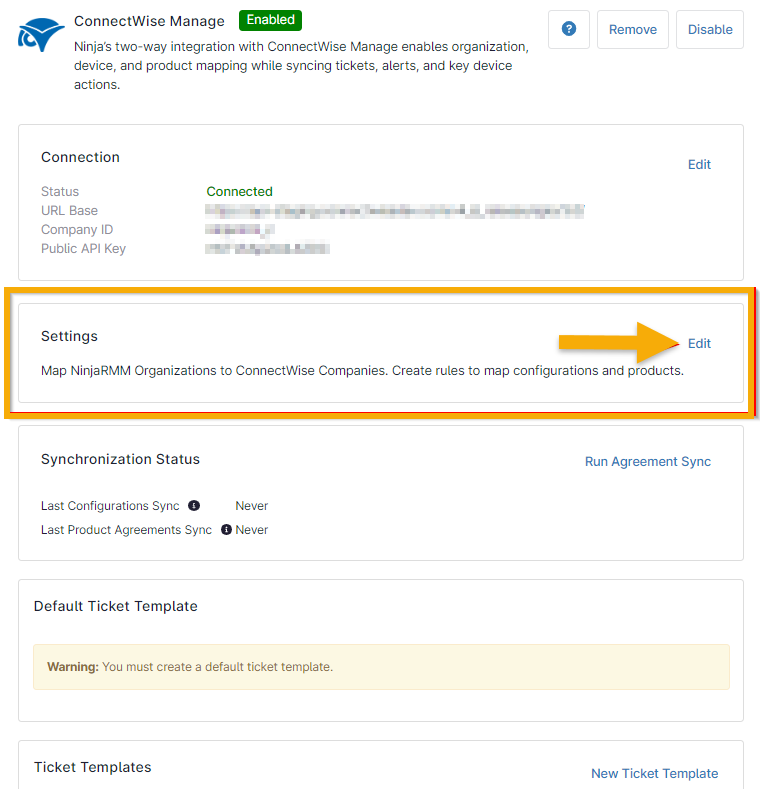
Figure 1: Edit ConnectWise integration settings in NinjaOne
The Sync tab of the Companies section is open by default.
- In the Company Criteria section of the page, use the Types and Statuses filters to limit the companies available for mapping. Types and Statuses refer to filters for different ConnectWise accounts. Select "Client" and "Active" and any additional filters as necessary for your configuration. You may add up to 50 options for each.
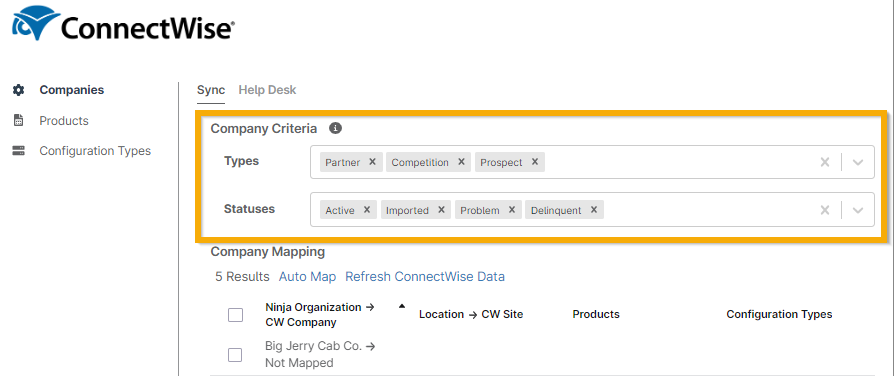
Figure 2: Sync ConnectWise company criteria to NinjaOne
- Click Auto Map to perform a match based on name. You will be prompted to confirm the mappings.

Figure 3: Automatically map ConnectWise companies to NinjaOne organizations
- Alternatively, click a specific organization's name in the list to manually configure the mappings. The modal allows you to create mappings from NinjaOne locations to ConnectWise sites. This includes unique mappings for products, configuration types, and agreements.

Figure 4: Map ConnectWise site to NinjaOne locations
- From the Help Desk tab, select the checkbox to create a new ConnectWise contact when an unknown email address submits a Help Request Form from the system tray icon.

Figure 5: Create a ConnectWise contact for unknown email addresses
Additional Resources
Use the following resources to learn more about the ConnectWise and NinjaOne integration.