Already a NinjaOne customer? Log in to view more guides and the latest updates.

NinjaOne Software Package Repository

reviewed by Aldwin Rodriguez

NinjaOne does not include a native feature explicitly labeled as a “Software Package Repository.” Instead, it provides a flexible Automation Library that can be used to achieve the same outcome. The Automation Library is organized into categories, which function as labels to group automations, and it supports both built-in automations and fully custom scripts created by IT teams. This design allows administrators to define, organize, and reuse automation workflows—including software installation packages—without being constrained by a fixed repository structure.

In practice, a Software Package Repository in NinjaOne is not a built-in feature but an organizational model you define using the Automation Library. By grouping scripts, installers, and related assets under a dedicated category label, IT teams can logically centralize and identify their software deployment resources in a consistent and scalable way. While the category itself is not a true repository, it provides an effective method to standardize and manage software packages across environments.

This document shows how to create and manage a Software Package Repository using the Automation Library. It focuses on how to structure the Automation Library effectively, how to design reusable installation packages, and how to maintain visibility and control over deployed software. The goal is to help IT teams turn a flexible automation framework into a reliable, repeatable system for software distribution and lifecycle management.

What is the NinjaOne Automation Library?

The NinjaOne Automation Library is a centralized place where IT teams can store, organize, and reuse automation scripts. It includes a set of built-in automations for common tasks, and it also allows administrators to create and add their own scripts.

The library is organized into categories, and additional categories can be created as needed. It also includes script templates that can be imported and used as a starting point for custom automations.

Automations in the library can be executed in several ways based on your operational needs. They can be assigned to policies to run automatically based on defined conditions, scheduled to run at specific times as part of routine maintenance, or executed on demand by technicians for immediate actions. This flexibility allows IT teams to standardize processes while maintaining control over when and how tasks are performed across their environments.

What script languages are supported by the automation library?

NinjaOne does not include its own script execution engine. Instead, it submits scripts from the Automation Library to the target endpoint, where they are executed using the endpoint’s native scripting capabilities.

This has two important implications:

  1. NinjaOne does not validate script functionality prior to execution on the endpoint.
  2. The supported scripting languages depend on what the endpoint operating system can execute.

Because NinjaOne supports Windows, Linux, and macOS, the scripting language used must align with the target platform:

  • Windows endpoints: Batch, PowerShell, VBScript, and JavaScript (via Windows Script Host using Cscript)
  • Linux and macOS endpoints: Shell scripts (e.g., Bash or Zsh)

Can I use a script to install software on an endpoint?

Yes. Software installation is an endpoint capability, and NinjaOne enables it by allowing you to run scripts on managed devices. You can deploy software by creating software packages for more structured, repeatable deployments. Refer to the documentation for detailed steps on installing software in NinjaOne.

Once a software package is created, it is best practice to store it in a dedicated repository, often referred to as a Software Package Repository.

How can I create the Software Package Repository?

Follow the steps below to create the Software Package Repository to organize your reusable software packages.

  1. From the NinjaOne console, navigate to Administration > Library > Automation.
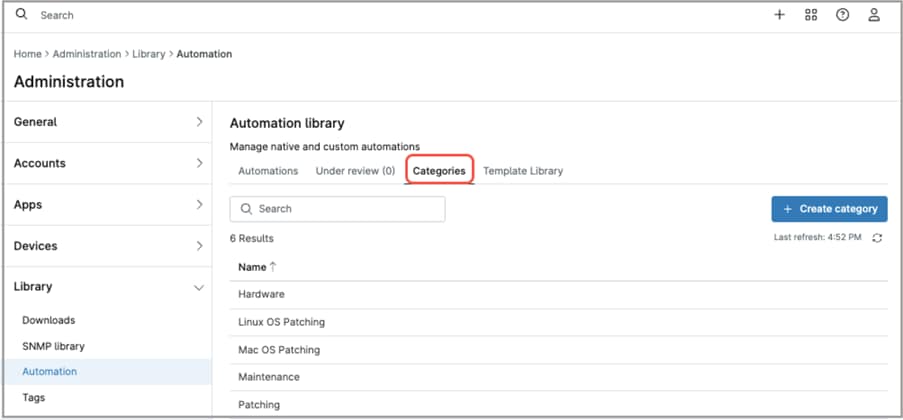
Navigate to Administration > Library > Automation

  1. Click Categories.
  2. Click + Create category. The Create category modal dialog appears.
  3. Enter a category name “Software Package Repository” for this case.
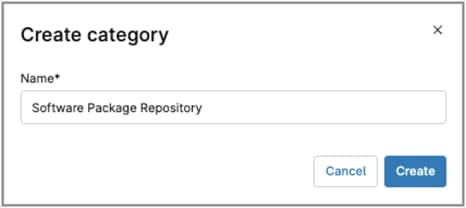
Create category modal

  1. Click Create.
  2. From now on, the Software Package Repository is available to store your software installation packages.

FAQ

The NinjaOne Software Package Repository is not a native, predefined feature within the platform. Instead, it is a logical construct that IT teams create using the Automation Library to organize and manage software installation packages.

In practice, this “repository” is implemented by creating a dedicated category in the Automation Library, which acts as a label to group related automations. These automations represent software packages, including the scripts and any associated deployment logic. While the category itself is not a true repository, it provides a simple and effective way to logically centralize and identify software deployment assets.

By grouping packages under a consistent label, IT teams can more easily locate, reuse, and maintain their software deployments. This approach improves visibility and standardization across the environment, while leveraging NinjaOne’s existing automation capabilities without requiring a separate repository feature.

The Software Package Repository in NinjaOne works as a logical organization model built on top of the Automation Library rather than as a native feature. IT teams create a dedicated category, which acts as a label, to group automations that represent software installation packages.

Each package is implemented as an automation that defines how the software is installed, updated, or removed. These automations may include scripts, installer files, and any required parameters. The category itself does not function as a storage repository but instead provides a way to logically group and identify related deployment assets.

Once organized under this label, packages can be easily located and reused. They can be executed on demand, scheduled as part of routine tasks, or assigned to policies to run automatically based on defined conditions, enabling consistent and repeatable software deployment across endpoints.

The Software Package Repository in NinjaOne can include any software package that can be deployed through a script executed on an endpoint. Since packages are implemented as automations and grouped using a category label, they are not limited to a specific installer format or vendor, but rather to what the target operating system can support and execute.

In practice, this includes common installation types such as:

Windows: .msi, .exe, .appx, and scripted installations using PowerShell, Batch, or VBScript

Linux and macOS: native package formats (.rpm, .deb, .pkg, .dmg) and shell-based installers

Because this approach is script-driven and label-based, it can accommodate both simple installers and more complex deployment workflows. This allows IT teams to standardize how software is installed, updated, and removed across their environments while keeping packages logically organized within the Automation Library.

To add a software package to the Software Package Repository, assign it to the “Software Package Repository” category in the Automation Library. This category acts as a label that groups all software package automations in one place.

When creating a new package, simply select this category. If the package already exists, update its category to “Software Package Repository” to include it in the group.

Packages are then managed directly within this labeled category, where they can be organized, updated, and reused as needed.

Yes. The Software Package Repository in NinjaOne can be used for both custom-developed and third-party applications. Since packages are implemented as automations and organized using a category label, there are no restrictions on the type or source of the software, as long as it can be deployed through a script on the target endpoint.

This includes commercial software, open-source tools, internally developed applications, and even portable or script-based utilities. IT teams can define the installation, update, and removal logic within the automation, allowing full control over how each application is deployed and maintained.

By grouping these packages under a consistent label, organizations can standardize deployment processes across different types of software while maintaining flexibility to support diverse application requirements and environments.

Automated software deployment is achieved by organizing software packages as automations within the Automation Library, which can then be executed through NinjaOne policies, scheduled tasks, or on demand. Although the repository itself is a category label, it groups all deployment-related automations in one place, making them easy to assign and reuse.

Each package defines the installation logic within a script, which can be linked to a policy to run automatically based on defined conditions. Packages can also be scheduled to run at specific times or triggered manually when needed.

By combining this structured organization with NinjaOne’s automation capabilities, IT teams can standardize and automate software deployment across endpoints while maintaining control over when and how packages are executed.

NinjaOne does not provide native version control for automations. However, packages can be updated directly by modifying the existing automation, allowing IT teams to maintain and improve deployment logic over time.

To manage versions, teams typically use naming conventions, documentation, or duplicate automations to represent different versions of a package. For example, a package can be cloned and updated while retaining the previous version for rollback or reference.

Because packages are organized using a category label rather than a true repository, version control is a manual process. Even so, this approach provides flexibility to update, test, and maintain software packages while preserving consistency across deployments.

Access to automations in the Automation Library—including those grouped under the “Software Package Repository” category—can be controlled through technician permissions. This allows IT teams to restrict which technicians can view, edit, or execute automations.

By limiting access to authorized personnel, organizations can prevent misuse and ensure that only approved technicians can run software deployment packages.

The Software Package Repository improves IT efficiency and consistency by providing a structured way to group and reuse software deployment automations within the Automation Library. Although it is implemented as a category label rather than a true repository, it allows IT teams to logically centralize their software packages and manage them from a single, identifiable location.

By standardizing how software packages are created and stored, technicians can avoid rebuilding scripts for each deployment. Instead, they can reuse validated automations, reducing manual effort and minimizing the risk of errors or inconsistencies across endpoints.

This approach ensures consistent logic and configuration for every deployment — whether on demand, scheduled, or policy‑triggered. As a result, IT teams can deliver more predictable outcomes, streamline operations, and maintain consistency across their managed environments.

Next Steps