
Topic
This article explains how to find common vulnerabilities and exposures (CVE) data for devices in NinjaOne.
Environment
- NinjaOne Endpoint Management
- NinjaOne Vulnerability
Description
The Vulnerabilities tab on the system, organization, and device dashboards will group data by CVE, with each dashboard table row representing a single CVE and its related devices. NinjaOne will filter the data by the set of devices visible to the calling user, so the dashboard shows counts only for those devices.
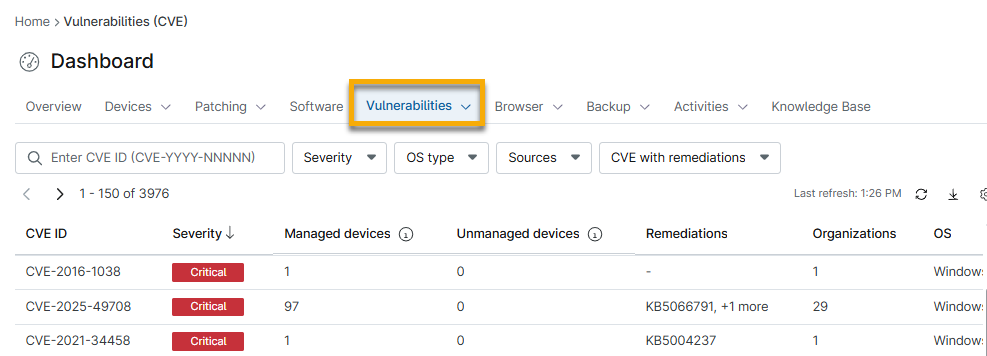
- The Remediations column will be populated only if you activate the NinjaOne Patch tool in the NinjaOne Vulnerability application. Review NinjaOne Endpoint Management: Getting Started with Vulnerability Data for details about patching tools.
- You can view and export CVE data associated with an unmanaged device by clicking the number in the Unmanaged devices column. Unmanaged devices will reflect data that NinjaOne could not map to an existing device.
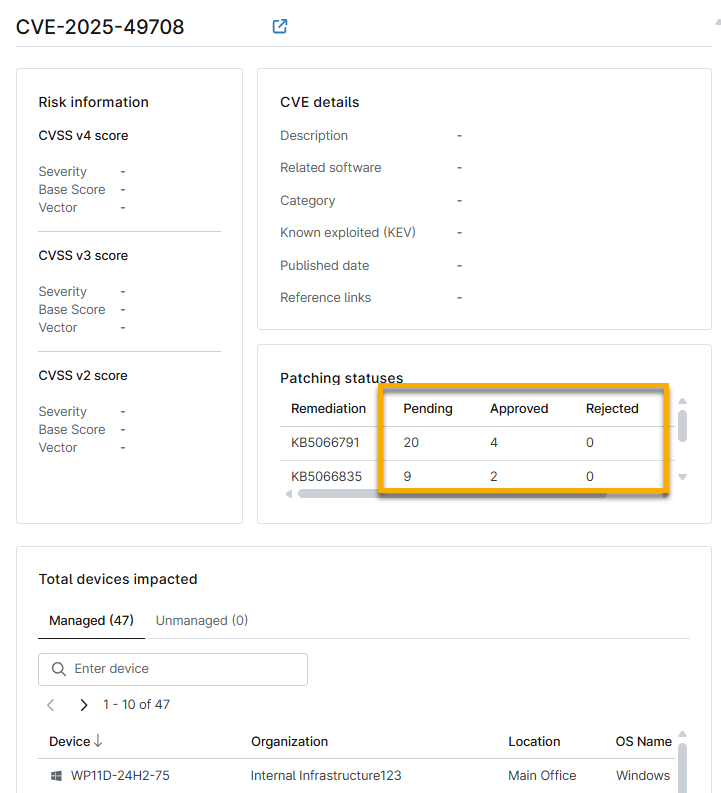
- Clicking the hyperlink in the CVE ID column will open a new page that provides risk information, the CVSS score, scan group information, impacted sources, impacted devices, references, and more.
- Access vulnerability remediation by clicking the status hyperlinks in the Patching statuses section. You will navigate to the applicable OS patching data table to take action.
Additional Resources
Refer to the Vulnerability Management: Resource Catalog to learn more about vulnerability tools in NinjaOne.