
Topic
This article explains how to view the sync history for the ServiceNow application in NinjaOne.
Environment
- NinjaOne Integrations
- ServiceNow
Description
To ensure a seamless integration between NinjaOne and ServiceNow, you must map your incident workflows, configuration items, and organizations. Successful mapping will optimize the data flow between the two software platforms, ensuring seamless integration and data exchange.
Before configuring the integration settings in NinjaOne for ServiceNow, you must enable it. If you have not already done so, refer to NinjaOne and ServiceNow: Enable the Integration for instructions.
Open the Sync History tab to view and manage sync logs, which include warnings and errors for each device. Note that these logs do not contain messages indicating when a device was created or updated successfully. You will only review logs when an error occurs during the synchronization process.
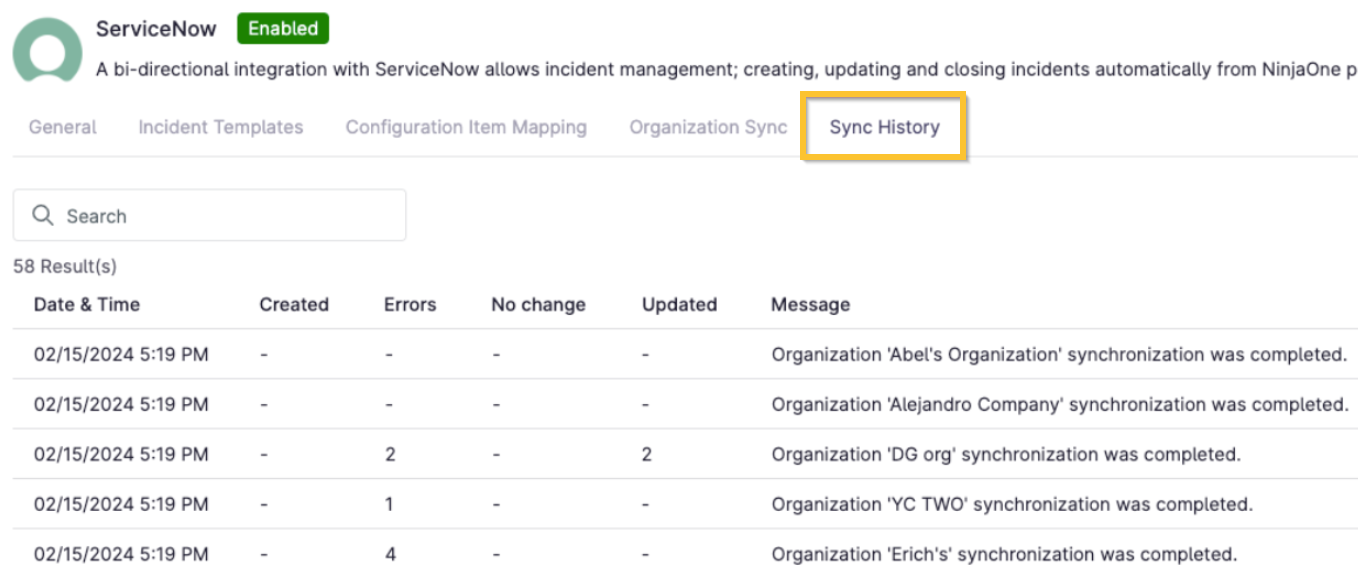
Figure 1: NinjaOne → ServiceNow application → Sync History
The table is divided into columns to identify the date and time that the error occurred, whether the device was created or updated, and the number of devices that experienced an error.
If an error appears in the sync log, click the number in the Error column to view the message details.
Additional Resources
Refer to the following articles to learn more about configuring ServiceNow integration settings in NinjaOne: