
Topic
This article explains how to use OAuth 2.0 to authenticate requests to NinjaOne Public API.
Environment
NinjaOne Public API
Description
The NinjaOne Public API uses OAuth 2.0 to authenticate requests. OAuth 2.0 allows applications to access NinjaOne resources (such as monitoring information) made available via the Application Programming Interface (API).
Only system administrators may configure OAuth tokens for the NinjaOne Public API. To start using the OAuth protocol for your app’s authentication with NinjaOne, you must first have an OAuth app credential from NinjaOne. The OAuth app will set up an authorization grant for you. OAuth 2.0 supports various grant types. However, NinjaOne Public API only supports authorization code and implicit grant types.
Generate an OAuth Client Application
To generate an OAuth client app ID in NinjaOne, perform the following steps.
- Navigate to API settings at Administration → Apps → API.
- Open the Client app IDs tab and click + Add client app.
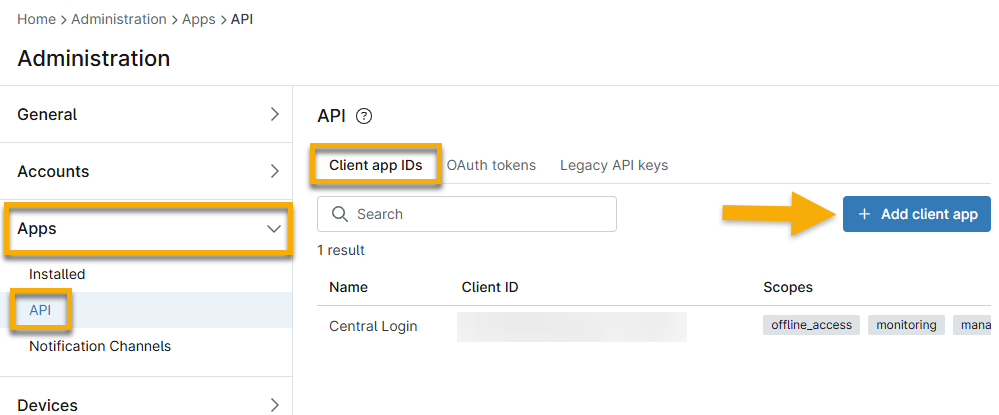
- Select an option from the Application Platform drop-down menu to generate more data fields.
- Use the following table to help you fill out the applicable fields.
| Field | Description |
|---|---|
| Name | Enter the title that will be displayed as the client application name in the consent screen. This name will be displayed in the Administration → Apps → API → OAuth Tokens in NinjaOne. |
| Redirect URLs | Enter one or more addresses where NinjaOne will send OAuth responses. This is not configurable when using the Native application platform option. |
| Scopes | These options allow access to all Public API Resources of a certain type.
|
| Allowed Grant Types | NinjaOne uses OAuth 2.0 grant types for the client application acting on behalf of a user.
|
- After the configuration is complete, click Save.
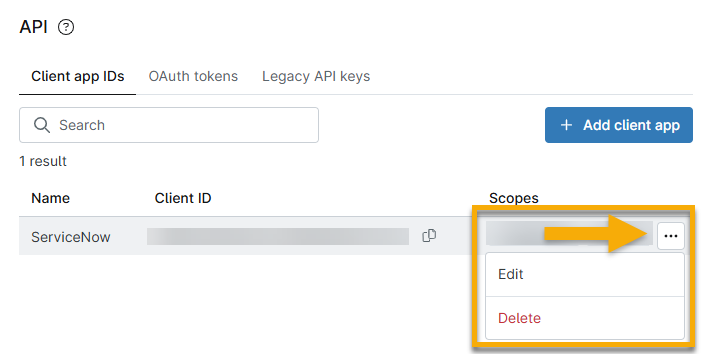
To edit or delete a client app ID, move your mouse cursor over the row and select the applicable option.
Additional Resources
Refer to NinjaOne Documentation: Public API to learn more about using the API with NinjaOne.