
Topic
This article describes how to add the NinjaOne Remote button to ServiceNow incidents and cases.
Environment
- NinjaOne Integrations
- ServiceNow
- NinjaOne Remote
Description
First, you must enable the integration between NinjaOne and ServiceNow and enable the Marketplace app. To learn how to do so, refer to Enabling the ServiceNow Integration.
Then, follow these steps:
- Log in to ServiceNow.
- Create a new incident, or edit an existing one.
- Add a device (endpoint) to the incident that has been mapped to NinjaOne. To learn how to map a device, refer to ServiceNow Integration Management and Mapping.
- Note the NinjaOne Remote icon to the right of the endpoint's data field. Click the button to initiate the connection.
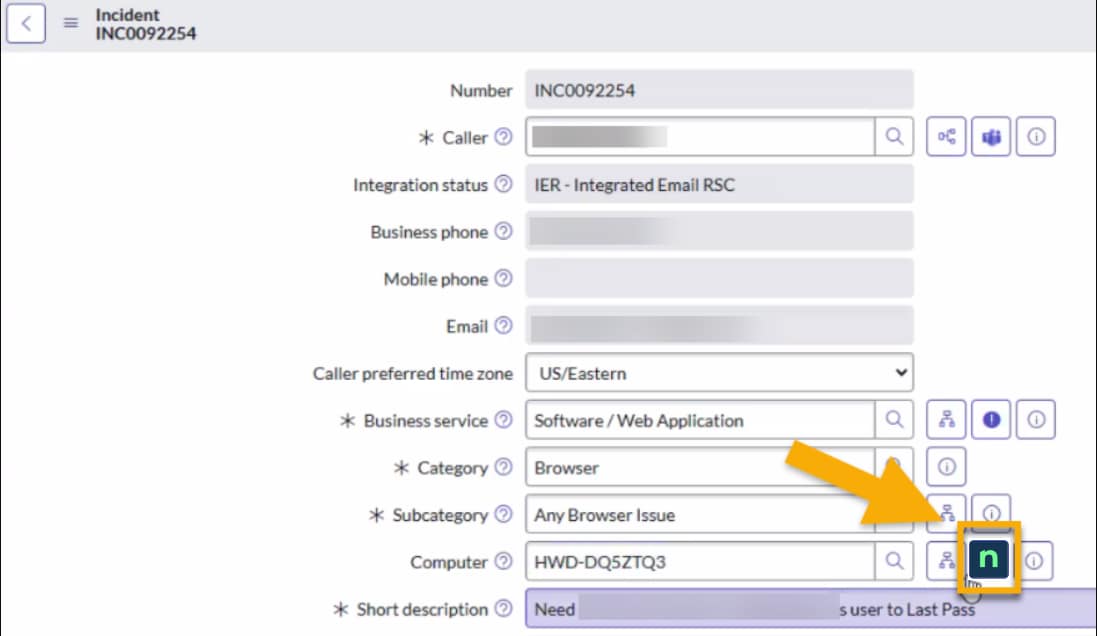
Figure 1: Launch NinjaOne Remote session from ServiceNow
If you do not see the NinjaOne Remote button in ServiceNow, make sure the NinjaOne Marketplace app is enabled in ServiceNow.