
Topic
Some NinjaOne policies support "parent to child" or policy inheritance. With policy inheritance, you can use an existing policy as a template and copy the configured settings into the new policy.
Environment
NinjaOne Endpoint Management
Description
The Role you select when creating a new policy will determine which policies you can select as the Parent policy. You must choose a device-type role to create a parent-child policy relationship. For example, if you choose "Windows server" as the device role, you can only select Windows server policy as the "Parent."
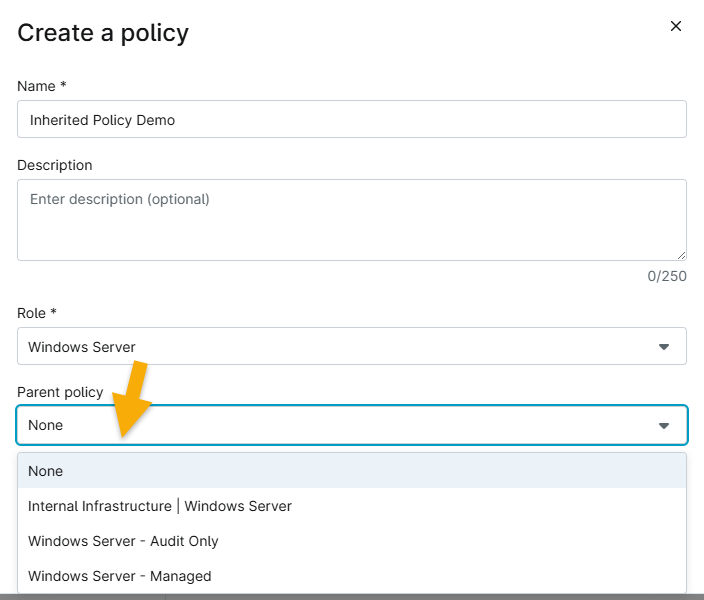
Figure 1: Selecting a parent policy in NinjaOne
If you use a Parent policy, you will see an "inherited" tag in the new policy with an option to override individual settings. Settings you override from the original policy will use a tag for identification. Move your cursor over the setting to see an option to revert it to its original value.

Figure 2: Revert an overridden setting in an inherited policy
- Instead of being given the option of "Remove" on inherited items, you'd only be able to Edit or Deactivate, as shown in Figure 4 below.
- Deactivating would change the Status column to "Inactive" and the "Inherited" label to "Overridden."
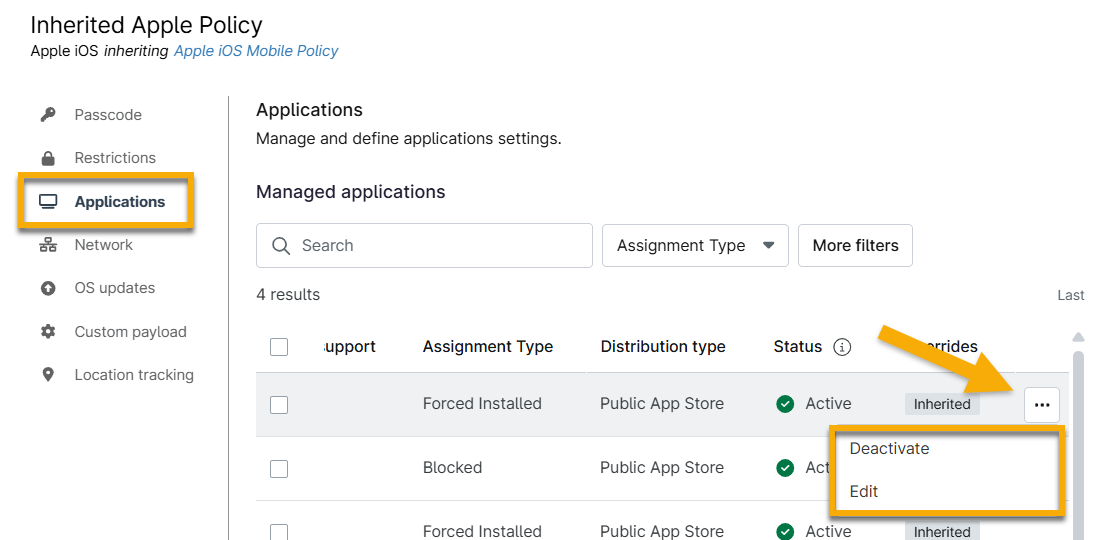
Figure 3: Deactivate or edit an application in an inherited policy