
Topic
This article explains how to SCIM for your identity provider (IdP) so you can configure access to NinjaOne directly from your preferred provider portal.
Environment
- NinjaOne Identity Access Management (IAM)
- NinjaOne Integrations
Description
Once you enable and set up single sign-on (SSO) in NinjaOne, enable SCIM provisioning to automate the management of user accounts and access rights across systems, ensuring efficient and accurate provisioning and deprovisioning.
Index
Select a topic to learn more.
Prerequisites
Ensure you complete the following tasks before configuring SCIM in NinjaOne.
- You must first configure Security Assertion Markup Language (SAML) between your Identity Provider and NinjaOne. For more information, refer to NinjaOne Identity Access Management (IAM): About IDP-Initiated Security Assertion Markup Language (SAML).
- Review the user and group assignments in your SSO application. These are the users and groups that SCIM will synchronize into NinjaOne.
- Determine which users in your IdP will be designated as technicians and which as end users.
Configure SCIM in NinjaOne
To configure SCIM in NinjaOne, perform the following steps:
- Log in to NinjaOne as a system administrator.
- Navigate to Administration → Accounts → Identity Providers. Click Add provider.
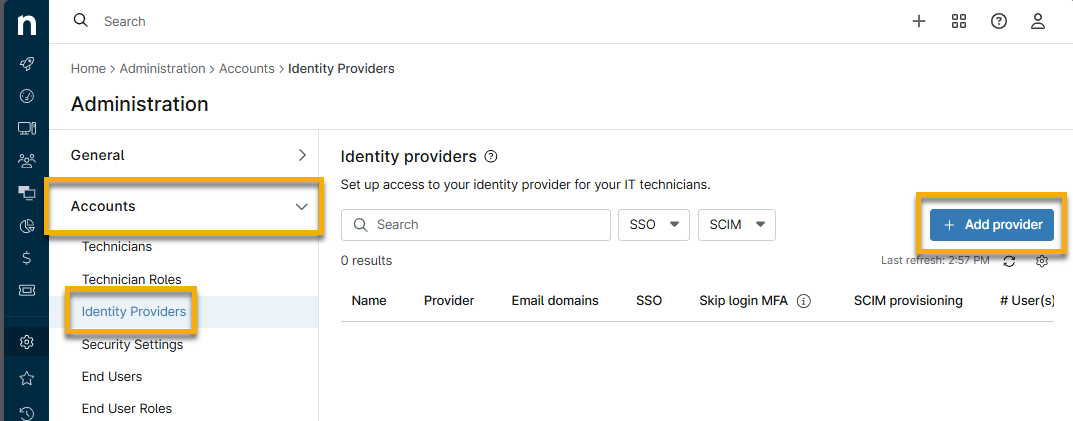
- Create and entry for your provider of choice. Refer to NinjaOne Identity Access Management: Configure Single Sign-On for instructions.
- Once you create the IdP, open the details page to edit it.
- Click Edit SCIM and then activate the Enable SCIM provisioning toggle.

- Activate the Enable SCIM provisioning toggle to enable SCIM.
- Follow the prompts to copy the data, then paste it into your IdP's site to authenticate to the endpoint. Copy and store the token in a secure place, as it will only be displayed once.
Your IdP may request an organization ID. To obtain this data, refer to NinjaOne Platform: How to Find an Organization ID.
Additional Resources
Refer to the following resources to learn more about Identity Access Management processes in NinjaOne: