
Topic
This article discusses how to create data searches with Archiver's eDiscovery feature.
Environment
NinjaOne SaaS Backup End-User Portal
Description
This feature lets you create and save specific, detailed data searches to aid in providing information requested by a regulatory official, such as a compliance officer.
The Data Protection Officer Role
A Data Protection Officer is responsible for ensuring organizational adherence to data protection laws. The DPO also acts as a liaison between the Data Processor and regulatory bodies.
Data Protection Officers can act on data searches, including reviewing flagged data, adding or modifying retention policies, and placing legal holds. Only users with the Data Protection Officer role can delete eDiscovery searches.
Assigning the Data Protection Officer Role
In the Organization's User Management console, click the user and select Data Protection Officer from the drop-down menu.

eDiscovery Versus Advanced Search
eDiscovery Search has additional menus for saving the search criteria, previewing email search results, and modifying the search criteria. You can set up alerts, tags, and review processes on the results of the eDiscovery search, whereas you cannot perform these functions with advanced search.
Use advanced search when you only need to download, restore, or migrate the search results.
Performing an eDiscovery Search
1. In the End-User Portal, click Compliance in the navigation menu, then choose eDiscovery from the expanded options.
2. The system will display a search modal containing the five most frequently used search criteria:
- Email Account
- Date Range
- From
- To/CC/BCC
- Keywords
Enter your search criteria in these fields, and modify it with AND and OR operator logic. You can leave unnecessary fields blank, but you must select at least one criterion. You can add additional search criteria by clicking +Add More Criteria(s).

Working With Search Results
When you run the eDiscovery search, the system will return results based on your search criteria.
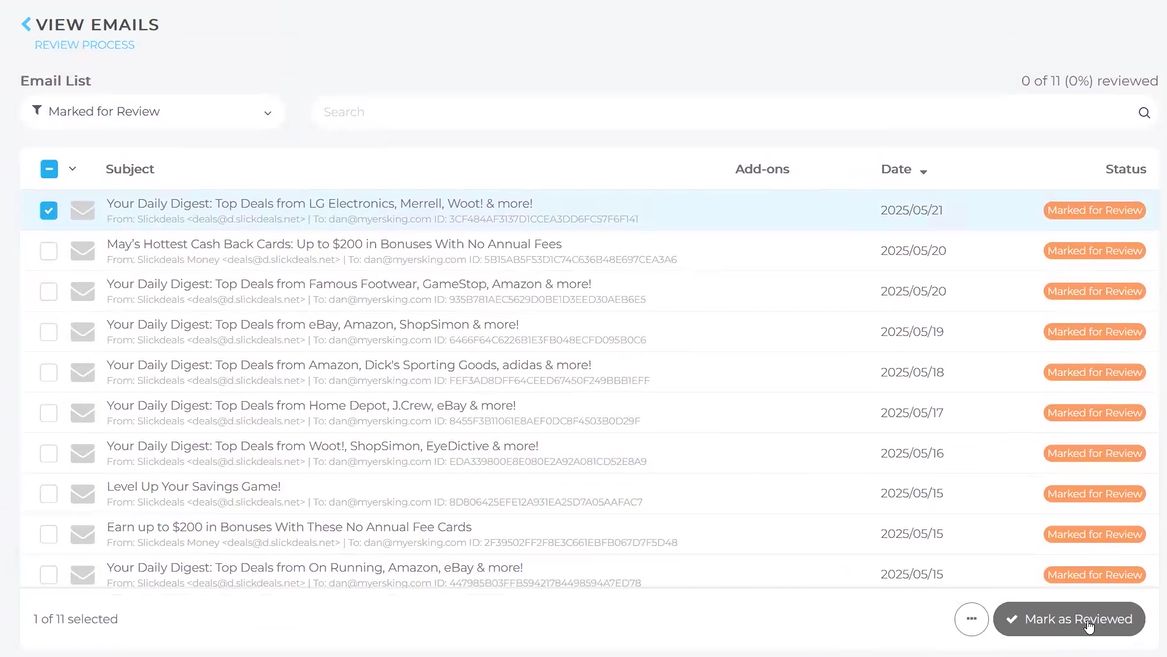
- You can designate these results for review by a Data Protection officer to ensure the data within is being appropriately handled. To flag a result, check the checkbox next to it.
- The Data Protection Officer can mark data as reviewed.
Additional Resources
The NinjaOne Dojo provides documentation for the NinjaOne SaaS Backup integration. For resources specific to the full NinjaOne SaaS Backup platform, including release notes and troubleshooting guides, visit the NinjaOne SaaS Backup Help Center.