Real-time browser visibility and extension risk control

Extend endpoint management into the browser. Inventory and manage URL access, extensions, and enforce web policies across Chrome, Edge, and Firefox, all from the platform you already use to manage endpoints.
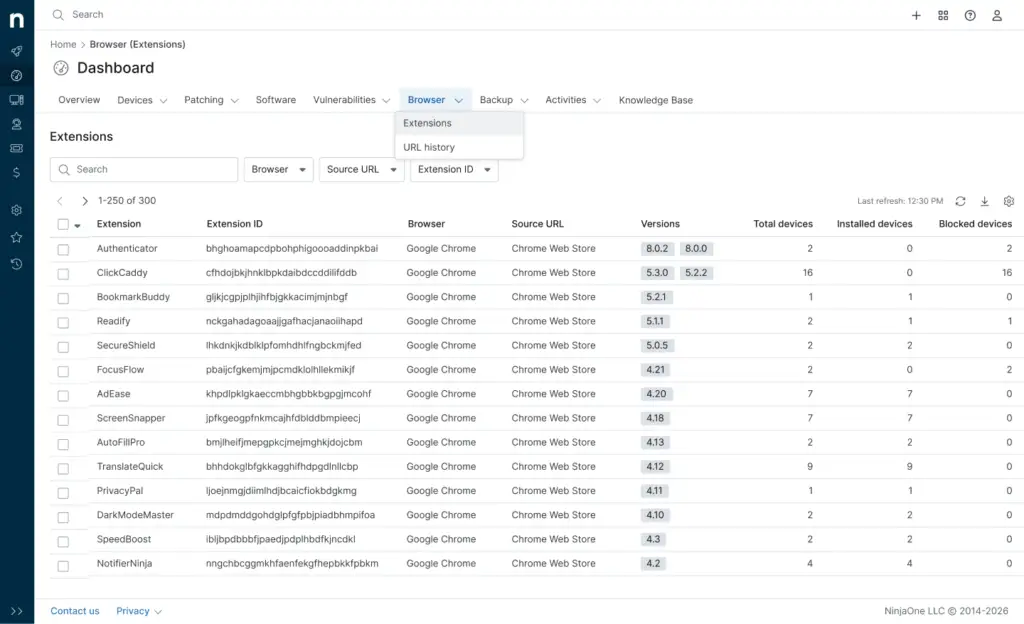
browser management dashboard

A smarter browser management tool 

Continuous visibility, no manual audits

Automatically discover every extension installed across managed devices. Get a real-time view of what’s running in the browser across your environment, no scripts, no spreadsheets, no chasing down device owners.

Built to enforce policy, not just report on it

Extension risk scores and web access controls connect directly into policy enforcement, so IT teams can block, allow, or quarantine extensions without a separate follow-up step.

Native to the platform you already run

Browser Management lives inside the same NinjaOne platform you already use for endpoint management and patching. No separate console, no new agent, no added infrastructure.

Browser Management Features

Browser extension inventory

Browser extension inventory

Automatically discover every extension installed across managed devices. Get a full, real-time view of what is running in the browser across your environment without manual audits or scripting.
Extension risk scoring

Extension risk scoring

Every discovered extension gets a risk score based on CRXcavator analysis. Quickly spot high-risk extensions, prioritize what to review first, and make informed calls on what to allow or block.
Extension policies: 
deploy, block, default-deny

Extension policies: 
deploy, block, default-deny

Push approved extensions out to your fleet, block specific extensions by ID, or lock things down with a default-deny model so only pre-approved extensions run. Layered controls flex to your risk tolerance.

Vulnerability-to-patch mapping

Block access to specific websites, domains, or categories across managed devices. Enforce acceptable use and cut down exposure to phishing, malware, and unapproved SaaS or AI tools.
Browser activity history

Browser activity history

Pull browsing history from managed devices to support incident response, compliance audits, and service desk troubleshooting, all without extra network-level tooling.
Multi-browser policy management

Multi-browser policy management

Manage Chrome, Edge, and Firefox from one workflow. Apply the same policies everywhere so standards hold no matter which browser your users pick.
Custom end-user block messages

Custom end-user block messages

When someone hits a blocked site or extension, show them a message that explains why. Fewer help desk tickets, more transparency, less back and forth with IT.

Native platform integration

Native platform integration

Browser Management runs inside the NinjaOne platform you already use. No new tools to deploy, no new infrastructure, no extra logins. Manage the browser the same way you manage every other endpoint.
left quote icon
Previously, it would take up to 72 hours to identify vulnerabilities, test, and deploy patches. With NinjaOne, it’s almost instantaneous. Patch Intelligence AI does the research and patch scoring we couldn’t otherwise do on our own.”

Ben Perryman

Senior IT Specialist

Discover value in 5 minutes.

Customers love NinjaOne

095 %

improved patch compliance

093 %

reduced time spent on patch management

095 %

saved time on manual tasks through automation

Kansas City skyline

NinjaOne Autonomous Patch Management protects Kansas City IT

This is why customers love us

It extends endpoint management into the browser, giving IT teams visibility, policy control, and risk reduction across Chrome, Microsoft Edge, and Firefox. It is built directly into the NinjaOne platform, so you manage the browser the same way you already manage endpoints.

The browser is where work happens now. SaaS apps, identity providers, AI tools, and sensitive business data all flow through it. Most organizations still manage that layer with scripts, GPOs, or nothing at all, and that gap is where risk builds up.
Google Chrome, Microsoft Edge, and Firefox. Mac support is on the roadmap.
No. Browser Management is embedded in the NinjaOne platform and delivered through the existing endpoint agent. There is no separate infrastructure, no new tool to learn, and no extra agent to manage.
Every discovered extension is scored using CRXcavator-based analysis, which evaluates permissions, web store data, and other signals. The score gives IT teams a way to prioritize what to investigate or block instead of reviewing every extension by hand.


A default-deny policy blocks every extension except the ones you have explicitly approved. It is the most secure posture for extension governance and fits well in regulated environments or any team that wants to shut down extension sprawl without a lot of ongoing maintenance.
GPOs and scripts are static and reactive. They need manual updates, drift out of date, and cannot give you continuous visibility into what is actually happening in the browser. Browser Management enforces policy continuously and gives you real-time activity data inside your existing workflows.
Most AI tool use in the enterprise happens in the browser. Browser Management lets you see which AI tools are being accessed and apply extension and web access policies to control what is allowed. For a lot of organizations, this is the first real visibility they have had into AI usage.
MSPs can add browser visibility, extension governance, and web access control to their existing managed services without standing up a separate platform. Smaller MSPs get an easy entry point using workflows they already know, larger MSPs and MSSPs can standardize policy enforcement and reporting across every client.
It is built to be simple operationally. Because it is embedded in NinjaOne, there is no new infrastructure, no scripting, and no specialized browser management expertise needed. Teams can start gaining visibility and enforcing basic policy right away using workflows they already know.
Ready to simplify work with unified IT?