
Topic
This article describes the Patch Intelligence AI Approval Override feature for Microsoft Windows patch policies. It also explains how to activate, configure, and manage artificial intelligence (AI)-driven patch risk analysis and mitigation.
Environment
NinjaOne Patching
Description
The Patch Intelligence AI Approval Override feature is an AI-based tool for detecting patch risks in Windows patch policies. During patching, the AI will override automated approvals for patches it considers to have known issues or cautions. If an override occurs, you can apply the patch manually or have the system reject it altogether.
Activating AI Approval Overrides
You must activate the NinjaOne AI App and activate the feature in the OS patching settings before using it.
Activate NinjaOne AI
Refer to NinjaOne Patching: Getting Started With Patch Intelligence AI to learn how to activate the NinjaOne Patch Intelligence AI.
Activate Patch Intelligence AI Approvals Overrides
- In NinjaOne, navigate to Administration → Policies, then choose a Windows policy from the Agent policies list.
- The policy’s management page will open. Select OS patching, scroll to the Patch Intelligence AI approvals overrides section, and then click Edit.
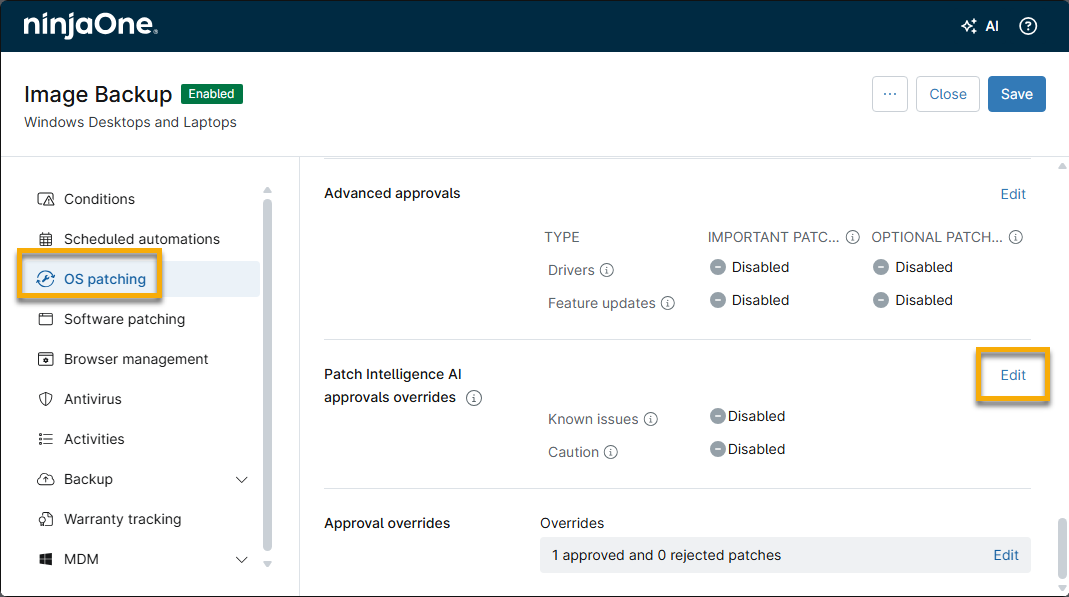
- The Edit AI approval overrides dialog will open. Activate the toggles. You can choose to trigger the override for either or both of the following:
- Enable approval changes for known issues: Microsoft has reported known issues with a patch and may offer workarounds.
- Enable approval changes for caution: Users are seeing increased failure rates or rollbacks, or problems have been reported in the community. NinjaOne AI detects a major reason for concern with a patch.
- Using the drop-down menus, select Reject or Manual options to specify whether the Patch Intelligence AI should move the patch to manual approval or reject it outright. Only patches with automated approvals are changed. Manually applied patches remain untouched.
- Click Apply and then save the policy.
Patch Sentiment Evaluation
Patch Intelligence AI evaluates the state of Windows patches every six hours. If the system applies patches immediately after release, the feature may not have had sufficient time to determine a patch sentiment. As it learns new information, the system may move a patch from an approved state to a manual or rejected state.
Additional Resources
For more information on Patch Intelligence AI, refer to NinjaOne Patching: Patch Intelligence AI.