
Topic
Frequently asked questions about NinjaOne Ticketing are answered here.
Environment
NinjaOne Ticketing
Description
Select a category below to see questions and their answers.
For questions about automations and alerts, refer to NinjaOne Ticketing: Automation Triggers and Templates.
- Questions about emails and ticketing
- Questions about attachments
- When a user sends or responds to a ticket via email and includes an attachment, where is the attachment stored? Will it appear in the ticketing system?
- Where are the ticket file attachments stored, and are they encrypted?
- What size and types of attachments can be uploaded to as ticket attachments?
- Is it possible to upload or attach documents and supported files in the event-based automations (email action) in the same way as inside a ticket comment?
- Is there a way to directly link knowledge base (KB) items and add it to a response template?
- Questions about an assigned user, reporter, or requester
- If I need people to see and view tickets, but not work tickets, do they need to have a technician account in NinjaOne?
- If an organization for a ticket is changed, what happens to the assigned requestor?
- Why is the actions menu button not visible when I have a device linked to a ticket?
- Why am I only seeing a few users when I try to add a user to a ticket?
- Is there a way to merge a contact and an end user in NinjaOne Ticketing?
- Questions about ticket reporting and auditing
- Why am I getting the system notification "Further condition updates are paused until this ticket is updated by a user"?
- Is it possible to run a report with the amount of time spent by specific technicians on a ticket?
- Is there an audit feature in each ticket or in the ticketing system?
- Is the date shown in the Solved Time column referring to when the ticket entered a Resolved status or a Closed status?
- Are ticket resolution times affected by business hours or ticket status?
- How can I export ticket information to a CSV?
- Miscellaneous questions
- Does responding to a ticket change the status?
- Can we solve and reply to tickets in bulk?
- Can users create their own boards?
- Can I create a "parent" or top tier ticket to which I can add tasks?
- Can we add a survey form at the end of a ticketing workflow?
- Is it possible to split or merge a ticket?
- Is the Pending Tickets board available in the mobile app?
- Is there a way to sync the ticketing system to the local active directory or does it only use Azure?
- Is there a workaround for pushing tickets out to an external billing system instead of exporting CSV file?
Questions about emails and ticketing
Why am I receiving pending emails with a Cause of "Receiver not found"?
You must ensure that the receiver email is configured as a forwarding address.
Is it possible to modify the emails generated by the system?
No. Native system email notifications cannot be edited at the moment. You need to create an "event based" automation in order to send out a custom email.
Does the ticketing system work with APIs?
Yes. We do have APIs for ticketing.
Do we have the ability to use scheduled or reoccurring tickets?
No. Nothing outside of the scheduled script workaround.
Questions about attachments
When a user sends or responds to a ticket via email and includes an attachment, where is the attachment stored? Will it appear in the ticketing system?
Yes; in the ticket on the NinjaOne platform, the technician can click the attachment to view it. It is stored in the server.
Where are the ticket file attachments stored, and are they encrypted?
NinjaOne encrypts all data in transit and at rest and stores its data with AWS (Amazon Web Services).
What size and types of attachments can be uploaded to as ticket attachments?
Attachment files currently have a 20-megabyte file size restriction.
Additionally, attachment files can be any of the following file types: .cab, .csv, .doc, .docx, .dot, .eml, .html, .log, .jpeg, .jpg, .mp3, .ods, .pdf, .png, .pps, .ppsx, .ppt, .pptx, .rar, .rtf, .sldx, .tar, .txt, .vsd, .vsdx, .wbk, .xls, .xlsx, .xml, .zip.
Is it possible to upload or attach documents and supported files in the event-based automations (email action) in the same way as inside a ticket comment?
It is currently not supported, but we are looking to add it in a future release.
Is there a way to directly link knowledge base (KB) items and add it to a response template?
You can create a shareable link to a KB and include it to a response template.
Questions about an assigned user, reporter, or requestor
If I need people to see and view tickets, but not work tickets, do they need to have a technician account in NinjaOne?
No; end users can see and view tickets if they have the proper permissions but cannot work them. Use the instructions below.
- When configuring the end user account, select a single organization under General on the account editor.

- Go to Ticketing and ensure the options are enabled. Select "Allowed" for Organization-wide ticketing access.
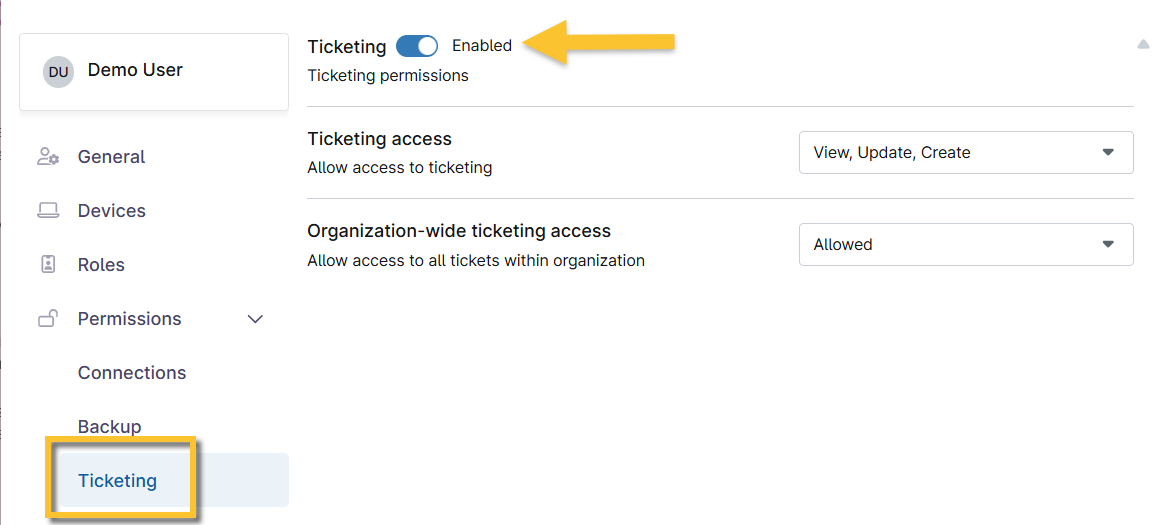
Figure 2: NinjaOne end user configuration page → Ticketing
If the end user has access to "All Organizations" (under General) then the Organization-wide ticketing access option (under Ticketing) will be restricted.
When Organization-wide ticketing access is set to "Allowed," they will be able to view all tickets under a specific organization regardless of who reported it. If the field is set to "No access," the end user can only view tickets that they reported; if the organization associated with the ticket changes and the reporter of that ticket does not have access to the new organization, then the reporter field must be updated to someone who does have access before saving the ticket.
If an organization for a ticket is changed, what happens to the assigned requestor?
If the assignee does not have access to the organization to which the ticket was moved (see FAQ above regarding permissions), then the assignee will be removed, and a new assignee must be manually added.
Why is the actions menu button not visible when I have a device linked to a ticket?
The action button is only visible on tickets that has an assigned technician. This button is not visible when viewing tickets that have not been assigned.
Why am I only seeing a few users when I try to add a user to a ticket?
When an organization is selected, only users who have been granted access to that organization via permissions or roles can be added to the ticket. A technician, end user, or contact must be associated with an organization if one is added to the ticket.
Is there a way to merge a contact and an end user in NinjaOne Ticketing?
Not at the moment. We are working on what the future of contacts and end users is going to be.
Questions about ticket reporting and auditing
Why am I getting the system notification "Further condition updates are paused until this ticket is updated by a user"?
After 100 condition updates (regardless of how many updates are sent per day) relating to a ticket, NinjaOne will pause further ticket updates until a user interacts with the ticket; this is to prevent excessive ticket notifications.
Is it possible to run a report with the amount of time spent by specific technicians on a ticket?
Go to Reporting and create a new summary report with the Ticketing template.
You can also use API for this; please refer to some helpful resources from our NinjaOne team members below:
Is there an audit feature in each ticket or in the ticketing system?
In the ticket, you can filter to view "System Activity."
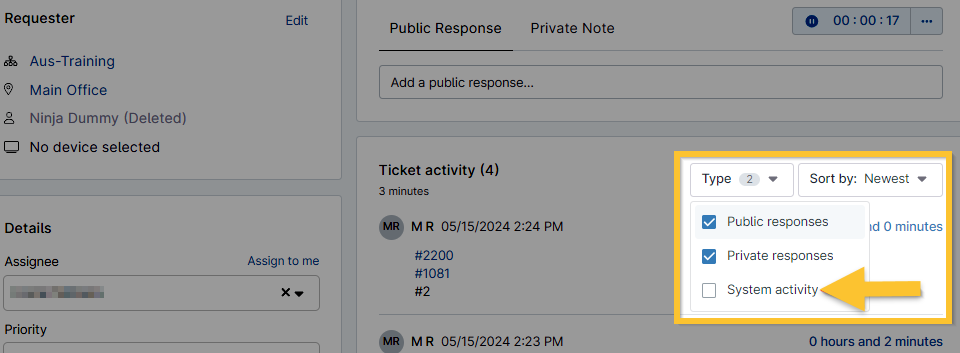
Figure 3: NinjaOne ticket page → Activity type filter
On the organization and device dashboards, the Activities tab shows events when a ticket is created by a condition or through Help Request. Other ticketing activities, such as ticket deletion or email configuration updates, display on the system dashboard Activities tab.
Is the date shown in the Solved Time column referring to when the ticket entered a Resolved status or a Closed status?
The date is recorded when the ticket enters the Resolved status.
Are ticket resolution times affected by business hours or ticket status?
No, ticket resolution time counter runs 24 hours a day, 7 days a week until the ticket is closed and/or resolved.
How can I export ticket information to a CSV?
NinjaOne Ticketing information can be exported either from a board or at the Org or Device-level Ticketing dashboards. Clicking Export provides the options to:
- Export tickets only
- Export tickets with public comments
- Export tickets with all comments
Miscellaneous questions
Does responding to a ticket change the status?
If a public comment is added to a ticket in a "Waiting" status, it will update to "Open". Otherwise, the status must be updated manually.
Can we solve and reply to tickets in bulk?
Tickets cannot be resolved in bulk at this time, but incident tickets will be grouped together in their own tab on the problem ticket page so you can access them all in one place.
This tab only displays on a ticket if incidents are linked to a problem ticket.

Figure 4: NinjaOne ticket page → Incidents tab
Can users create their own boards?
End users cannot make their own boards, but technicians with the proper permissions can; click here for instructions.
Can I create a "parent" or top tier ticket to which I can add tasks?
NinjaOne Ticketing is not designed for product management at this time; however, "incident" tickets can be attached to a ticket labeled as a "problem" for a workaround. Click here for instructions.
Can we add a survey form at the end of a ticketing workflow?
NinjaOne Ticketing does not have satisfaction surveys at this time; however, you can use a third-party company to generate links to surveys and send those via an automation.
Alternatively, you can use ticketing forms to create a questionnaire that will display in the ticket. The question can be entered into the Title field, and the user or technician can enter the answer into the Description field. Make the field required to ensure user engagement.
Is it possible to split or merge a ticket?
This can be accomplished in one of two ways:
- From a NinjaOne Ticketing board, simply select the checkbox(es) next to the ticket(s) you wish to split or merge.
- Or, from directly within a ticket, select the ellipses in the upper-right and choose whether to split or merge the ticket.
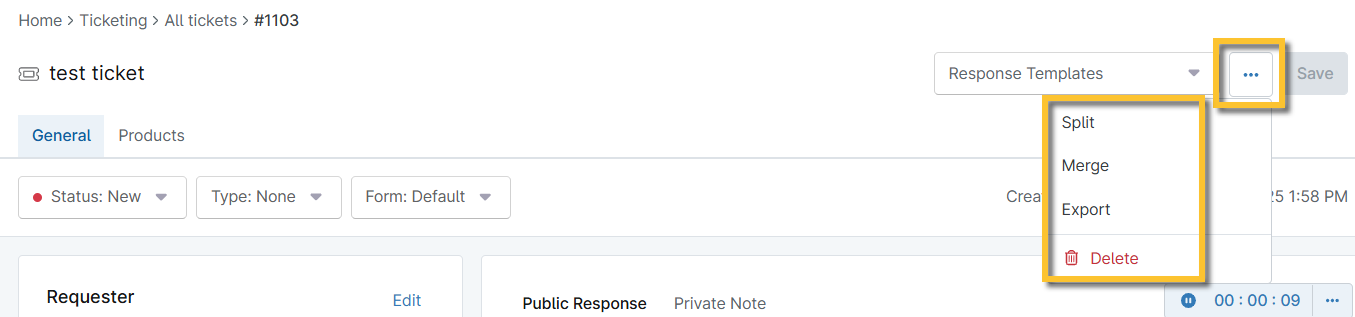
Figure 5: NinjaOne ticket page → Action menu
Is the Pending Tickets board available in the mobile app?
No. The Pending Tickets board is only visible within the web application.
Is there a way to sync the ticketing system to the local active directory or does it only use Azure?
If it is regarding SCIM for end users, On-Prem Active Directory is not supported.
Is there a workaround for pushing tickets out to an external billing system instead of exporting CSV file?
Yes. You could use NinjaOne API.