

The NinjaOne WYSIWYG custom fields operate an allowlist of elements and supported inline styles that can be used for the elements. NinjaOne also provides CSS classes that technicians can utilize for NinjaOne styling.
Table of Contents:
- Using the WYSIWYG Editor in NinjaOne
- Using HTML and Inline Styling through API and CLI
- HTML Elements
- Inline Styling Options
- Charts
- NinjaOne CSS Classes
Using the WYSIWYG Editor in NinjaOne:
The NinjaOne Documentation application offers WYSIWYG (What You See is What You Get) fields in both the Knowledge Base and as a custom field for document templates.
WYSIWYG Functionality:
- By default, when an HTML field has more than 10,000 characters, it will collapse and user must click the expand button to see the full content.
- The max character limit for WYSIWYGs is 200 thousand characters.
- There can be no more than 20 WYSIWYG custom fields per form or document template. Once the limit is reached, the WYSIWYG selection for the Field type will be locked.
Using HTML and Inline Styling through API and CLI:
NinjaOne system administrators and technicians can use HTML and inline styling when creating Role/Global Custom Fields and Apps & Services documentation that use the "WYSIWYG" field type.
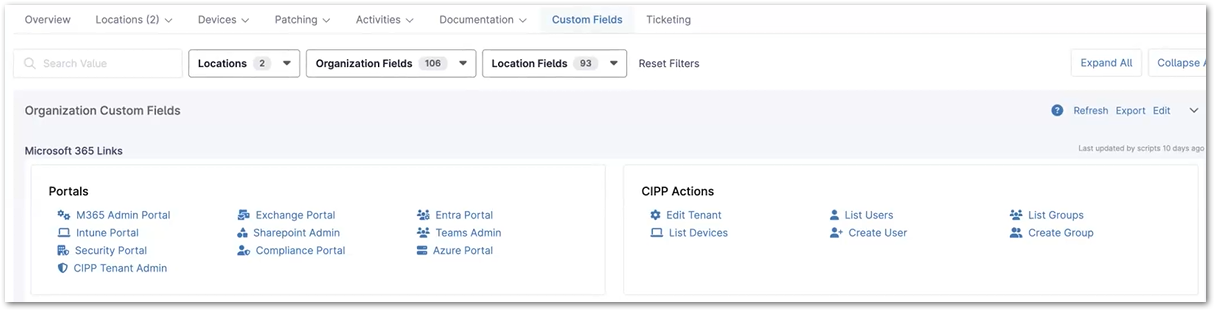
These styling options allow for greater flexibility and customization when displaying data in NinjaOne. For example, the screenshot below shows what it would look like if a custom field contained widgets with hyperlinks:
See below for a complete list of elements and CSS classes that can be used to build your content:
HTML Elements:
| Element | Supports NinjaOne classes? |
|---|---|
| a | Yes |
| blockquote | Yes |
| caption | Yes |
| code | |
| col | Yes |
| div | Yes |
| h1 | Yes |
| h2 | Yes |
| h3 | Yes |
| h4 | Yes |
| h5 | Yes |
| h6 | Yes |
| i | Yes |
| li | Yes |
| ol | Yes |
| p | Yes |
| pre | |
| span | Yes |
| table | Yes |
| tbody | Yes |
| td | Yes |
| tfoot | Yes |
| th | Yes |
| thead | Yes |
| tr | Yes |
| ul | Yes |
Inline Styling Options:
| Style | Allowed Values |
|---|---|
| color | RGB or hex color codes. (ex: RGB (240,30,50,.7), #f015ca) |
| background-color | RGB or hex color codes. (ex: RGB (240,30,50,.7), #f015ca) |
| display | block, inline, inline-block, flex, inline-flex |
| justify-content | center, start, end, flex, flex-start, flex-end, left, right, normal, space-between, space-around, space-evenly |
| align-items | center, start, end, flex, flex-start, flex-end, left, right, normal, stretch |
| word-break | normal, break-all, keep-all, break-word |
| box-sizing | border-box, content-box |
| white-space | normal, no-wrap, pre, pre-wrap, pre-line, break-spaces |
| overflow-wrap | normal, break-word, pre, anywhere |
| text-align | start, end, left, center, right, justify, justify-all, match-parent |
| width | Valid CSS unit values (e.g., 100%, 400px, auto, 2em, etc.) |
| height | Valid CSS unit values (e.g., 100%, 400px, auto, 2em, etc.) |
| font-size | Valid CSS unit values (e.g., 100%, 400px, auto, 2em, etc.) |
| font-family | serif, sans-serif, monospace, cursive, fantasy, system-ui, emoji |
| margin | Valid CSS unit values (e.g., 100%, 400px, auto, 2em, etc.) |
| margin-top | Valid CSS unit values (e.g., 100%, 400px, auto, 2em, etc.) |
| margin-right | Valid CSS unit values (e.g., 100%, 400px, auto, 2em, etc.) |
| margin-bottom | Valid CSS unit values (e.g., 100%, 400px, auto, 2em, etc.) |
| margin-left | Valid CSS unit values (e.g., 100%, 400px, auto, 2em, etc.) |
| padding | Valid CSS unit values (e.g., 100%, 400px, auto, 2em, etc.) |
| padding-top | Valid CSS unit values (e.g., 100%, 400px, auto, 2em, etc.) |
| padding-right | Valid CSS unit values (e.g., 100%, 400px, auto, 2em, etc.) |
| padding-bottom | Valid CSS unit values (e.g., 100%, 400px, auto, 2em, etc.) |
| padding-left | Valid CSS unit values (e.g., 100%, 400px, auto, 2em, etc.) |
| border-width | Valid CSS unit values (e.g., 100%, 400px, auto, 2em, etc.) |
| border-style | none, solid, dashed, inset, outset |
| border-color | RGB or hex color codes (ex: RGB(240,30,50,.7), #f015ca) |
| border-top | Valid CSS unit values (e.g., 100%, 400px, auto, 2em, etc.) |
| border-right | Valid CSS unit values (e.g., 100%, 400px, auto, 2em, etc.) |
| border-bottom | Valid CSS unit values (e.g., 100%, 400px, auto, 2em, etc.) |
| border-left | Valid CSS unit values (e.g., 100%, 400px, auto, 2em, etc.) |
| border-radius | Valid CSS unit values (e.g., 100%, 400px, auto, 2em, etc.) |
| border-collapse | collapse, separate |
Charts:
NinjaOne supports Charts.css, a new open-source framework for data visualization. For more information, please see Introduction | Charts.css (chartscss.org).
NinjaOne recommends using the Piped commands for setting HTML in custom fields via the CLI.
$HTML | Ninja-Property-Set-Piped fieldName
Example: .png)
<div class="row g-3">
<div class="col-xl-4 col-lg-6 col-md-12 col-sm-12 d-flex">
<table class="charts-css column show-heading">


<tbody>
<tr>
<td style="--size: 0.4"> <span class="data"> 40% </span> </td>
</tr>
<tr>
<td style="--size: 0.6"> <span class="data"> 60% </span> </td>
</tr>
<tr>
<td style="--size: 0.75"> <span class="data"> 75% </span> </td>
</tr>
<tr>
<td style="--size: 0.9"> <span class="data"> 90% </span> </td>
</tr>
<tr>
<td style="--size: 1"> <span class="data"> 100% </span> </td>
</tr>
</tbody>

</table>

</div>

<div class="col-xl-4 col-lg-6 col-md-12 col-sm-12 d-flex">

<table class="charts-css column show-data-on-hover show-heading">
<tbody>
<tr>
<td style="--size: 0.4"> <span class="data"> 40% </span> </td>
</tr>
<tr>
<td style="--size: 0.6"> <span class="data"> 60% </span> </td>
</tr>
<tr>
<td style="--size: 0.75"> <span class="data"> 75% </span> </td>
</tr>
<tr>
<td style="--size: 0.9"> <span class="data"> 90% </span> </td>
</tr>
<tr>
<td style="--size: 1"> <span class="data"> 100% </span> </td>
</tr>
</tbody>

</table>

</div>

<div class="col-xl-4 col-lg-6 col-md-12 col-sm-12 d-flex">

<table class="charts-css bar show-heading">
<tbody>
<tr>
<td style="--size: 0.4"> <span class="data"> 40% </span> </td>
</tr>
<tr>
<td style="--size: 0.6"> <span class="data"> 60% </span> </td>
</tr>
<tr>
<td style="--size: 0.75"> <span class="data"> 75% </span> </td>
</tr>
<tr>
<td style="--size: 0.9"> <span class="data"> 90% </span> </td>
</tr>
<tr>
<td style="--size: 1"> <span class="data"> 100% </span> </td>
</tr>
</tbody>

</table>

</div>


<div class="col-xl-4 col-lg-6 col-md-12 col-sm-12">
<div class="row g-3">
<div class="col-12">
<table
class="charts-css line multiple show-data-on-hover show-labels show-primary-axis show-10-secondary-axes show-heading">
<tbody>
<tr>
<th scope="row"> 21-03 </th>
<td style="--start: 0.1; --end: 0.3;"><span class="data"> 30 </span></td>
<td style="--start: 0.6; --end: 0.4;"><span class="data"> 40 </span></td>
<td style="--start: 0.8; --end: 0.7;"><span class="data"> 70 </span></td>
<td style="--start: 0.7; --end: 0.9;"><span class="data"> 100 </span></td>
</tr>
<tr>
<th scope="row"> 20-03 </th>
<td style="--start: 0.3; --end: 0.1;"><span class="data"> 10 </span></td>
<td style="--start: 0.4; --end: 0.6;"><span class="data"> 60 </span></td>
<td style="--start: 0.7; --end: 0.9;"><span class="data"> 90 </span></td>
<td style="--start: 0.9; --end: 0.7;"><span class="data"> 70 </span></td>
</tr>
<tr>
<th scope="row"> 19-03 </th>
<td style="--start: 0.1; --end: 0.3;"><span class="data"> 30 </span></td>
<td style="--start: 0.6; --end: 0.4;"><span class="data"> 40 </span></td>
<td style="--start: 0.9; --end: 0.8;"><span class="data"> 80 </span></td>
<td style="--start: 0.7; --end: 0.9;"><span class="data"> 90 </span></td>
</tr>
<tr>
<th scope="row"> 18-03 </th>
<td style="--start: 0.3; --end: 0.1;"><span class="data"> 10 </span></td>
<td style="--start: 0.4; --end: 0.6;"><span class="data"> 60 </span></td>
<td style="--start: 0.8; --end: 0.8;"><span class="data"> 80 </span></td>
<td style="--start: 0.9; --end: 0.9;"><span class="data"> 90 </span></td>
</tr>
<tr>
<th scope="row"> 17-03 </th>
<td style="--start: 0.1; --end: 0.3;"><span class="data"> 30 </span></td>
<td style="--start: 0.6; --end: 0.4;"><span class="data"> 40 </span></td>
<td style="--start: 0.8; --end: 1.0;"><span class="data"> 100 </span></td>
<td style="--start: 0.9; --end: 0.7;"><span class="data"> 70 </span></td>
</tr>
</tbody>
</table>

</div>
<div class="col-12">

<ul class="charts-css legend legend-inline legend-rectangle">
<li> C: </li>
<li> D: </li>
<li> CPU </li>
<li> Memory </li>
</ul>

</div>
</div>
</div>


<div class="col-xl-4 col-lg-6 col-md-12 col-sm-12 d-flex">

<table class="charts-css area show-heading">
<tbody>
<tr>
<th scope="row"> 21-03 </th>
<td style="--start: 0.1; --end: 0.3;"><span class="data"> 30 </span></td>
<td style="--start: 0.6; --end: 0.4;"><span class="data"> 40 </span></td>
<td style="--start: 0.8; --end: 0.7;"><span class="data"> 70 </span></td>
<td style="--start: 0.7; --end: 0.9;"><span class="data"> 100 </span></td>
</tr>
<tr>
<th scope="row"> 20-03 </th>
<td style="--start: 0.3; --end: 0.1;"><span class="data"> 10 </span></td>
<td style="--start: 0.4; --end: 0.6;"><span class="data"> 60 </span></td>
<td style="--start: 0.7; --end: 0.9;"><span class="data"> 90 </span></td>
<td style="--start: 0.9; --end: 0.7;"><span class="data"> 70 </span></td>
</tr>
<tr>
<th scope="row"> 19-03 </th>
<td style="--start: 0.1; --end: 0.3;"><span class="data"> 30 </span></td>
<td style="--start: 0.6; --end: 0.4;"><span class="data"> 40 </span></td>
<td style="--start: 0.9; --end: 0.8;"><span class="data"> 80 </span></td>
<td style="--start: 0.7; --end: 0.9;"><span class="data"> 90 </span></td>
</tr>
<tr>
<th scope="row"> 18-03 </th>
<td style="--start: 0.3; --end: 0.1;"><span class="data"> 10 </span></td>
<td style="--start: 0.4; --end: 0.6;"><span class="data"> 60 </span></td>
<td style="--start: 0.8; --end: 0.8;"><span class="data"> 80 </span></td>
<td style="--start: 0.9; --end: 0.9;"><span class="data"> 90 </span></td>
</tr>
<tr>
<th scope="row"> 17-03 </th>
<td style="--start: 0.1; --end: 0.3;"><span class="data"> 30 </span></td>
<td style="--start: 0.6; --end: 0.4;"><span class="data"> 40 </span></td>
<td style="--start: 0.8; --end: 1.0;"><span class="data"> 100 </span></td>
<td style="--start: 0.9; --end: 0.7;"><span class="data"> 70 </span></td>
</tr>
</tbody>
</table>
</div>


<div class="col-xl-4 col-lg-6 col-md-12 col-sm-12 d-flex" style="height:300px; width: 300px;">

<table class="charts-css pie show-heading">
<tbody>
<tr>
<th scope="row"> 21-03 </th>
<td style="--start: 0; --end: 0.2;"><span class="data"> 30 </span></td>
</tr>
<tr>
<th scope="row"> 20-03 </th>
<td style="--start: 0.2; --end: 0.3;"><span class="data"> 10 </span></td>
</tr>
<tr>
<th scope="row"> 19-03 </th>
<td style="--start: 0.3; --end: 0.55;"><span class="data"> 30 </span></td>
</tr>
<tr>
<th scope="row"> 18-03 </th>
<td style="--start: 0.55; --end: 0.75;"><span class="data"> 10 </span></td>
</tr>
<tr>
<th scope="row"> 17-03 </th>
<td style="--start: 0.75; --end: 1;"><span class="data"> 30 </span></td>
</tr>
</tbody>
</table>
</div>
</div>
NinjaOne CSS Classes:
NinjaOne documentation and custom fields supports the Bootstrap 5 Grid System and the Free Font Awesome 6 Library for icons. In addition, we provide several classes to allow technicians to access the NinjaOne styles.
Standard Card
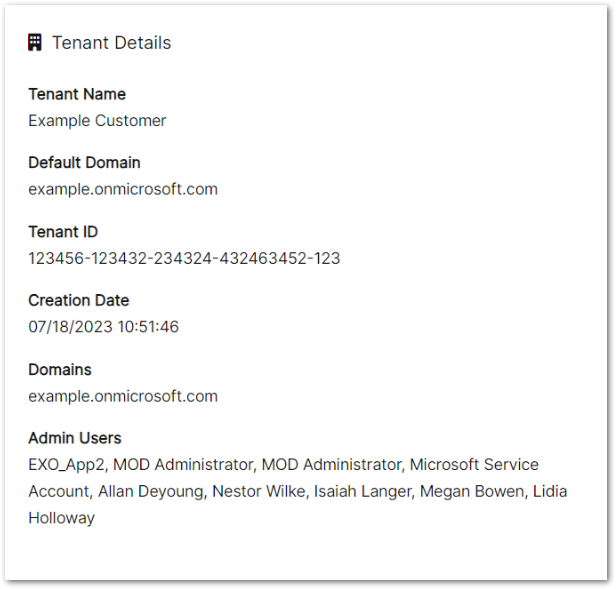
<div class="card flex-grow-1">
<div class="card-title-box">
<div class="card-title"><i class="fas fa-building"></i> Tenant Details</div>
</div>
<div class="card-body">
<p class="card-text"></p>
<p><b>Tenant Name</b><br>Example Customer</p>
<p><b>Default Domain</b><br>example.onmicrosoft.com</p>
<p><b>Tenant ID</b><br>123456-123432-234324-432463452-123</p>
<p><b>Creation Date</b><br>07/18/2023 10:51:46</p>
<p><b>Domains</b><br>example.onmicrosoft.com
</p>
<p><b>Admin Users</b><br>EXO_App2, MOD Administrator, MOD Administrator, Microsoft Service Account, Allan
Deyoung, Nestor Wilke, Isaiah Langer, Megan Bowen, Lidia Holloway</p>
<p></p>
</div>
</div>
Card with Action
<div class="card flex-grow-1">
<div class="card-title-box">
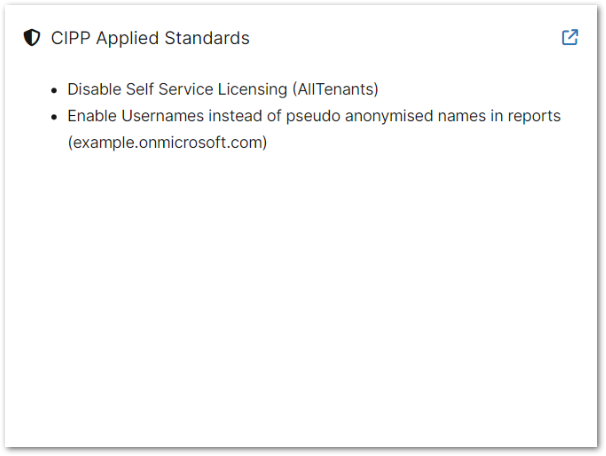
<div class="card-title"><i class="fas fa-shield-halved"></i> CIPP Applied Standards</div>
<div class="card-link-box"><a
href="https://localhost:4280/tenant/standards/list-applied-standards?customerId=1e593540-8f80-4831-87a9-f1f95804a206"
target="_blank" class="card-link" rel="nofollow noopener noreferrer"><i
class="fas fa-arrow-up-right-from-square" style="color: #337ab7;"></i></a></div>
</div>
<div class="card-body">
<p class="card-text"></p>
<ul>
<li><span>Disable Self Service Licensing (AllTenants)</span></li>
<li><span>Enable Usernames instead of pseudo anonymised names in reports
(example.onmicrosoft.com)</span></li>
</ul>
<p></p>
</div>
</div>
Tables

<table>
  <thead>
    <tr>
       <th>Testing</th>
       <th>Testing</th>
       <th>Testing</th>
       <th>Testing</th>
       <th>Testing</th>
       <th>Testing</th>
       <th>Testing</th>
       <th>Testing</th>
       <th>Testing</th>
    </tr>
  </thead>
  <tbody>
    <tr>
       <td>Testing</td>
       <td>Testing</td>
       <td>testing</td>
       <td>Testing</td>
       <td>Testing this one has a lot longer text testing testing testing</td>
       <td>testing</td>
       <td>Testing</td>
       <td>Testing</td>
       <td>testing</td>
    </tr>
    <tr class="danger">
       <td>Testing</td>
       <td>Testing this one has a lot longer text testing testing testing</td>
       <td>Testing</td>
       <td>testing</td>
       <td>Testing</td>
       <td>testing</td>
       <td>Testing</td>
       <td>Testing</td>
       <td>testing</td>
    </tr>
    <tr class="success">
       <td>Testing</td>
       <td>Testing</td>
       <td>testing</td>
       <td>Testing</td>
       <td>Testing this one has a lot longer text testing testing testing</td>
       <td>testing</td>
       <td>Testing</td>
       <td>Testing</td>
       <td>testing</td>
    </tr>
    <tr class="other">
       <td>Testing</td>
       <td>Testing</td>
       <td>testing</td>
       <td>Testing</td>
       <td>Testing this one has a lot longer text testing testing testing</td>
       <td>testing</td>
       <td>Testing</td>
       <td>Testing</td>
       <td>testing</td>
    </tr>
    <tr class="warning">
       <td>Testing</td>
       <td>Testing</td>
       <td>testing</td>
       <td>Testing</td>
       <td>Testing this one has a lot longer text testing testing testing</td>
       <td>testing</td>
       <td>Testing</td>
       <td>Testing</td>
       <td>testing</td>
    </tr>
    <tr class="unknown">
       <td>Testing</td>
       <td>Testing</td>
       <td>testing</td>
       <td>Testing</td>
       <td>Testing this one has a lot longer text testing testing testing</td>
       <td>testing</td>
       <td>Testing</td>
       <td>Testing</td>
       <td>testing</td>
    </tr>
  </tbody>
</table>
Paragraphs

<p>This is an example paragraph Lorem ipsum dolor sit amet, consectetur adipiscing elit. Lorem ipsum dolor sit
   amet, consectetur adipiscing elit. Lorem ipsum dolor sit amet, consectetur adipiscing elit.</p>
<p>Lorem ipsum dolor sit amet, consectetur adipiscing elit. <strong>Bold Text</strong> Lorem ipsum dolor sit
   amet, consectetur adipiscing elit.</p>
Headings

<h1>Headings</h1>
<h1>Heading 1</h1>
<h2>Heading 2</h2>
<h3>Heading 3</h3>
<h4>Heading 4</h4>
<h5>Heading 5</h5>
Buttons

<a href="https://example.com" target="_blank" class="btn">Primary Button</a>
<a href="https://example.com" target="_blank" class="btn secondary">Secondary Button</a>
<a href="https://example.com" target="_blank" class="btn danger">Danger Button</a>
Info Cards
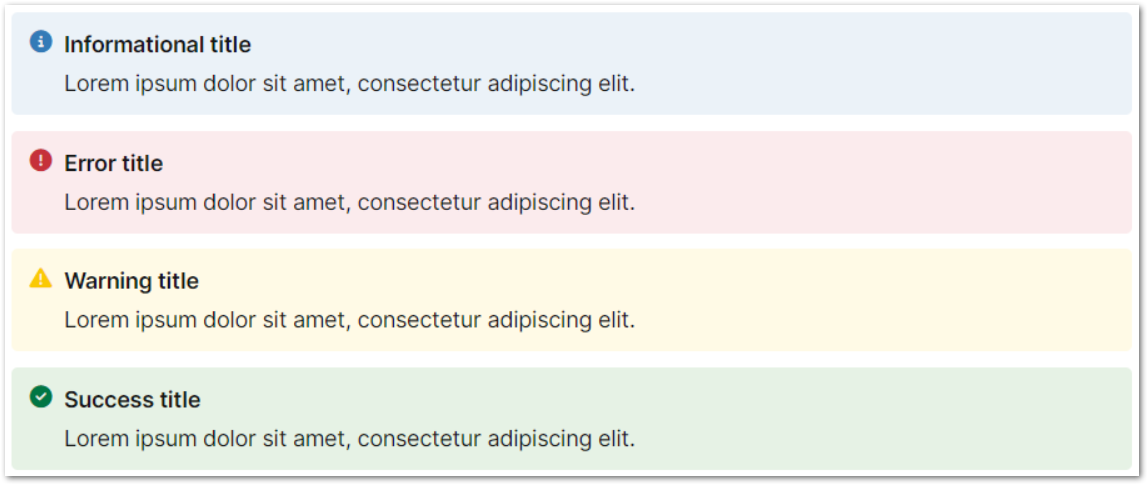
<div class="info-card">
  <i class="info-icon fa-solid fa-circle-info"></i>
  <div class="info-text">
    <div class="info-title">Informational title</div>
    <div class="info-description">
      Lorem ipsum dolor sit amet, consectetur adipiscing elit.
    </div>
  </div>
</div>


<div class="info-card error">
  <i class="info-icon fa-solid fa-circle-exclamation"></i>
  <div class="info-text">
    <div class="info-title">Error title</div>
    <div class="info-description">
      Lorem ipsum dolor sit amet, consectetur adipiscing elit.
    </div>
  </div>
</div>


<div class="info-card warning">
  <i class="info-icon fa-solid fa-triangle-exclamation"></i>
  <div class="info-text">
    <div class="info-title">Warning title</div>
    <div class="info-description">
      Lorem ipsum dolor sit amet, consectetur adipiscing elit.
    </div>
  </div>
</div>


<div class="info-card success">
  <i class="info-icon fa-solid fa-circle-check"></i>
  <div class="info-text">
    <div class="info-title">Success title</div>
    <div class="info-description">
      Lorem ipsum dolor sit amet, consectetur adipiscing elit.
    </div>
  </div>
</div>
Tags

<div class="tag">Enabled</div>
<div class="tag disabled">Disabled</div>
<div class="tag expired">Expired</div>
Statistic Cards

<div class="stat-card">
<div class="stat-value"><a href="https://example.com" target="_blank" rel="nofollow noopener noreferrer"><span
style="color: #CCCCCC;"><i class="fas fa-circle-xmark"></i></span></a></div>
<div class="stat-desc"><a href="https://example.com" target="_blank" rel="nofollow noopener noreferrer"><span
style="font-size: 18px;"><span style="white-space:nowrap;">AD</span> <span
style="white-space:nowrap;">Connect</span></span></a></div>
</div>
<div class="stat-card">
<div class="stat-value"><a href="https://example.com" target="_blank" rel="nofollow noopener noreferrer"
style="color: #008001;">0</a></div>
<div class="stat-desc"><a href="https://example.com" target="_blank" rel="nofollow noopener noreferrer"><span
style="font-size: 18px;">Blocked Senders</span></a></div>
</div>
Line Chart

<div class="p-3 linechart">
   <div style="width: 33.3333333333%; background-color: #55ACBF;"></div>
   <div style="width: 33.3333333333%; background-color: #3633B7;"></div>
   <div style="width: 33.3333333333%; background-color: #8063BF;"></div>
</div>
<ul class="unstyled p-3" style="display: flex; justify-content: space-between; ">
   <li><span class="chart-key" style="background-color: #55ACBF;"></span><span>
      Licensed (20)</span></li>
   <li><span class="chart-key" style="background-color: #3633B7;"></span><span>
      Unlicensed (20)</span></li>
   <li><span class="chart-key" style="background-color: #8063BF;"></span><span>
      Guests (20)</span></li>
</ul>
Related Documentation: