
Issue
The NinjaOne Network Management user interface does not populate syslog or NetFlow information as expected.
Environment
- NinjaOne Network Management System (NMS)
Cause
NinjaOne's monitoring servers are not receiving syslog or NetFlow logs.
Resolution
To triage this issue, perform the following steps:
- Ensure your device can export NetFlow and syslog export data. You can find this information in the device's user manual or on the manufacturer's website.
Due to the wide range of appliances available and varying network configurations, NinjaOne Support cannot configure your network devices. However, we can provide limited best-effort support if and when possible.
- Use port status conditions or Telnet to verify that the firewall ports in the following list are open for inbound communications on the NMS agent machine. These ports are necessary for syslog data to be collected properly. They are automatically opened on the NMS device upon installation of the agent, but a reboot is necessary to bind the ports properly.
| Port | Protocol | Purpose |
|---|---|---|
| 5053 | TCP | 128 AES Encrypted Host Server Port |
| 5054 | TCP | Agent deployment CAB file downloads |
| 5055 | TCP | Encrypted Remote Control Tunnel Port |
| 61 | UDP | SNMP Trap Collector |
| 69 | UDP | TFTP Server |
| 514 | UDP | Syslog collector |
| 2055 | UDP | NetFlow collector |
| 6343 | UDP | sFlow collector |
| 9555 | UDP | NetFlow Alternative port #2 collector |
| 9995 | UDP | NetFlow Alternative port #3 collector |
- Create a port status check in NinjaOne. To do so, edit the NMS policy for the device in question at Administration → Policies → NMS Policies → Network Performance → Port.
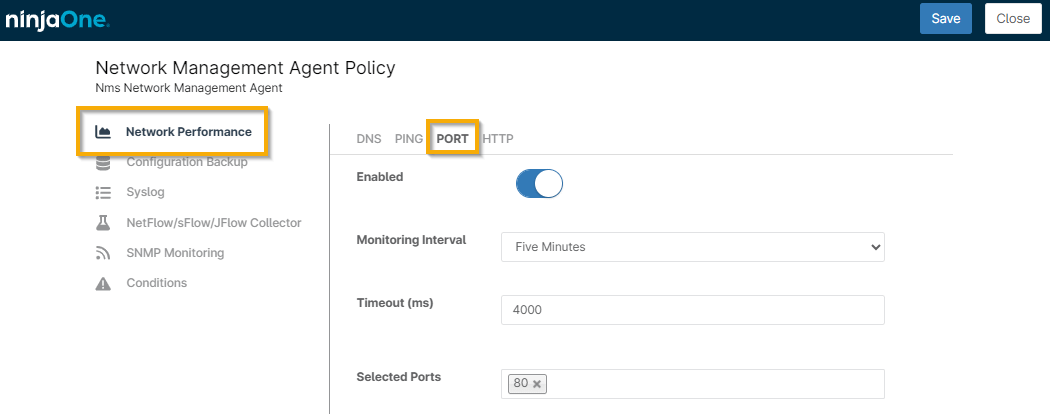
Figure 1: Network Management Agent Policy (click to enlarge)
- You can check port status in NinjaOne on the Details tab of the device dashboard. It may take a few minutes for newly configured port monitors to appear.
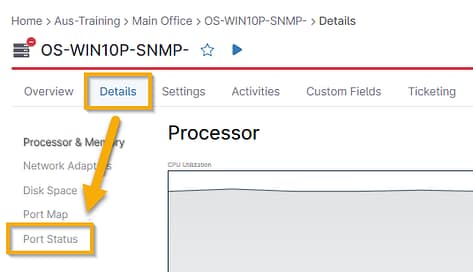
Figure 2: Port Status
Additional Resources
For additional NMS troubleshooting help, refer to the following articles: