
Topic
This article provides examples of commonly used permissions for NinjaOne technicians. You can configure these permissions in an individual technician account or technician role.
Environment
NinjaOne Platform
Description
These commonly used permissions will help your technician get started in NinjaOne. For a description of each permission in a NinjaOne technician account, refer to NinjaOne Platform: Permission Settings for Technicians.
Index
- Access Organizations
- Access Devices
- Reboot Devices
- Ticketing and Reporting Permissions
- Wake-on-LAN Permissions
- Additional Resources
Access Organizations
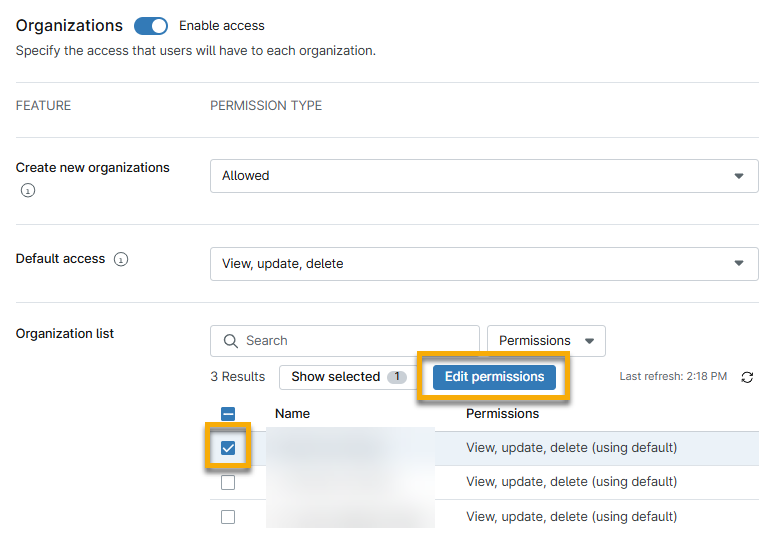
The Organizations section on the technician permissions page allows you to configure whether the technician can create new organizations, and which organization pages they can access.
To configure these settings, you must activate the Enable access toggle.

When you activate this toggle, the Default access permission will update to View. You can give the technician additional permissions by selecting View, update, delete from the drop-down menu. The Default access defines the technician's access to all organizations in NinjaOne. If you want to specify which organizations the technician can access, select the organization checkbox in the Organization list section and then click Edit permissions.
Access Devices
In addition to activating permissions for the Organization section, as shown in the previous section, you must activate the Enable access toggle in the Device access section to give a technician access to manage the organization's endpoints and set the Default access feature to at least View. Otherwise, techncians will not be able to access the device dashboard, and the organization dashboard will not show device data.
You can also set different levels of access for specific device types.

Reboot Devices
If you want a technician to be able to reboot devices using NinjaOne's native or custom automations, you must activate the Enable access toggle in the Automation library section and set the Default access feature to at least View, Run. This will provide the option to reboot devices and give the users access to all automations from the dashboard actions menu or through a scheduled task.
You can also set different access levels for specific automations.

Ticketing and Reporting Permissions
Access to tickets is based on organization access, meaning a technician with access to an organization will have access to all tickets for that organization, regardless of the permissions set in the Ticketing section. To learn more about these permissions, refer to NinjaOne Ticketing: Technician and User Permissions.
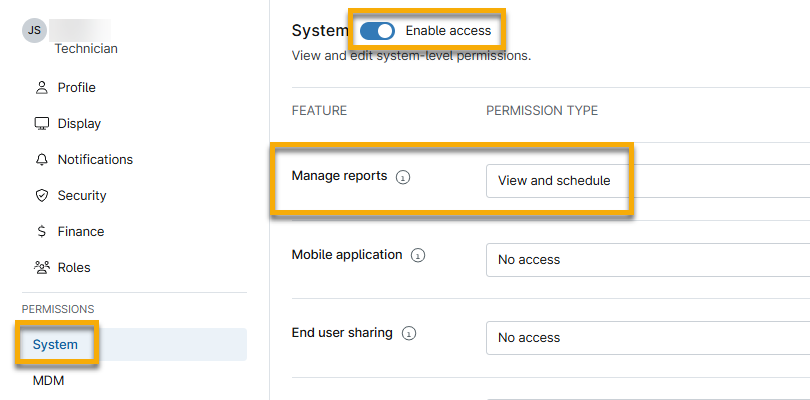
When you configure ticketing permissions, we recommend also setting the Manage reports permission in the System section to at least View and schedule, so the technician can pull data for reporting items such as the number of open tickets, pending tickets, resolved tickets, resolution time, ticketing volume, and technician ticket efficiency.
Wake-on-LAN Permissions
For technicians to have access to Wake-on-LAN, the Default Access for Automation Library must be set to at least Run, and the technician must have at least View and Update for Default access in the Device access section.
Additional Resources
Refer to User Management: Resource Catalog to learn more about user management.