
Topic
This article explains how to deactivate short message service (SMS) for MFA. You can perform this action in bulk for technicians and end users.
Environment
NinjaOne Platform
Description
NinjaOne supports multiple options for secure login authentication, such as hardware tokens from an identity provider (IdP) or third-party authenticator applications. Deactivating SMS for MFA enhances account security and mitigates risks from SMS provider outages.
Deactivating SMS for MFA may be beneficial if your SMS provider regularly experiences service outages or other issues that impact SMS codes from being delivered.
Change the SMS for MFA Settings
To deactivate SMS for all technicians or all end users, perform the following steps:
- Navigate to Administration → Accounts → Security Settings.
- Click Edit in the Use SMS for MFA section.

- Read the warning prompt before proceeding.
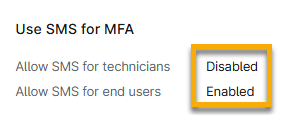
- Select the toggle to allow or disallow SMS for either technicians, end users, or both.

- Click Update.
The page will update to reflect the new settings.
Additional Resources
Refer to NinjaOne Identity Access Management (IAM): Resource Catalog for SSO, SAML, and SCIM to learn more about access options for NinjaOne.