
Topic
This article explains how to use the NinjaOne Remote mobile application.
Environment
NinjaOne Remote
Description
The NinjaOne Remote mobile application, which may appear in your application store as NinjaRMM Screenshare Utility, is NinjaOne's built-in remote control tool. This app empowers you to quickly and securely take control of your managed endpoints directly from your mobile device.
Features include:
- One-click access from the mobile application
- Fast and intuitive controls
- Full keyboard functionality
- Mult-monitor support
Index
Select a category to learn more:
- Support
- Download the Mobile Application
- Using the Mobile Application
- Manage Application Settings
- Additional Resources
Support
You can download the mobile application to your Apple iOS, Apple iPadOS, or Android device.
- Android version 8 or newer is supported.
- Apple iOS 6 is currently compatible, and iOS 12 or later is supported.
- At this time, NinjaOne's mobile app is not compatible with iPhone XS.
The NinjaOne Remote mobile application supports the following servers and workstations:
- Microsoft Windows
- Apple macOS
- Linux
Refer to NinjaOne Remote: Getting Started for additional support information.
Download the Mobile Application
Open your App Store or Google Play from the mobile device you will use to access your managed endpoints remotely. Search for "NinjaRemote" and download the app from developer NinjaRMM, LLC.
Using the Mobile Application
The NinjaOne Remote application is considered a "helper" application. That is, the application does not do anything on its own, and you will see the following dialog on your screen if you open it.
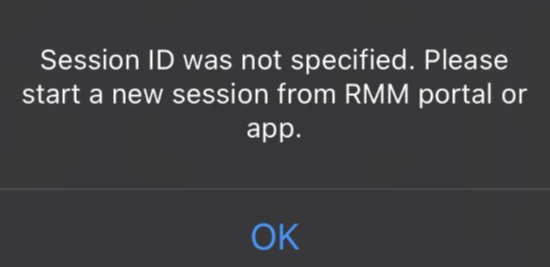
The NinjaOne Remote application leverages the NinjaOne Mobile application, which you can learn more about at NinjaOne Platform: The Mobile Application. When you initiate a remote session from the NinjaOne Mobile application, your device will use the NinjaOne Remote mobile application to launch the session, automatically starting the application on your device.
Once you terminate the session on the NinjaOne Remote mobile application, you must go back to the NinjaOne Mobile application to initiate it again.
Manage Application Settings
Tap the gear icon in the NinjaOne Remote mobile application to manage your settings. Use the icons on the sidebar menu to navigate through the sections.

Session
In this section, you can configure the following settings:
- Session Timeout: add or remove an automated timeout to exit out of the remote session.
- On session close: optionally lock the device or log out the technician when the remote session ends.
- Clipboard Synchronize
- On session close clear clipboard
- Disable technician keyboard and mouse
- Show remote cursor
Resolution
You can only adjust these settings during a remote session.
Interface
In this section, you can configure the following settings:
- Configure inactivity timeout
- Auto keyboard on input
- Enable paste as keystrokes icon on toolbar
- Show toolbar on left
- Interface size
- Mouse speed
- Gesture sensitivity
- Show multi-monitors button
- Touch as mouse
System
In this section, you can configure the following settings:
- Hybrid Transmission Control Protocol (TCP) and User Datagram Protocol (UDP) link
- Grayscale video
- Enable audio
- Volume
- Video quality
- Keyboard mode (key codes or text)
- Proxy type
Information
In this section, you can view the following data:
- Version
- Qt runtime and build
- Status
- Session
- Remote player
- Proxy type
- Duration
- TCP
- Codec
Additional Resources
Refer to the following resources to learn more about NinjaOne Remote and our mobile applications: