
Topic
NinjaOne integrates with CrowdStrike Falcon (FalconInsight XDR and Falcon Prevent), an integrated cloud-based endpoint detection and response (EDR) and endpoint protection platform (EPP) solution.
Environment
- NinjaOne Integrations
- CrowdStrike
Description
Disclaimer: CrowdStrike was designed as a complete antivirus replacement. NinjaOne does not recommend using it with other endpoint detection and response vendors. NinjaOne does not uninstall the antivirus from devices if you deactivate CrowdStrike in NinjaOne. NinjaOne utilizes the generally available version of the CrowdStrike Falcon Sensor cached installer, as it is known to be compatible with devices. The NinjaOne CrowdStrike integration follows CrowdStrikeFalcon sensor policies so that the Falcon sensor will be upgraded or downgraded after installation, depending on your CrowdStrike settings. |
The CrowdStrike integration is policy-driven from within NinjaOne when activated. NinjaOne maps organizations automatically to CrowdStrike Dynamic Host Groups (groups of standard devices) based on Falcon Grouping tags.
The policy triggers the NinjaOne remote monitoring management (RMM) agent to detect the existing installation of the CrowdStrike Sensor on the endpoint and automatically perform the installation if the sensor is not present. If a device already has CrowdStrike installed before you activate the integration, the NinjaOne agent can read the existing agent ID.
View additional tutorials in our video library.
Select a category to learn more:
- Support
- Prerequisites
- Main Features
- Activate the CrowdStrike Integration
- Map NinjaOne Organizations to CrowdStrike Host Groups
- Configure API Scopes for Multi-tenancy
- Additional Resources
Support
Falcon Sensor 7.19.18910 on Microsoft Windows and Apple macOS.
NinjaOne does not support CrowdStrike installation tokens. Instead, this process will use access tokens.
Prerequisites
You must meet the following requirements before proceeding with the integration:
- Maintain an existing CrowdStrike Falcon license.
- Be able to generate Application Programming Interface (API) tokens in the CrowdStrike Falcon console.
- Have access to CrowdStrike applications: Falcon Prevent and Falcon Insight XDR (extended detection and response).
- Have a CrowdStrike parent account (NinjaOne does not currently monitor inherited accounts in CrowdStrike Flight Control for organizations).
If your CrowdStrike instance requires the allowlisting of Internet Protocol (IP) addresses, refer to NinjaOne Global Allowlist Information.
Main Features
The CrowdStrike integration in NinjaOne provides the following benefits.
- Access CrowdStrike Sensor activity logs on the organization and device dashboards. When the API client scope is missing, an event log returns in the Activities tab on the dashboard.
- Manage CrowdStrike multi-tenant client authentication or host groups.
- Review device details and the health section for threats, viruses, and installation issues. When CrowdStrike detects a device threat, NinjaOne displays an alert immediately. By clicking the alert in NinjaOne, the technician can navigate to that device in the CrowdStrike console for investigation and remediation.
Activate the CrowdStrike Integration
To activate the CrowdStrike integration in NinjaOne, perform the following steps:
- Navigate to Administration → Apps and click Add Apps. Select CrowdStrike from the list of available third-party apps.
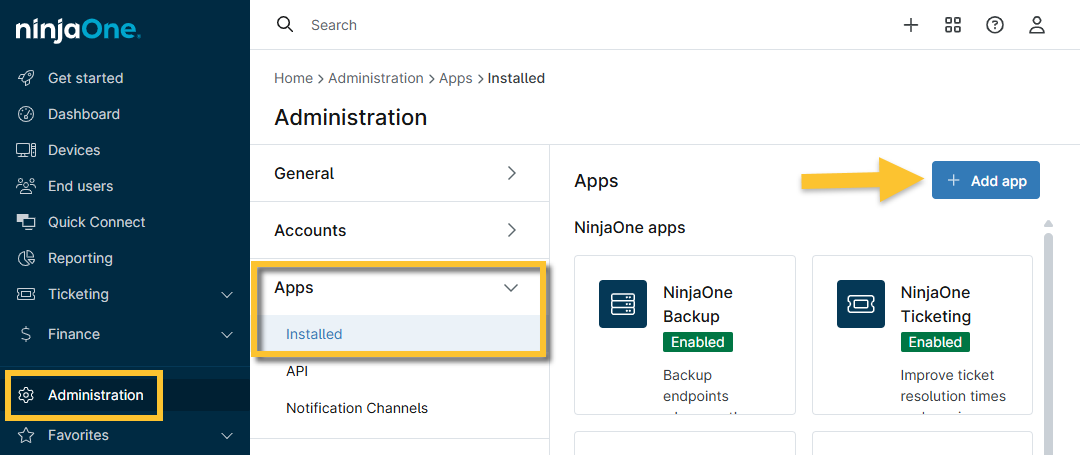
Figure 1: Add third-party apps in NinjaOne
The application settings page displays.
- Click Enable. The application setup dialog displays.
- Thoroughly read the terms outlining the migration process in the CrowdStrike Setup dialog, and then select the checkbox at the bottom of the page to activate the Accept button.
- Navigate to https://falcon.{domain}.crowdstrike.com/support/api-clients-and-keys (base URL will differ based on geo-location or cloud license) and select an API client or create a new one. You can reset your client secret from this page if you have forgotten it. Enter the required details to confirm your API client and then provision your API scopes:
- Each API client is assigned one or more API scopes. Scopes are permissions that specify the endpoints and methods an API client can access. When creating an API client, choose from Read and Write actions that you can execute on different groups of API endpoints. The scopes you set are applied to access tokens generated by the API client credentials, and access is granted only to those endpoints authorized for use.
API clients have one or more API scopes. Scopes allow access to specific CrowdStrike APIs and describe the actions that an API client can perform. Use scopes to fine-tune the permissions of your API clients. OAuth 2.0 access tokens scope to the resources configured in the API client.
If an API Client does not have the minimum permissions scoped to it, the integration may not be functional. At a minimum, ensure you provision the following scopes to the API Client. These scope permissions are necessary for the integration to be successful.
Scopes required on version 7.0:
| Scope | Requirement |
|---|---|
| Alerts | Read |
| Hosts | Read/Write |
| Host Groups | Read/Write |
| Sensor Download | Read |
- Click Enable.
Your CrowdStrike status should now show as activated and connected, and you can check whether the authentication credentials used are valid by clicking the Edit button in the Settings widget.
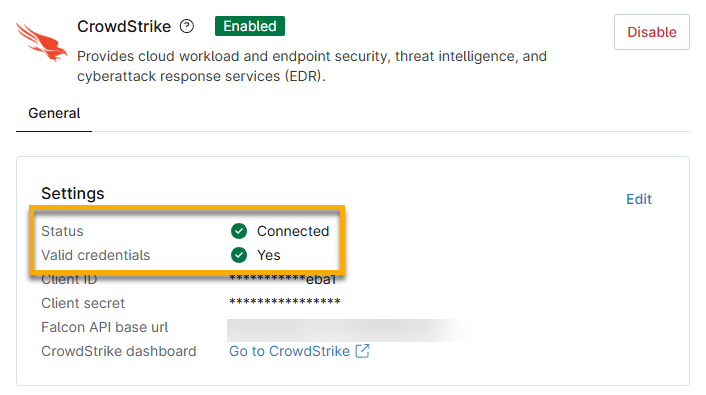
Figure 2: CrowdStrike integration status in NinjaOne
Map NinjaOne Organizations to CrowdStrike Host Groups
The "mapping" process associates NinjaOne organizations with CrowdStrike Host Management Groups, ensuring that the proper device group or policy is set and that reporting is available in NinjaOne. This process is automated and performed without user or administrator interaction.
When you activate the CrowdStrike integration in NinjaOne, Host Management Groups are automatically created in CrowdStrike for every existing NinjaOne organization as soon as you activate the CrowdStrike integration. Creating a Host Group in CrowdStrike does not require enabling it in the policy or deploying the CrowdStrike antivirus. These new Dynamic Group Hosts reflect the organization name used in NinjaOne and are seamlessly updated when NinjaOne organizations are created or deleted.
NinjaOne assigns a Falcon Grouping Tag (unique identifier) to any device with the NinjaOne agent and a CrowdStrike Sensor installed in the NinjaOne organization. Tagging allows activities and threats to be properly associated with the corresponding CrowdStrike Host Group.
Configure Technician Notifications or Tickets for CrowdStrike Errors
If your end users experience issues with invalid credentials for the CrowdStrike and NinjaOne integration, you can configure system activities in NinjaOne to send alerts to technicians or create tickets for resolution.
If the invalid credentials are a result of Error 403 or 401, this will prompt the Invalid CrowdStrike Credential activity. However, if the NinjaOne agent determines that Error 403 was caused by a missing API client scope, it will trigger the CrowdStrike Integration Missing API Client Scope with the corresponding API client scope in the message.
Use the instructions described in NinjaOne Endpoint Management: Device and System Activity Notification Feed to configure the Invalid CrowdStrike Credential and CrowdStrike Integration Missing API Client Scope activities.
Configure API Scopes for Multi-tenancy
If you are using multi-tenancy in NinjaOne, you must set up new scopes for the API client. To learn more, refer to NinjaOne and CrowdStrike: Multi-tenancy Integration.
Additional Resources
Refer to the following resources to learn more about the NinjaOne integration with CrowdStrike: