
Creating cohesive policies is a snap with NinjaOne, enabling you to manage endpoints easily and efficiently. In this guide, we’ll cover key policy concepts with real-world examples of how policies work within the NinjaOne console.
Table of Contents:
- About NinjaOne's Policy Functionality
- Policy Inheritance
- Policy Hierarchies
- Device Overrides
- Policy Management Strategies
- Related Documentation

About NinjaOne's Policy Functionality:
What are policies in NinjaOne?
Policies are NinjaOne’s centralized device management and automation engine. The policies you set will determine how NinjaOne manages your devices.
What does a policy contain?
With policies, you’re telling NinjaOne how you want your endpoints managed on a day-to-day basis. NinjaOne automatically executes the actions provided by policies across all related devices continuously.
Policies include endpoint monitoring rules, automation rules, granular patch management options, security solution preferences, and data backup & retention.
How does NinjaOne handle policies differently?
With NinjaOne, we use a simple “one policy per device” rule, giving you more visibility and understanding into how each device is managed. With other solutions, you may have multiple policies applied to a single endpoint, making management more difficult and confusing. Using this single policy method, you get a more intuitive and efficient experience.
Policy Inheritance:
NinjaOne includes a concept called policy inheritance which allows for more standardized and efficient management of devices. Upon creation, a new policy (child) can be assigned to inherit another policy (parent) which links the two policies such that any changes made to the parent policy are reflected in the child policy. This relationship is ongoing and one directional, allowing you to balance customization needs with standardization and efficient management.
While the following are not defined policy statuses in NinjaOne, policies can be categorized as:
- Standalone policies, which are policies that have neither a parent nor child policy.
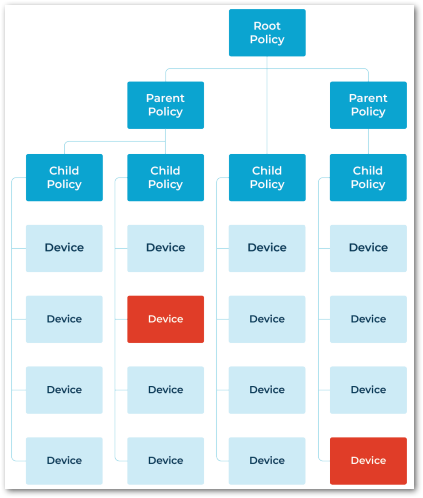
- Root policies are the top-level policies with no parent policies. These policies define overall rules for any policies living under them. Most of your work will be done at the root level. Once you set up your new traits, you’ll turn them all off and then turn those rules on or override them at the parent or child level. Root policies will include every condition, scheduled script, patch management policy, backup plan, etc. Anything that applies to more than one device group or is complex to set up will generally live within the root policy level.
- Parent policies are the mid-level policies that coordinate decisions between the different policy levels. Using parent policies, you can enable or disable traits created at the top level. As middle management, these policies are just there to drive additional efficiency at the child level.
- Child policies enable device-specific traits. Anything that is proprietary to an individual client or device group, requiring specific credentials, or includes anything only applicable to a small group of routines will generally live within the child policy level.
How Policies Interact
Below is an example of what a set of policies can look like within NinjaOne. Note that each device lives under a single policy rather than under multiple, which simplifies operations.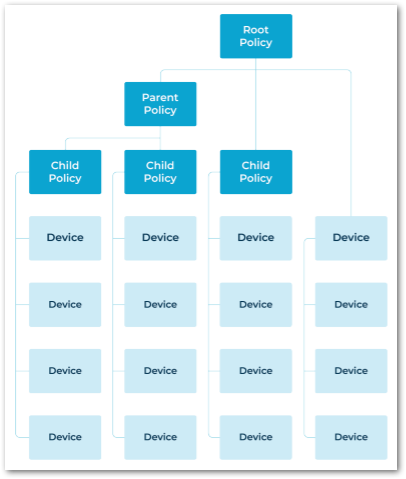
When it comes to the interactions between policies, the following applies:
- Any changes to a parent or root policy will pass down to the rest of the child policies listed underneath.
- Child policies can override decisions made in the parent policy or add additional traits.
- When you make changes to child policies, the parent policies do not change.
- Inheritance can stack to multiple levels, from root to child.
How Hierarchies Affect Policy Creation
As you create your policies, it’s important to note that your parent policies must be built before you create a child policy under it. Whenever you create any new policy, you have the option to assign to any other policy, which will then become the parent.
You cannot create a policy then assign it as an inherited policy down the line. If you’d like to assign it to a parent policy, that will need to be done before publishing. After publishing, you will not have the ability to assign to a new parent.
You do have the option to copy policies, but it is strictly a copy and will not inherit any traits changed by the original policy that was copied.
Policy Hierarchies:
Now that we’ve established a base level on what you can expect with policy management, let’s take a look at three different policy structures to compare use cases and benefits.
Siloed Policies
Siloed policies are the simplest version of policies that require the least amount of forethought. Siloed policies are rarely the best choice for device management in NinjaOne as each policy is unrelated, with no consolidation or cross-policy efficiency. There are almost always some efficiencies to be gained by having a parent policy for each device role.
This also means that any workflow updates that need to be made, like changes to patching schedules or backup rules, will need to be manually duplicated across any relevant policies rather than taking advantage of an overarching parent policy. This kind of structure can work for very simple environments but lacks the efficiency of scale as you start adding more devices to NinjaOne.
Siloed policies can be effective if:
- All your devices within a role are managed the same way with no variation between devices / device groups.
- Each device group is managed so differently that there is no efficiency benefit from consolidating work into a parent policy.

Global Parent Policies
Global parent structures are a level up from siloed policies, with policy work consolidated in the global parent level rather than managing each set of devices through isolated child policies. This is still a fairly flat hierarchy but gives you a bit more depth and manageability. This structure is best for environments that benefit from flexibility and standardization.
By taking advantage of the parent and child structure, you can drive more efficiency. Work that is done at the parent level will be automatically duplicated to child policies. You should do as much work as possible in the global parent policy then make customizations and adjustments at the child policy level. Workstation management, for example, is often easily standardized from a monitoring, task automation, antivirus, and backup perspective with variations in patching schedules being most common.
This is the most common policy structure we see with mature customers and is suitable for most situations.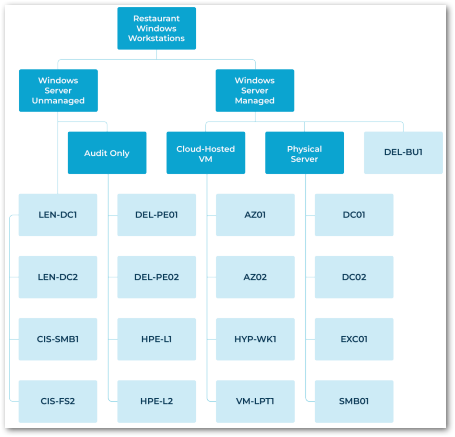
Multi-Layer Policies
Multi-layer setups will be the most complicated structure of the three, adding greater complexity with root, parent, and child-level policies. This structure can be incredibly effective in complex but highly structured environments but can also become complex and difficult to manage if not properly controlled.
Having multiple layers of inheritance allows for a baseline standard for device management, customization by device groups, and personalization at scale. In general, you always want to push configurations as high in the policy tree as possible and consolidate to as few policies as possible to achieve your goals.
This policy structure is used most commonly for server management where you are managing many servers with different purposes or for MSPs who want to standardize across clients.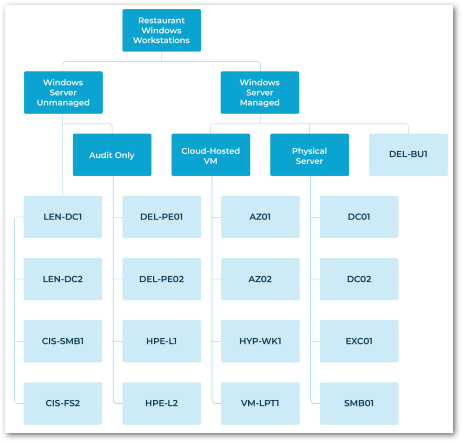
Real World Example
Once you start adding more devices into the NinjaOne platform, this is what your organization structure may look like, taking advantage of each type of structure in one cohesive platform: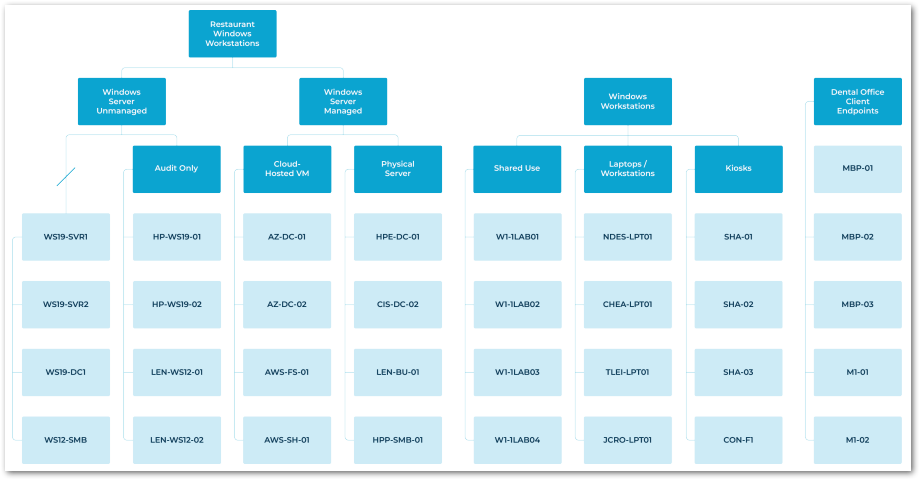
Device Overrides:
You will always have the opportunity to override policies at the device level. For example, if you have a particular laptop that needs to be exempt from the existing patch schedule, you can override that specific device and put it on a separate patching schedule. Any policy trait, such as conditions and scripts, can be added or overridden at the device level.
Overrides will take precedent over policy standards. If you make an override at the device level and the parent policy is changed, the override will still take precedent and ignore the change to the parent policy.
Policy Management Strategies:
As you move forward with policy management and building or updating your policy structure, here are a few things to consider:
- Plan, then build. Prior to building or updating your policies, decide on the function of hierarchies. Remember that you can always plan for growth but only utilize the layers needed for now. Questions to ask:
- Are device-facing policies per client? Per subsidiary? Per functional group?
- Do you need a multi-level hierarchy?
- If using a multi-level structure, what do mid-level policies translate to?
- Consolidation is key. Now is the time to invest in root policies. The more work you do in the planning stage is less work you’ll have to do down the line. Remember, you can always disable traits in the global parent by default if it’s not broadly applicable. Use mid-level or device-facing policies to enable functionality and only enable what’s needed through the parent and child levels.
- Standardize everywhere. If you have existing policies, think about if you really need the differentiation between existing policy groups. Start consolidating into single policies rather than individual management. If certain devices need exceptions, make those exceptions to policies rather than overrides. Minimize the number of overrides and standalone policies in your structure, as those exceptions will often lead to more headaches down the line.
- Having an extra parent policy never hurts. Because NinjaOne doesn’t allow you to retroactively assign a parent policy, it never hurts to have a global parent across policies in a device role. Setup a global parent, even if it is blank, and assign all new policies to that parent policy as they are created. The likelihood that you cannot push some conditions, scheduled scripts, or patching best practices to a parent policy for more efficiency is very low.
Related Documentation: