
Topic
This article explains how to deploy the NinjaOne agent directly to discovered Microsoft Windows devices from the NinjaOne Dashboard.
Environment
- NinjaOne Network Management System (NMS)
- Microsoft Windows
Description
Network Management System (NMS) can discover unmanaged Windows devices on your network and deploy the NinjaOne agent to them directly from the NinjaOne dashboard, eliminating the need to onboard discovered devices through a separate workflow.
You can deploy to a single device or multiple devices at once, monitor deployment progress from the asset dashboard, and review past deployment attempts in the deployment history.
Important Considerations
Device Discovery Considerations
Before beginning deployment, make sure your environment meets the following conditions:
- NMS must have already discovered the target devices, and they must be visible in the asset dashboard. Refer to NinjaOne NMS: Network Discovery to learn more.
- You must install the NMS network probe and ensure it is communicating with the platform.
- You must have sufficient permissions to deploy agents in your NinjaOne organization.
Device Deployment Considerations
For NinjaOne to offer agent deployment to your Windows devices through this method, they must:
- Use the same monitor delegate.
- Belong to the same organization.
- Belong to the same location.
If one or more of the devices you select for deployment fail to meet all three conditions, NinjaOne will not display the deployment option.
Deploying the NinjaOne Agent
To deploy the agent, perform the following steps:
- In NinjaOne, click Dashboard, then select your organization.
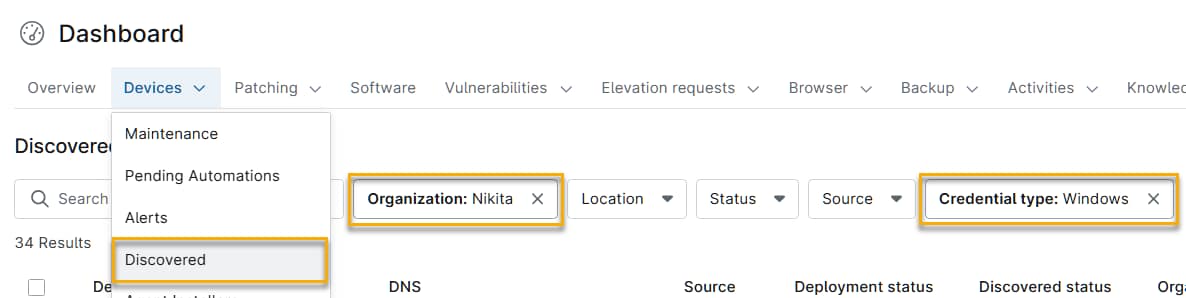
- From the Devices drop-down menu, select Discovered, then use the filters to find your Windows devices in the list. For example, you can click the Credential Type filter, then select Windows from the drop-down menu.
- Select the checkboxes next to one or more device names. If you do not see that option, ensure all devices you selected meet the criteria in the Device Deployment Considerations section of this article.
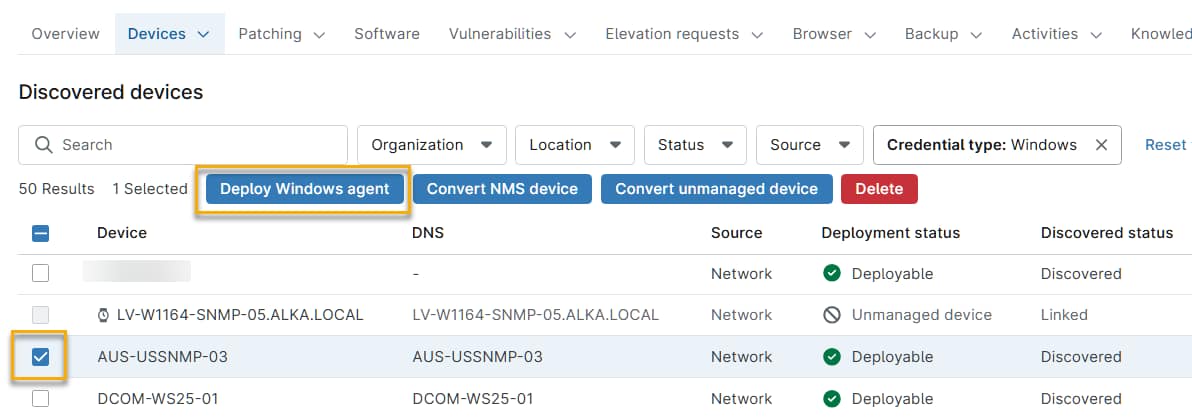
The Deploy Windows agent window will open, summarizing the devices selected for deployment.
- In the Deploy Windows agent window, enter the following information:
- Windows credential: If NinjaOne is already storing credentials for these devices, select the Use existing credentials to access the device checkbox. If not, use the Windows credential drop-down menu to select the device credentials you created during the network discovery process.
- Device role: Select the role you assigned to the devices during the network discovery process.
- NinjaOne will begin deploying the NinjaOne Windows agent to the selected devices. On the Dashboard page, the device's deployment status will change from Deployable to Deploying.
Additional Resources
Refer to NinjaOne NMS: Configuring a Device for Windows Agent Deployment for information about how to properly configure a device to receive the NinjaOne Windows agent.