
Topic
This article explains how to find an organization identification number in NinjaOne.
Environment
NinjaOne platform
Description
To integrate NinjaOne with supported vendor applications, you may be required to provide the NinjaOne ID. To find this information, perform the following steps:
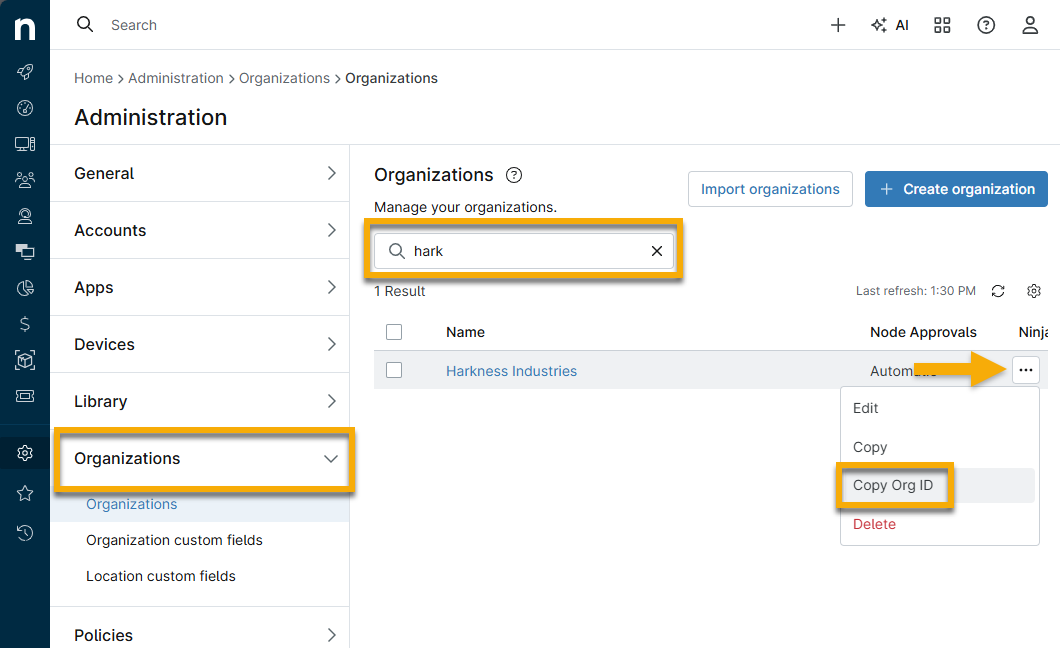
- In NinjaOne, navigate to Administration and click Organizations.
- Use the search field to find the organization in question.
- Move your cursor over the table row and click the ellipsis button. Select Copy Org ID.
Additional Resources
To learn more about organizations in NinjaOne, refer to Organizations and Locations – NinjaOne Dojo.