
Topic
This article explains how to record supplier data for software licenses associated with the NinjaOne IT Asset Management feature.
Environment
NinjaOne ITAM
Description
Add supplier data to the NinjaOne ITAM tool to ensure your vendor and publisher information is kept up to date.
Index
Select a topic to learn more.
Add a Supplier
To create a new supplier option for software licenses, perform the following steps.
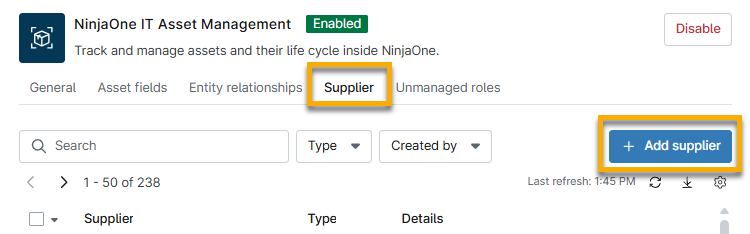
- From the NinjaOne IT Asset Management configuration page, select Supplier and click + Add supplier.
- Enter a unique identifier or name in the Supplier field. Optionally, provide a description.
- Select Publisher or Vendor from the Type drop-down menu. If you select both options, NinjaOne will show two separate entries for the supplier.
- Click Save.
Manage Supplier Data
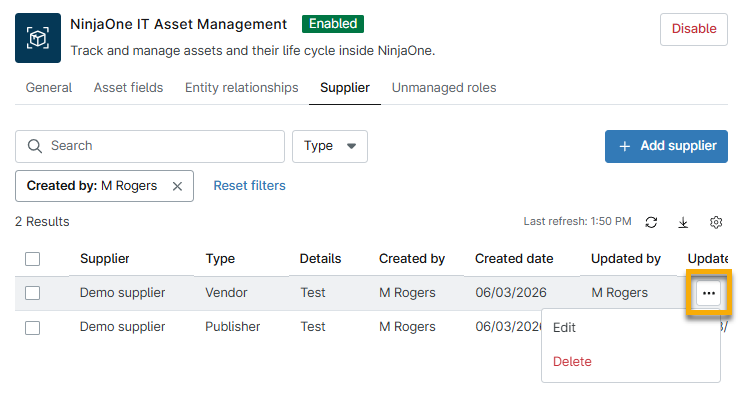
To edit or delete the supplier data, move your cursor over the name and then select the actions menu.
Add Supplier Data to Your Assets
After you create the supplier data, you can add it to your software license details. To learn more, refer to NinjaOne ITAM: Software Licenses.
Additional Resources
Refer to NinjaOne IT Asset Management: Resource Catalog to learn more about the NinjaOne ITAM feature.