
Topic
This article explains the data available on a mobile device's Details page in NinjaOne.
Environment
NinjaOne Mobile Device Management (MDM)
Description
Viewing Mobile Device Details
In NinjaOne, navigate to Devices, find the mobile devices in the list, and click the Details tab.
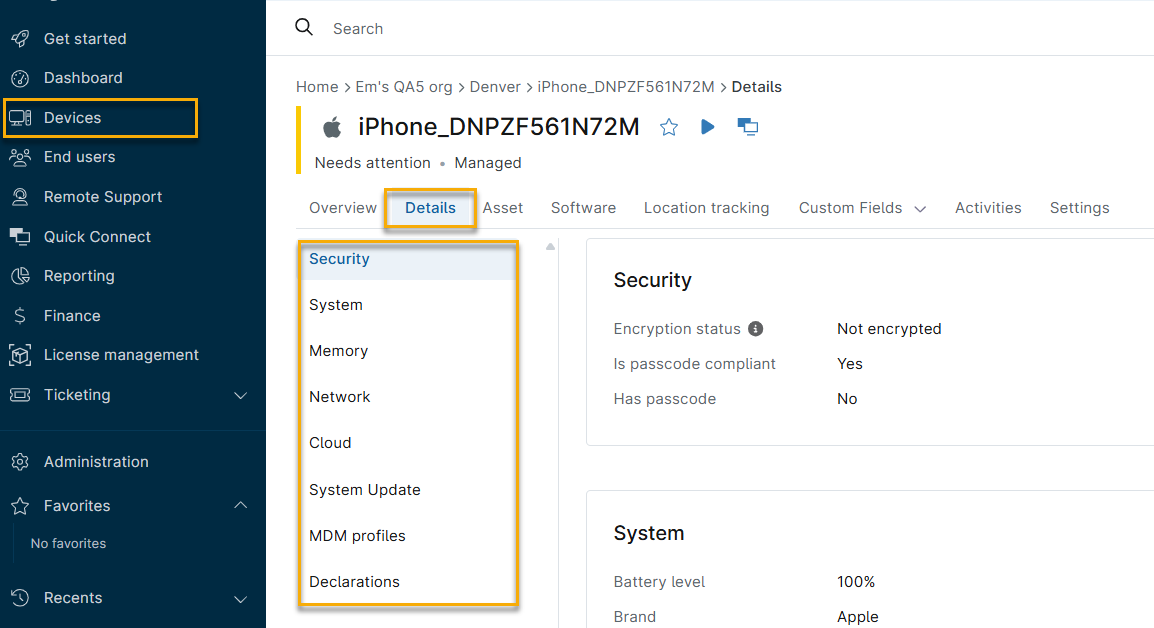
The Details tab on the device dashboard displays different sets of data, depending on whether the device is company-owned or personally owned.
- For Android and Apple iOS devices that are company-owned or have work profiles, NinjaOne will only share and display data from the work profile.
- Any fields not highlighted in this section work the same regardless of ownership.
Android Device Details
This table describes each data tab in the Details section.
| Data Tab | Description |
|---|---|
| Compliance | No data is provided for this section. |
| Security | View details for the following items:
|
| System | View details for the following items:
|
| Memory | View the amount of internal storage used. |
| Network | View details for the following items:
|
iPad and iOS Device Details
This table describes each data tab in the Details section. Different devices may show more network data if cellular is available. This data is provided for either enrollment type.
| Data Tab | Description |
|---|---|
| Security | View details for the following items:
|
| System | View details for the following items:
|
| Memory | View the amount of internal storage used. |
| Network | View details for the following items:
|
| Cloud | View details for the following items:
|
| System Update | No data is provided for this tab. |
| MDM Profiles | View all MDM profiles that are installed on the device. These profiles are typically deployed through the NinjaOne policy. |
| Declarations | Click this column to view the contents of all declarations installed on the device. If a declaration is reporting as invalid, click it to see more details. |