
In remote monitoring and management (RMM) or mobile device management (MDM) platforms policy templates are predefined configuration frameworks that help IT teams standardize and accelerate the setup of system, security, or operational policies across managed devices. Instead of creating every rule from scratch, administrators can use templates as a starting point that reflects best practices or organizational standards. This ensures consistency in how endpoints are monitored, secured, and maintained.
By using templates, IT departments reduce configuration errors and save significant time during onboarding or policy rollout. They also help maintain compliance, since every device can be aligned with the same patching cadence, password policy, firewall rule, or backup schedule. Templates can later be customized to reflect environment-specific needs while retaining a consistent baseline.
Ultimately, policy templates transform device management from a manual, error-prone process into a repeatable and reliable one, helping IT teams maintain operational consistency, accelerate onboarding, and strengthen overall security posture.
Does NinjaOne have policy templates?
NinjaOne manages a similar concept under a different name: policy inheritance.
With policy inheritance, instead of defining a reusable template, you create a parent policy.
Then, instead of generating new policies from a template, you create child policies that inherit all settings from the parent.
In essence, the concept differs in structure, but the outcome is the same: consistent, scalable configuration management across multiple environments.
How are parent policies created in NinjaOne?
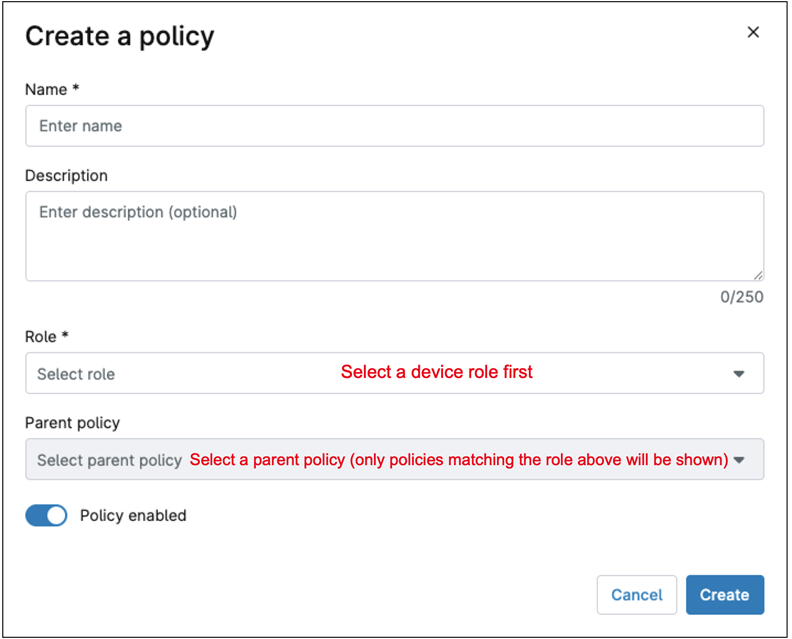
In NinjaOne, any policy can serve as a parent policy, even a child policy can act as a parent for another. When creating a new policy, simply select an existing policy as its parent; this establishes a relationship in which the new policy becomes the child policy and inherits all settings from its parent. The only requisite is that both, the parent and the child policies must belong to the same device role. So, before you can choose a parent policy, you must select a device role.
See the screenshot below for reference.
Can inheritance be broken to customize certain settings in a child policy?
Absolutely, here is how it works:
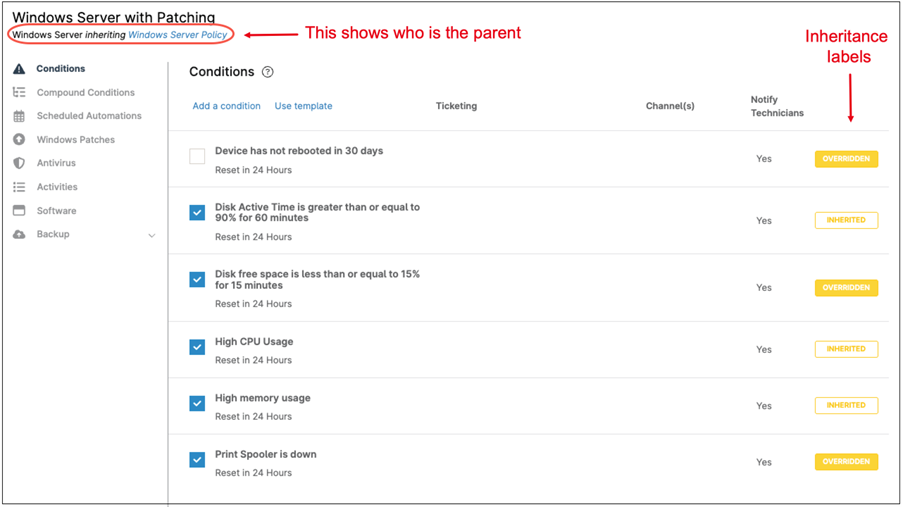
When a new policy is created under a parent one, all settings are initially inherited, and a label appears to the right of each setting or condition indicating that it is INHERITED. If you modify any of these settings, the label changes to OVERRIDDEN. Showing that the inheritance for that specific setting has been broken.
See the screenshot below for reference.
Is the policy inheritance real time or does it occur only when the policy is created?
Policy inheritance in NinjaOne happens real time. This means that if you have several polices linked in succession (grandparent, parent, child), any change made to the grandparent policy, immediately cascades down to the parent and the child, as long as inheritance has not been overridden.