
Topic
This guide provides instructions for generating a NinjaOne Agent installer for a Microsoft Windows device.
Environment
- NinjaOne Endpoint Management
- NinjaOne Agent for Microsoft Windows
Description
The NinjaOne Agent installer is an executable file that installs the NinjaOne Agent on a device, after which the NinjaOne platform can monitor and manage the device. This guide explains how to generate the installer from the NinjaOne platform, download it to your device, and share an installer link with end users.
Figure 1: How to Add a Computer to NinjaOne (NinjaOne, Inc., 1:26)
Before You Start
Before generating the installer, confirm that your environment meets the following requirements:
- You must generate and install the NinjaOne Agent on a device before you can manage the device in NinjaOne. Refer to NinjaOne Endpoint Management: Microsoft Windows Agent System Requirements and OS Support before installing the NinjaOne Agent on your endpoints.
- To generate the NinjaOne installer, you first need to set up an organization and create a policy. Refer to NinjaOne Endpoint Management: Creating and Editing Organizations and NinjaOne Policies: Create and Manage a Policy for instructions.
Generating a NinjaOne Agent Installer
- In NinjaOne, click the Add icon and select Device from the drop-down menu.
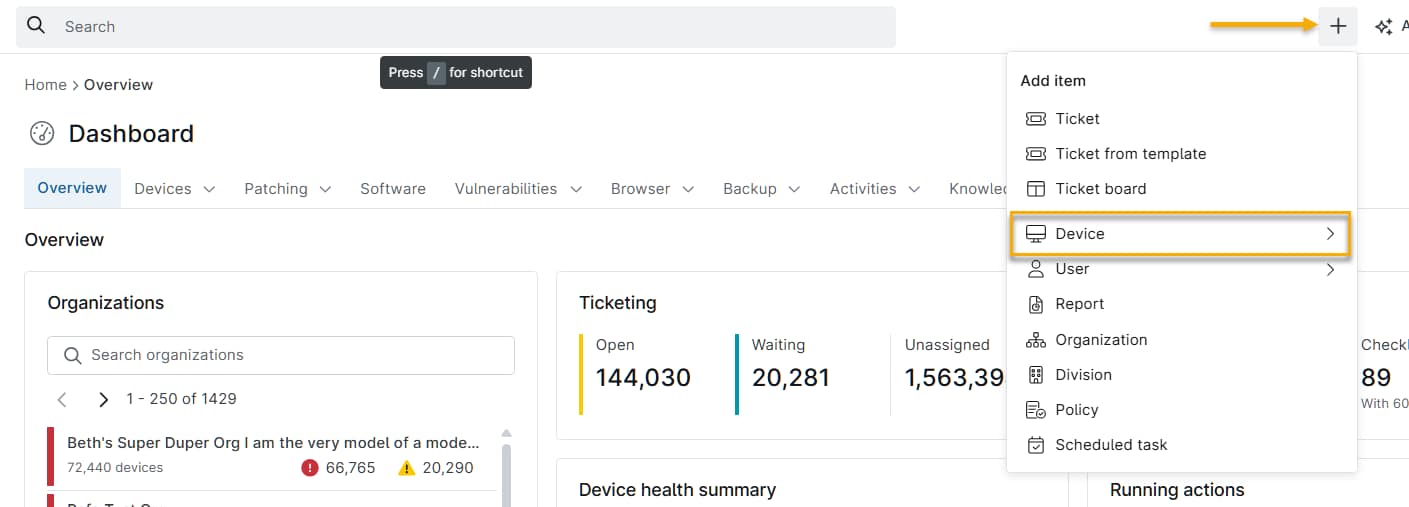
- The Add a computer window will open.
- Select Windows from the operating system options.
- Select the appropriate Organization, Location, and Device Role values.
- Click Generate Installer.
- The NinjaOne platform will display a confirmation prompt when installer generation is complete.
Sharing a Link to the Installer
Click Download to save the installer to your device, or click Copy link to copy a shareable installer link to your clipboard. This link may expire in the following circumstances:
- Division cached installers are cleared.
- A minor or major agent upgrade is released.
- A bug fix for an installer-related issue is released.
Additional Resources
The following articles provide additional guidance for deploying the NinjaOne Agent to other platforms and environments.
- For information about installing the NinjaOne Agent on Apple macOS devices, refer to NinjaOne Agent Installation: Add an Apple macOS Device.
- For information about installing the NinjaOne Agent on Linux devices, refer to NinjaOne Agent Installation: Add a Linux Device.
- For information about installing the NinjaOne Agent on Linux devices for FedRAMP customers only, refer to NinjaOne Endpoint Management: How to Add a Linux Device (FedRAMP).
- For additional methods of deploying the NinjaOne Agent on multiple devices, refer to NinjaOne Agent Installer: Mass Deployment.