
Topic
This article covers frequently asked questions about the NinjaOne mobile application. For questions about Mobile Device Management (MDM), please see Mobile Device Management (MDM) FAQ.
Environment
NinjaOne mobile application
Description
- Questions about actions/features on mobile app
- Questions about access/logging in
- Other/miscellaneous questions
Questions about actions/features on mobile app
- Why can't I see the play/action button icon in the top right corner of the screen when I navigate to a device?
- What remote access tools are currently available via the mobile app?
- Can I reset alerts through the mobile app?
- When attempting to cancel a task on Android, is the cancel button to close the window or cancel the job that is currently running?
Why can't I see the play/action button icon in the top right corner of the screen when I navigate to a device?
The Action button will not be visible when a device is offline. Please refresh your app and check whether the device in question is currently offline.
What remote access tools are currently available via the mobile app?
Splashtop, NinjaOne Remote, and Cloud RDP (BETA) are currently available via the NinjaOne mobile app.
Can I reset alerts through the mobile app?
Yes; if you swipe an active alert in the mobile app, you will see options to either view the device or reset the alert.
When attempting to cancel a task on Android, is the cancel button to close the window or cancel the job that is currently running?
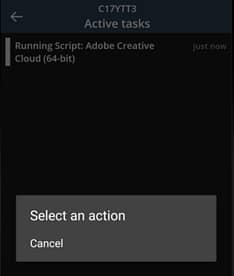
The Cancel button will cancel the action. To go back, select the Back softkey on Android.
Questions about access/logging in
- I am getting an error when attempting to log in, even though I am certain that I am using the proper credentials. Why?
- Should users be prompted to authenticate with MFA upon each login?
- Is the mobile app available for end users?
- A user is getting a "Not Authorized" error when trying to sign into the Mobile App (shown below). Why?
- I use SAML/SSO to log into NinjaOne. Can I log into the mobile app?
- When using YubiKey with the mobile app, device does not require MFA. Is this a security issue?
I am getting an error when attempting to log in, even though I am certain that I am using the proper credentials. Why?
You may be attempting to log in to the incorrect instance—depending on whether you use app.ninjarmm.com, eu.ninjarmm.com, oc.ninjarmm.com, or ca.ninjarmm.com for the Web app, ensure you've selected the US, US2, EU, OC, or CA instance of the mobile app, respectively. To see how to select an instance during login, see Step 2 of the To log into the NinjaOne mobile app section of NinjaOne Mobile App.
Should users be prompted to authenticate with MFA upon each login?
Users will be prompted to authenticate with MFA upon the original login. From there, users will not be prompted for MFA if they close the app and reopen it until the configured MFA global administrative idle time is met, at which point they will be prompted again for MFA. If users sign out of the app, they will be prompted to authenticate with MFA with log in when the app is next launched.
Is the mobile app available for end users?
End users cannot currently use the NinjaOne mobile app. The mobile app is available for technician users only. Instead, end users can use our NinjaOne Assist mobile application.
A user is getting a "Not Authorized" error when trying to sign into the Mobile App (shown below). Why?
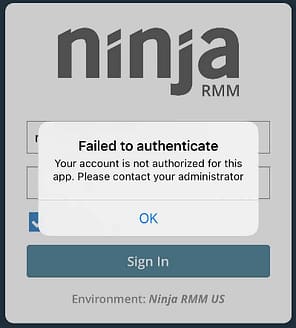
This may occur if the user attempting to log in is an end user, rather than a technician. At this time, the mobile app is only available for technicians. If you have a technician NinjaOne account and are encountering this error, please reach out to your system administrator so that they can review your account permissions.
I use SAML/SSO to log into NinjaOne. Can I log into the mobile app?
Yes. The mobile application supports SAML/SSO if it is configured for your NinjaOne account and user.
When using YubiKey with the mobile app, device does not require MFA. Is this a security issue?
It is likely that you have a valid session with a registered device, in which case this is expected behavior. When you log out on the device and it disassociates from your account, you will be prompted for MFA the next time you log in.
Other/miscellaneous questions
- Is the mobile app compatible with my branded site?
- Why am I getting "Sync with server" error?
- Is it expected behavior to enable the notification option every time you log in to the mobile app?
Is the mobile app compatible with my branded site?
No; NinjaOne's mobile app is not currently compatible with custom branded sites.
Why am I getting a "Sync with server" error?
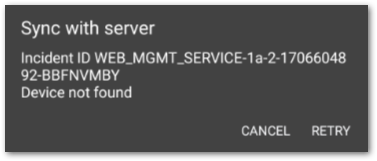
This error indicates the device was not successfully registered for notifications in NinjaOne. Please sign out and sign in again, as this may resolve the issue. If the issue does not resolve, please reach out to NinjaOne Support.
Is it expected behavior to enable the notification option every time you log in to the mobile app?
Yes, this is as designed. If you are signing out manually in the mobile app, the NinjaOne system unregisters your mobile device so that notifications will not be pushed to your device. This should not occur if you are logged out due to session expiration.