
Topic
This article answers frequently asked questions about custom fields in NinjaOne.
Environment
NinjaOne Endpoint Management
Index
Select a topic to continue.
- When I add quotes or formatting to a Multi-Line custom field, it is getting stripped. Why does this occur?
- Can custom fields be locked so that only the command-line interface from an administrator portal can read or write to them, but the local terminal cannot?
- What size or types of attachments can be uploaded to the Attachment field?
- Do text fields have any character limits?
- How can I track changes that have been made to custom fields?
- Who has access to custom fields?
- How does NinjaOne store data for the Secure field option?
- How can I interact with custom fields via the command-line interface and custom scripts?
- Can I receive notifications based on the value of a field (or multiple fields)?
- Can I export the custom field data?
- What is the PowerShell equivalent to see in the Custom tab on a dashboard if I run a script?
Frequently Asked Questions
When I add quotes or formatting to a Multi-Line custom field, it is getting stripped. Why does this occur?
Multi-line fields do not allow for text formatting at this time. Refer to NinjaOne Custom Fields: Types and Functionality for more on each field type.
Can custom fields be locked so that only the command-line interface from an administrator portal can read or write to them, but the local terminal cannot?
No. The only option would be to turn off the automations so that devices cannot access them at all.
What size or types of attachments can be uploaded to the Attachment field?
Refer to NinjaOne Attachment File Use and Limitations for more information.
Do text fields have any character limits?
Yes. Multiline fields have a 10000-character limit. Text fields have a 200-character limit. Secure fields have a character limit of between 200 and 10000 characters (as configured in the Advanced Settings for the field).
How can I track changes that have been made to custom fields?
All custom field changes are logged in the Activity feed. You can view these activities from the dashboard. Use the Activity type filter to search for "Custom fields" related data.
For more information, refer to NinjaOne Platform: Device and System Activity Notification Feed.
Who has access to custom fields?
System administrators can grant custom field access to an individual technician or through a role.
Reference: User Permissions: Permission Options.
How does NinjaOne store data for the Secure field option?
NinjaOne implements the encryption technology of a cluster of Hardware Security Modules (HSM) in each environment and uses them to generate unique data encryption keys (DK) for each account. These keys are then used to encrypt and decrypt all secure notes, secure fields, and credentials.
System administrators are required to re-authenticate their identity to access data from secure fields.
How can I interact with custom fields via the command-line interface and custom scripts?
Reference: Custom Fields and Documentation: CLI and Scripting.
Can I receive notifications based on the value of a field (or multiple fields)?
Yes. Refer to NinjaOne Platform: Policies: Condition Configuration for information about the custom field condition.
Can I export the custom field data?
Yes. You can export custom field data from the dashboard or the Devices search page.
From the dashboard, open the Custom tab and click the export button.
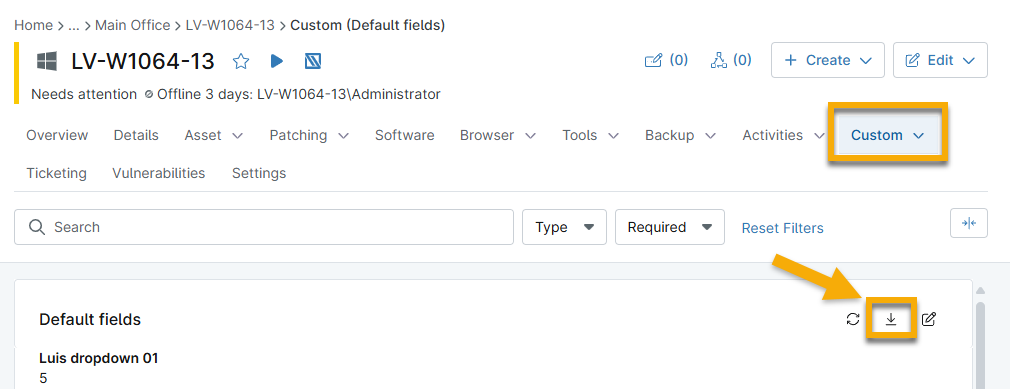
From the Devices search page, filter the table to display specific data and then click the export button. Select Export with custom fields.

What is the PowerShell equivalent to see in the Custom tab on a dashboard if I run a script?
The PowerShell equivalent is:
Ninja-Property-Set win11BlockDeleteKeysScriptHasBeenRun 1Additional Resources
For more information about custom fields, refer to Custom Fields: Resource Catalog.