
Issue
Backups for a protected endpoint surface a warning or fail with the error message, "Error 326: Fast delta failed."
Environment
NinjaOne Device Backup
Cause
An Image backup job was unable to reference the previous shadow copy used by the backup agent. NinjaOne needs this information to optimize the current backup job's efficiency in terms of speed and size.
Common Causes include:
- Another application is deleting/modifying existing Volume Shadow Copy Service (VSS) snapshots.
There is not enough storage space allocated for the volume to maintain both VSS snapshots.
The larger the volume or amount of data change between backups, the more storage space you'll need.
Resolution
VSS needs to be healthy and have the amount of space necessary to keep both the current and previous backup jobs' VSS snapshots. In most cases, you'll encounter this error if you have not allocated enough disk space for shadow copy storage. We recommend a 20 percent allocation be allowed, but it can be dependent on the size of the disk, the amount of change per backup, and other factors. We have seen machines with only three percent available to shadow copies never have a problem, and some with 20 percent that need a bit more because of the data churn on the disk.
For additional information about VSS issues, refer to: NinjaOne Device Backup: Unstable VSS Writer Alerts.
If the issue persists, our Technical Support team can provide further assistance with troubleshooting.
Additional Information: What is Fast Delta?
NinjaOne Image backup uses VSS snapshots of a hard drive to send data to backup storage. Image backup always attempts to retain the previous snapshot of the last backup job and then takes a new snapshot of the current running job. By having the last snapshot available, the backup agent knows exactly which blocks have changed and only needs to back up those changes, without scanning unchanged blocks. Additionally, there are 'pieces' of data inside each block of backup data, and we track these pieces as well. Keeping the last VSS Snapshot means the backup engine only needs to upload changed pieces and not the entire block.
We call this technology Fast Delta. Fast Delta results in a backup job running as efficiently as possible in both speed and size.
Problems occur if the VSS Snapshot from the prior backup job is missing or unreadable; the backup agent must scan the entire hard drive to determine what has changed. Additionally, when we discover which blocks have changed from this scan, we cannot determine which pieces have changed within the block and must therefore back up the entire block again.
This situation can lead to longer backup times and larger-than-expected incremental backups. However, as of January 2026, over 95% of Image backup jobs are running Fast Delta successfully.
The following images illustrate snapshots taken with and without Fast Delta:
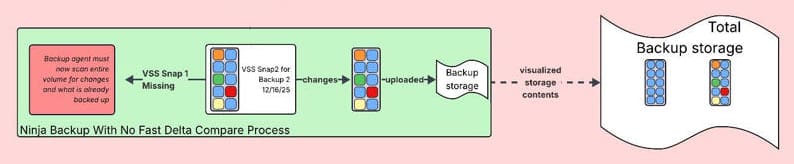
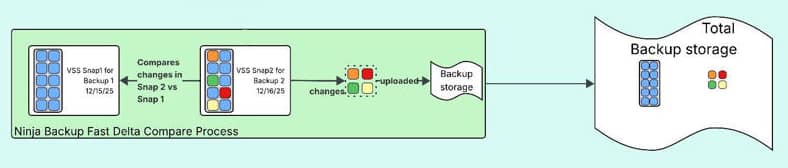
To view a more detailed illustration of the process, you can download the JPG file attached to this document.
Additional Resources
For additional troubleshooting guidance, refer to: