
Topic
The NinjaRMM Public API uses OAuth2 to authenticate requests. OAuth 2.0 allows applications to access NinjaRMM resources (such as monitoring information) made available via the API.
Environment
NinjaOne API
Description
About
To start using the OAuth protocol for your app’s authentication with NinjaOne, you must first have an OAuth app credential from the NinjaOne system. The OAuth app will set up an authorization grant for you. OAuth 2.0 supports various grant types. However, NinjaOne Public API supports authorization code and implicit grant types.
Find your API settings under Administration → Apps → API.
Generate an OAuth Client Application
- From the API page in NinjaOne, open the Client app IDs tab and click Add client app.
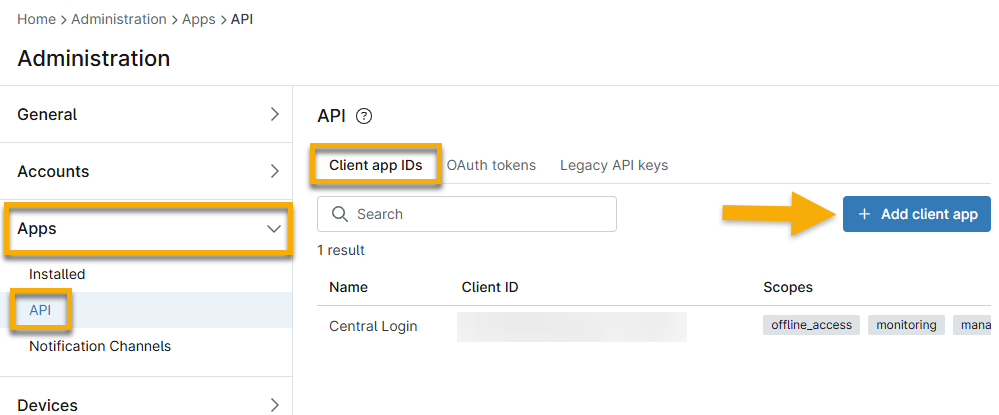
Figure 1: Add a new client app configuration in NinjaOne
- Select an option from the Application Platform drop-down list to generate more data fields.
- Use the following table to help you fill out the applicable fields.
| Field | Description |
|---|---|
| Name | Enter the title that will be displayed as the client application name in the consent screen. This name will be displayed in the Administration → Apps → API → OAuth Tokens in NinjaOne. |
| Redirect URLs | Enter one or more URL(s) where NinjaOne will send OAuth responses. This is not configurable when using the Native Application Platform. This will use a local host. |
| Scopes | This allows access to all Public API Resources of a certain type: Monitoring, Management, and Control. Activate the checkbox next to the type to enable it.
|
| Allowed Grant Types | OAuth 2.0 grant types are used for the client application acting on behalf of a user. To minimize security risks, limit the allowed grant types to Authorization Code, Refresh Token, and Implicit.
|
After the configuration is complete, click Save at the top of the page. You will see your Client ID, which you can copy and use when the app interacts with NinjaOne.
To edit or delete a client app ID, move your cursor over the row and select the applicable option on the right side of the page.
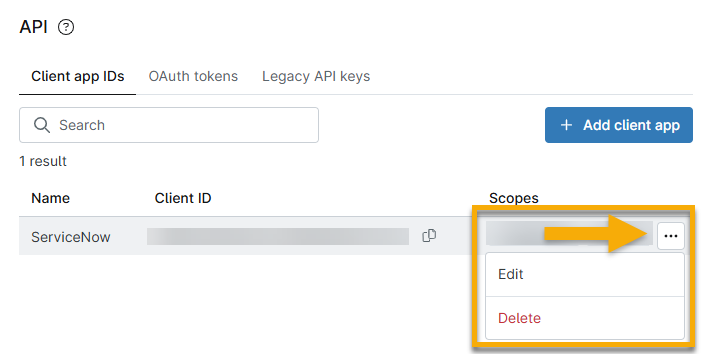
Figure 3: Edit or delete a client app configuration in NinjaOne
Additional Resources
Refer to the following resource(s) to learn more about using API with NinjaOne: NinjaOne Public API Operations.