
Frequently Asked Questions about Network Management Systems:
Q: What NMS device types does NinjaOne support?
- A: NinjaOne NMS supports most common models of Cisco, Dell, Hewlett Packard (HP legacy brand, not derivatives such as Aruba), NETGEAR, and devices that support the standard MIB-2 (management information base) protocol.
- Please note, certain makes/models may not display data as they deviate from the standard OIDs for CPU, memory, network adapters etc. For monitoring these types of devices, please leverage our Custom SNMP monitoring feature (currently in beta). Also, contact the NinjaOne Support Team to report problematic vendors or request support for a vendor.
Q: Can the device name for NMS devices be something other than the IP, such as host name?
- A: The information NMS shows is identified by the device. If the device doesn't have SNMP enabled, or isn't providing SNMP information to NMS, then NMS will only be able to display the information that it has — which, at a minimum, is usually the IP address.
- This can be tested by something like a printer that has SNMP enabled publicly and by default for reasons of easy setup. A printer usually will self-identify as its make and model with 0 SNMP setup or credentials required and will be displayed as its host name in NMS. Routers, firewalls, PCs and similar usually require a bit more configuration for security reasons.
Q: Why is backup configuration not displaying?
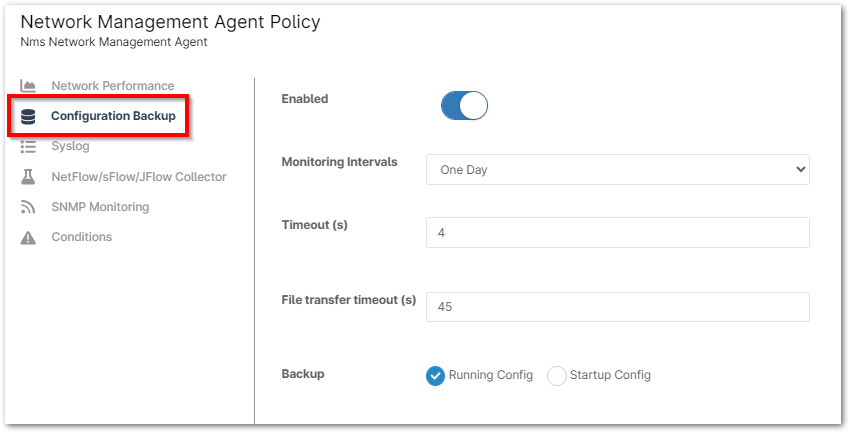
- A: Only HP and Cisco devices are supported for configuration backup. It can take a moment for the device configuration to be imported by the NMS agent. After the initial import of the configuration, new changes will not be reflected until the next Monitoring Interval is reached. This is configured at the policy level as well, under the Configuration Backup tab. It is also important to validate the credentials on the NMS device.
- Please make sure the Telnet/SSH credentials configured for the device in NinjaOne are correct; NinjaOne uses these protocols to capture the device configuration.
Q: What traffic monitoring does NinjaOne NMS support?
A: NinjaOne NMS supports the following traffic protocols:
- NetFlow — supported by Cisco and SonicWALL devices.
- jFlow — supported by Juniper devices.
- sFlow — supported by HP and NETGEAR devices.
- IPFIX — supported by some SonicWALL devices.
Q: If the NMS server is down, is it expected for the Device Down conditions to trigger for the NMS monitored devices as well, or should the condition only trigger for the NMS server?
- A: Only the "NMS server down" alert will trigger. Devices monitored by NMS server will trigger only if the NMS server is able to monitor and alert.