
Topic
NinjaOne has implemented some basic API sets outlined in this article in JSON representations. We are working to release additional APIs with future releases.
Environment
- Android OS
- NinjaOne MDM
Description
To learn more about Android Management API (AMAPI), please see the Android developer documentation.
- Android Application Endpoint
- Delegated Scope
- Permission Grant
- Device Connectivity Management
- Factory Reset Protection (FRP) Management
- Accessible Track IDs
- Custom Messaging
- Always On VPN Package
Android Application Endpoint:
{{server}}/ws/mdm/application/android/{packageName}The above endpoint has been created to fetch the data below.
- Display a list of permissions for that application (packageName), including runtime.
- View the latest pre-release version and app trans for any app that access has been granted.
- Return an appTracks array with package data.
Delegated Scope:
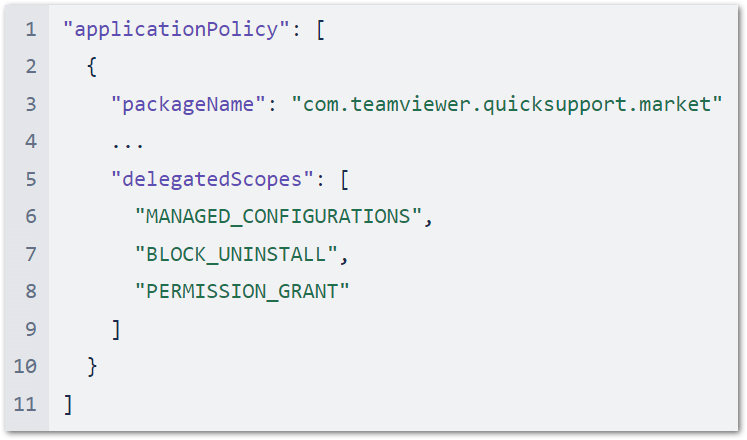
Set the DelegatedScope fields on an Android policy application. These provide additional privileges for the applications affected. Delegated scopes are a multi-select API, allowing an application within Policy/Applications/App settings to be granted one or more delegated scopes for additional functionality on-device.
Scopes can be applied to multiple applications, with the exception of SECURITY_LOGS, CERT_SELECTION and NETWORK_ACTIVITY_LOGS, which can be delegated to only one app at a time.
| Enums | |
|---|---|
DELEGATED_SCOPE_UNSPECIFIED | No delegation scope specified. |
CERT_INSTALL | Grants access to certificate installation and management. |
MANAGED_CONFIGURATIONS | Grants access to managed configurations management. |
BLOCK_UNINSTALL | Grants access to blocking uninstallation. |
PACKAGE_ACCESS | Grants access to package access state. |
ENABLE_SYSTEM_APP | Grants access for enabling system apps. |
NETWORK_ACTIVITY_LOGS | Grants access to network activity logs. Allows the delegated application to call setNetworkLoggingEnabled, isNetworkLoggingEnabled and retrieveNetworkLogs methods. This scope can be delegated to at most one application. Supported for fully managed devices on Android 10 and above. Supported for a work profile on Android 12 and above. When delegation is supported and set, NETWORK_ACTIVITY_LOGS is ignored. |
SECURITY_LOGS | Grants access to security logs. Allows the delegated application to call setSecurityLoggingEnabled, isSecurityLoggingEnabled, retrieveSecurityLogs and retrievePreRebootSecurityLogs methods. This scope can be delegated to at most one application. Supported for fully managed devices and company-owned devices with a work profile on Android 12 and above. When delegation is supported and set, SECURITY_LOGS is ignored. |
CERT_SELECTION | Grants access to selection of KeyChain certificates on behalf of requesting apps. Once granted, the delegated application will start receiving DelegatedAdminReceiver#onChoosePrivateKeyAlias. Allows the delegated application to call grantKeyPairToApp and revokeKeyPairFromApp methods. There can be at most one app that has this delegation. choosePrivateKeyRules must be empty and privateKeySelectionEnabled has no effect if certificate selection is delegated to an application. |
Example Payload
Permission Grant:
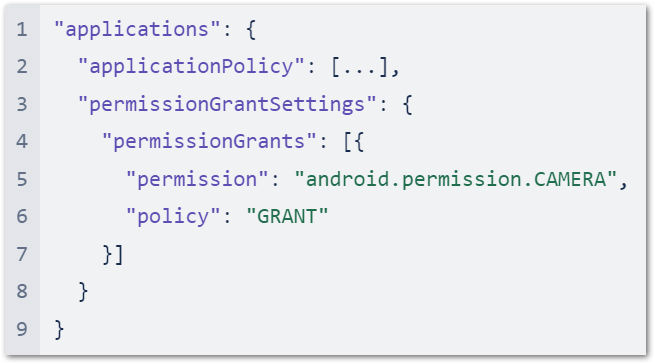
Configure the Android permission policy and its grant state for the application configuration: all user-choice (i.e., prompt) or deny.
| Methods | |
|---|---|
| "permission" | String This is the Android permission or group; for example: android.permission.READ_CALENDAR android.permission_group.CALENDAR. |
| "policy" | enum (PermissionPolicy) This is the policy for granting the permission; for example: GRANT |
Example Payload
Device Connectivity Management:
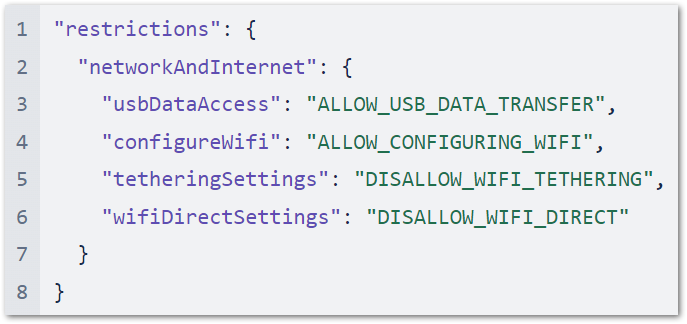
Control device connectivity such as Wi-Fi, USB data access, keyboard/mouse connections, and more.
| Methods | |
|---|---|
| "usbDataAcess" | enum (UsbDataAccess) This controls what files and/or data can be transferred via USB on company-owned devices. |
| "configureWifi" | enum (ConfigureWifi) This controls Wi-Fi configuring privileges. Based on the option set, user will have either full, limited or no control in configuring Wi-Fi networks. |
| "wifiDirectSettings" | enum (WifiDirectSettings) This controls the ability to configure and use Wi-Fi direct settings. Supported on company-owned devices running Android 13 and above. |
| "tetheringSettings" | enum (TetheringSettings) This controls tethering settings. Based on the value set, the user is partially or fully disallowed from using different forms of tethering. |
Example Payload
Factory Reset Protection (FRP) Management:
FRP management allows system administrators to input a specific Google account which overrides the FRP email on devices that are reset in an unauthorized way (e.g., recovery, re-flashed, too many wrong password attempts, etc.). Once set via an input string in Policy/Security under the title “Factory Reset Protection allowlisted account”, only this account can be used to unlock a reset device.
 | As best practice, NinjaOne suggests that these bind accounts not be user-associated. |
| Methods | |
|---|---|
| "frpAdminEmails[]" | string Email addresses of device administrators for factory reset protection. When the device is factory reset, it will require one of these admins to log in with the Google account email and password to unlock the device. If no admins are specified, the device won't provide factory reset protection. |
Example Payload

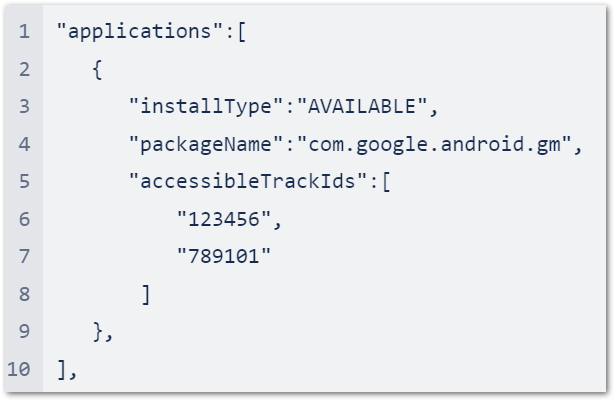
Accessible Track IDs:
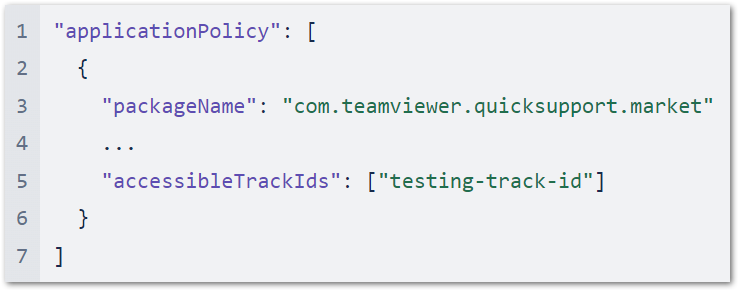
Select the track ID for an application on any Android MDM policy. The appTrackInfo[] list included in the response contains the following for given apps:
trackId: The track’s unique identifier, taken from thereleaseTrackIdin the URL of the page in the Play Console that displays the app's track information.trackAlias: The human-readable name for the track, which is modifiable in the Play Console.
To install a closed track on a user's device, specify the accessibleTrackIds in their device's policy.
Example Payload
Custom Messaging:
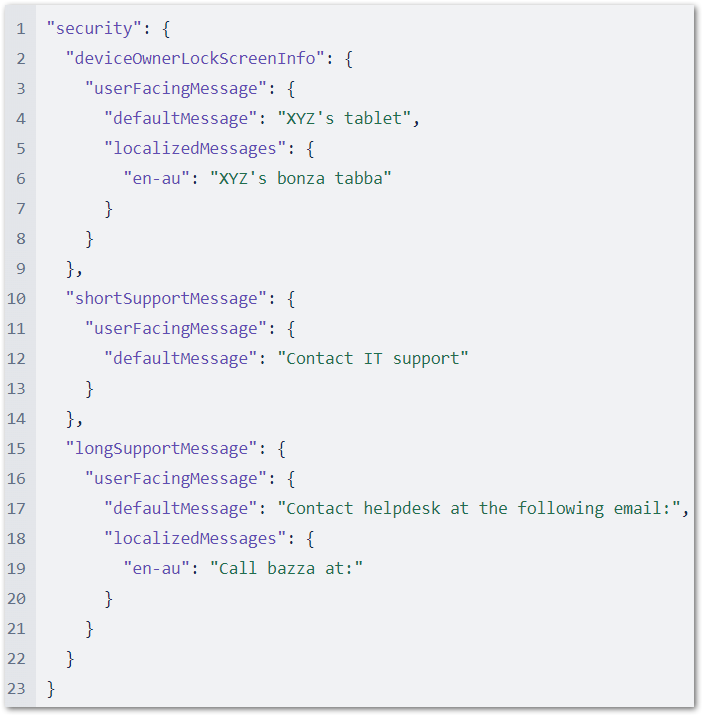
Allow organizations to set a custom lockscreen message, which can help administrators better communicate why something is blocked.
| Methods | |
|---|---|
| "deviceOwnerLockScreenInfo" | object (UserFacingMessage) The device owner information to be shown on the lock screen. |
| "shortSupportMessage" | object (UserFacingMessage) A message displayed to the user in the settings screen wherever functionality has been disabled by the admin. If the message is longer than 200 characters, it may be truncated. |
| "longSupportMessage" | object (UserFacingMessage) A message displayed to the user in the device administration settings screen. |
| "localizedMessages" | map (key: string, value: string) A map containing <locale, message> pairs, where locale is a well-formed BCP 47 language code, such as en-US, es-ES, or fr. |
| "defaultMessage" | string The default message displayed if no localized message is specified or the user's locale doesn't match with any of the localized messages. A default message must be provided if any localized messages are provided. |
Example Payload
Always On VPN Package:
Configure the AlwaysOnVpnPackage fields on an Android policy.
| Methods | |
|---|---|
| "packageName" | string The package name of the VPN app. |
| "lockdownEnabled" | boolean Disallows networking when the VPN is not connected. |
Example Payload
