
Topic
This article explains how to resolve the error status NJ-INT-WR001 if you encounter it with your Webroot integration with NinjaOne.
Environment
- NinjaOne Integrations
- Webroot
Description
If you notice an error status of NJ-INT-WR001 for the Webroot application on the Device Dashboard in the Settings tab, perform the steps outlined in this article. This error indicates that the device is not synced properly with the Webroot GSM console.
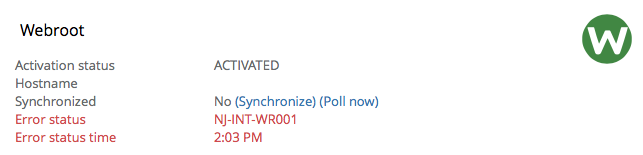
Select a category to learn more:
- Issue
- Cause
- Resolution Option 1: Synchronize NinjaOne and Webroot
- Resolution Option 2: Verify Device Exists with Site Permissions
- Resolution Option 3: Activate the Device
- Additional Resources
Issue
The Webroot agent is not fully installed on the device or was installed recently and has not had a chance to be processed through the Webroot backend.
Cause
It can take time for a new endpoint registration (and endpoint ID) to percolate through all the various servers that make up the Webroot backend. Webroot has different groups of servers, and the communications between these groups of servers could take as long as 24–48 hours.
When the NinjaOne backend queries the Webroot API for the machine ID in question, and that new endpoint registration has not percolated all the way through the Webroot server groups, our query will come up empty. The NinjaOne backend retries once per minute for 10 minutes before failing the synchronization.
Resolution Option 1: Synchronize NinjaOne and Webroot
Click Synchronize in the NinjaOne UI to restart the "query the Webroot API for the machine ID once per minute for 10 minutes" process.
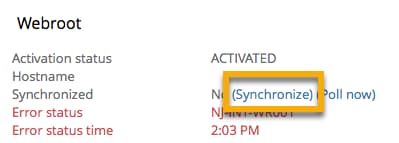
If you want to trigger a Webroot sync on multiple devices, you can do so from the Devices tab on the left navigation pane in NinjaOne. Select the checkbox for all devices you'd like to trigger an action on, and then click Run → Webroot Actions → Synchronize. Please note that the devices must all be the same device type and must all be online.
Resolution Option 2: Verify Device Exists with Site Permissions
If synchronizing Webroot and NinjaOne did not resolve the issue, another solution is to confirm that the device exists in Webroot under the GSM key you are using. If the device is not listed in the Webroot GSM console, NinjaOne cannot find it.
- Navigate to the Webroot GSM console (which may be found here).
- Click the Admins tab.
- Click the name of any user who needs access to all sites.
- Click Site Permissions.
- Grant admin access for all sites.
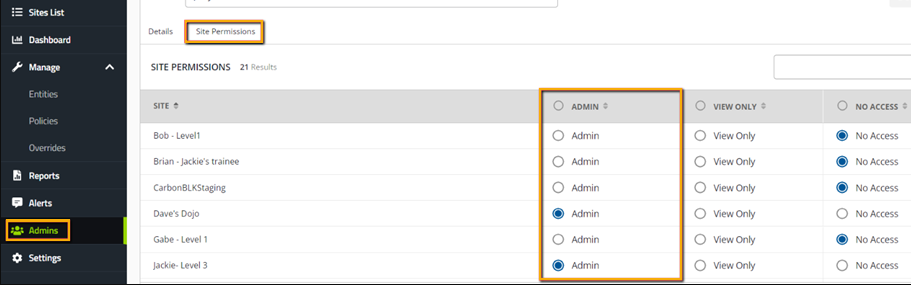
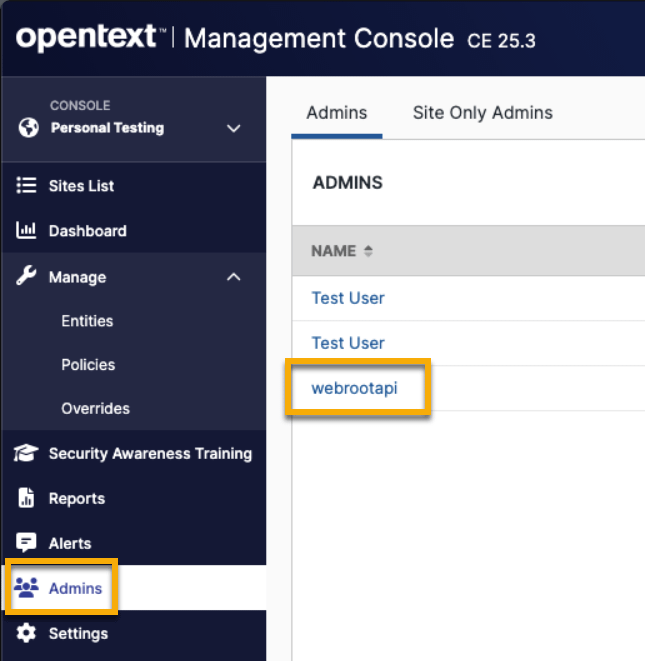
- Navigate back to the Admins tab and select [webrootapi]. The NinjaOne integration generates this to facilitate the synchronization between the sites, and it must be properly configured.
- Click Site Permissions.
- Verify that every NinjaOne integrated site is set to Admin.
- Save your changes, if applicable.
You should also check the keycode in the device against your site key in your Webroot GSM console. To do so:
- Go to my.webrootanywhere.com and log in with your Webroot credentials. From there, you should see your sites.
- Access the device, click the Webroot application, and then click My Account.
- Make sure your desktop application keycode matches the site keycode in your GSM console. If they are different, then there are two ways to resolve this issue with the correct site code:
- You can manually input the site key from your Webroot console into your Webroot agent UI on the device itself.
You can try to uninstall Webroot from that device by using this command, run as admin:
C:Program Files (x86)Webrootwrsa.exe -uninstall
Resolution Option 3: Activate the Device
If synchronizing Webroot and NinjaOne did not resolve the issue, and the device exists in NinjaOne with appropriate site permissions, then the issue may be caused by the device being deactivated in Webroot. The Webroot API does not allow NinjaOne to query deactivated sites, so devices can hide there.
In this case, find the device in the GSM console and move it to an active site via the “change key-code” command.
Additional Resources
Refer to the following resources to learn more about the Webroot integration in NinjaOne:
The following links are webinars related to Webroot:
- Webinar: Webroot Security Awareness Training
- Webinar: NinjaRMM + Webroot Partnership Roadmap
- Webinar: Webroot - Get the Facts You Need toKeep Your Clients Safe Against Today's Threats