
Topic
This article explains how to delete or remove a device in NinjaOne.
Environment
NinjaOne Endpoint Management
Description
There are multiple methods for device removal in NinjaOne, either individually or in bulk.
When you delete a device from NinjaOne, NinjaOne will automatically uninstall the RMM agent if the device is online and remove all device information from the console. If the device is offline at the time of deletion, it will remain in the update queue until the device is back online but will not appear in the console. Once the device is online, NinjaOne will proceed to uninstall the agent.
If you are trying to remove a mobile device managed by our NinjaOne Mobile Device Management (MDM) tool, refer to Mobile Device Uninstall Management.
Select a category to learn more:
Delete a Single Device
You can delete a single device from the device dashboard in NinjaOne. To learn more about accessing and using dashboards, refer to NinjaOne Dashboards: Resource Catalog.
- Go to the device dashboard for the endpoint you want to delete from NinjaOne.
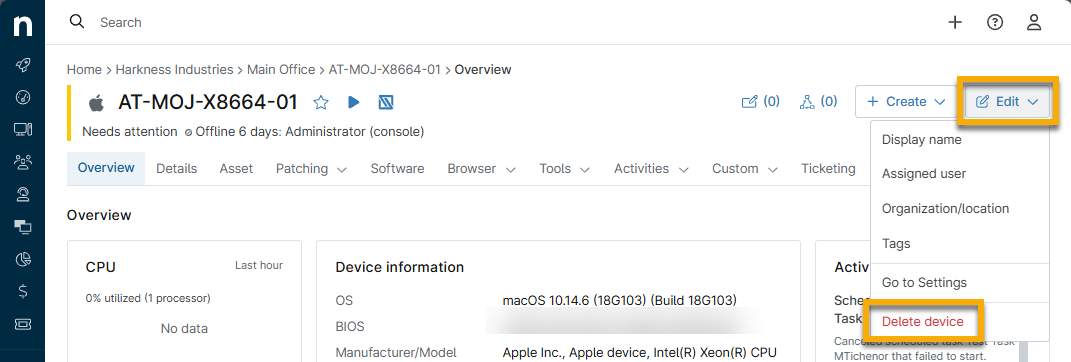
- Click Edit on the device dashboard and click Delete device.
Delete Multiple Devices
You can delete multiple devices in bulk from the Devices search page. The devices do not need to be the same type to perform this action.
- Click Devices in the left navigation pane.
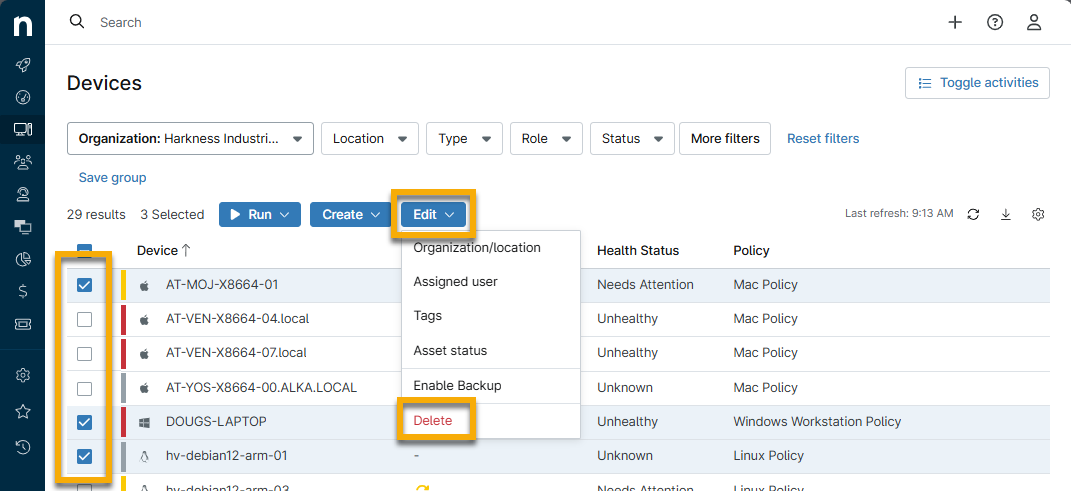
- Select all devices you wish to delete from NinjaOne.
- Click Edit and then click Delete.
- Enter the email you used to sign in to confirm the action.
Additional Resources
Refer to the following resource to learn more about managing your devices in NinjaOne: Device Enrollment & Management: Resource Catalog.