
Topic
This article explains how to enable the QuickBooks integration within the NinjaOne Billing application.
To learn how to use NinjaOne Billing, refer to NinjaOne Billing: Getting Started with Professional Services Automation (PSA).
Environment
- NinjaOne Billing
- QuickBooks
Description
After enabling the NinjaOne Billing, you can enable the QuickBooks integration. This allows you to map organizations and products in NinjaOne to QuickBooks data.
After you click Enable in the Integrations tab, you will be directed to sign in to QuickBooks using your existing Intuit Account. If you do not already have an account, you can create one at this point in the process.
When QuickBooks is enabled, a Settings button will display; click this button to configure and sync your QuickBooks settings with NinjaOne.

Figure 2: Integrate your QuickBooks account with NinjaOne Billing
-
Customers: Map your organizations created in NinjaOne to the customers you created in QuickBooks. If the names match, you can use the Auto Map button. If not, select the checkbox next to any mapped or unmapped organization to view the Change Mapping option. The Auto Map option displays a modal that allows you to confirm the mapping is correct.
- You can type in the customer's name as it is reflected in QuickBooks or select an option from the drop-down menu. Then, click Update to confirm.
- When the organization is mapped to a QuickBooks customer, selecting it will also display a Clear Mapping option.
- At this time, NinjaOne does not support mapping locations or sub-customers.
- QuickBooks resource: Add and manage customers in QuickBooks Online (intuit.com).
- QuickBooks resource: Group products and services into different categories in QuickBooks Online (intuit.com).
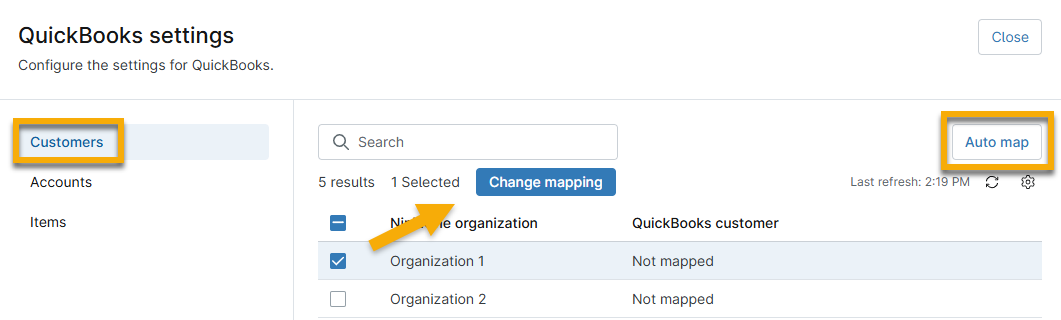
Figure 1: Map your NinjaOne organizations to QuickBooks customers
-
Accounts: map high-level PSA product types to your QuickBooks chart of accounts.
- QuickBooks resource: Add an account to your chart of accounts in QuickBooks Online (intuit.com).
- QuickBooks resource: Learn about the chart of accounts in QuickBooks Online (intuit.com).
-
Items: map your products in NinjaOne to items created in QuickBooks.
- QuickBooks resource: Add product and service items to QuickBooks Online (intuit.com).
Additional Resources
Refer to NinjaOne Billing: Resource Catalog to view all related articles.