
Topic
This article explains the process for performing a manual backup with NinjaOne Backup.
Environment
NinjaOne Backup
Description
While NinjaOne Backup has robust scheduling capabilities that allow you to perform backups at a predetermined frequency, there may be times when you need to initiate a backup that you haven't scheduled in advance. NinjaOne enables you to perform manual backups at your convenience.
Starting a Backup
Follow these steps to initiate a manual backup:
- From the NinjaOne dashboard, navigate to the device overview page for the device on which you want to run the backup.
- Place your cursor over the drive icon located next to the device name at the top of the page to reveal a drop-down menu of the backup plan options.
- Select Run Backup Plan.
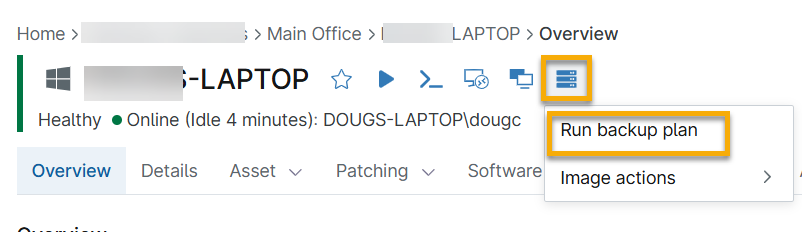
If your device is on more than one backup plan, you can select the plan you want to execute.
- Select the plan you wish to execute and click Run. The backup will begin immediately.

Running Actions
You can monitor the progress of your backup by scrolling to the Running actions section at the bottom of the device overview page.

The Running actions section displays all actions currently running on the device and their current progress. It will also indicate when NinjaOne ran the last backup for the device.
Place your cursor over the action menu icon (3 dots), to reveal the Cancel and Detail options. Refer to the sections below for a detailed description of each option.

Cancel
Click Cancel to open a modal where you can select Cancel backup to stop the backup job.

Details
Click Details to open a modal that displays details of the running job, including the number of files scanned and the size of the uploaded files. You can also cancel the backup from here by clicking Cancel backup.
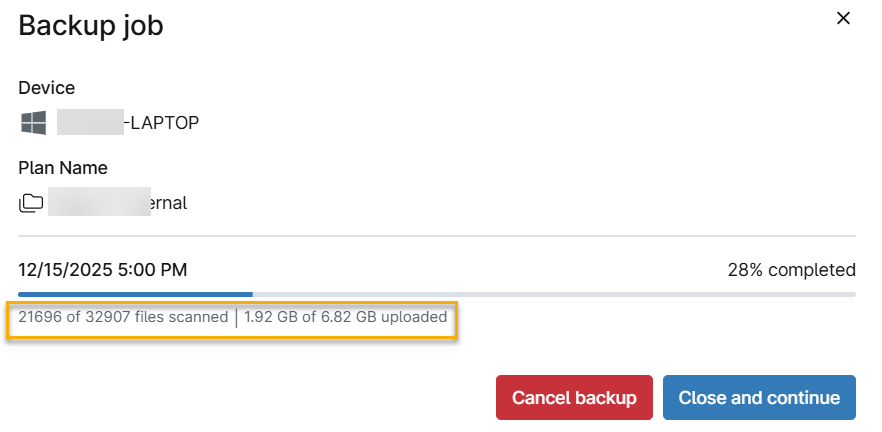
When your backup is complete, it will no longer display in the Running actions section. The backup is now available for download or restoration. NinjaOne will list it in the Activities section of the device overview page and on the NinjaOne Backup dashboards, where you can access it for downloads or restores. For more information on backup dashboards, refer to NinjaOne Backup: Backup Dashboards

Additional Resources
Refer to these resources for more information on backups.