
Topic
Frequently asked questions about NinjaOne Backup:
- What Does NinjaOne Backup Work with or Support?
- General FAQs
- Deployment FAQs
- Transitioning Backup Tools FAQs
- Image Backup and Restore FAQs
- Mac FAQs
- Disaster Recovery and Ransomware FAQ
What Does NinjaOne Backup Work with or Support?
- What service does NinjaOne Backup use for data storage?
- Can data be carried over to a second storage location?
- Which regions may be selected for NinjaOne Backup storage?
- Can I use different regions for NinjaOne Backup storage for different organizations?
- Which versions of Windows does NinjaOne Backup support?
- Does NinjaOne Backup support Linux?
- Can NinjaOne back up a machine running Microsoft SQL Server?
- Are backups from pre-NinjaOne Backup accessible?
- Should I run NinjaOne on the main server computer, or should I run NinjaOne on each of the virtual machines? Is there a preference?
- If I did a local backup to an NAS device and then downloaded the Key to restore that backup from NinjaOne, does that Key expire? If so, how long is the Key active?
- Does NinjaOne Backup support files encrypted with EFS?
- Does NinjaOne Backup support virtual machine backup?
- Does NinjaOne Backup have the ability to back up SQL / Exchange / QuickBooks / similar databases?
- Are mapped network drives included in backups?
- Does NinjaOne Backup output to an SIEM?
- Can I exclude files/folders from backups using Regex?
- Is it possible to back up to a USB drive/external drive?
- Can I perform a restore across virtualization platforms?
- Can I perform bare metal restores to servers that are being hosted in Azure?
- Does NinjaOne Backup support backups or restores of software RAID controllers?
- Does NinjaOne Backup work with proxy settings?
- Does NinjaOne Backup work with Microsoft ARM processors?
- Is NinjaOne Backup capable of backup up devices with BitLocker enabled?
- Does NinjaOne backup hidden folders on a device?
- Can external hard drives be backed up?
- Why am I unable to backup OneDrive files in a file/folder backup?
- Can I back up a file/folder whose path changes?
What service does NinjaOne Backup use for data storage?
NinjaOne Backup uses AWS to store data.
What storage options are available for NinjaOne Backup?
Cloud and NAS storage options are available for NinjaOne Backup.
Can data be carried over to a second storage location?
At this time, we do not allow data to be carried over to a second storage location.
Which regions may be selected for NinjaOne Backup storage?
Partners using the EU instance may select between Frankfurt, Stockholm, Ireland, Zurich, London, and Paris. Partners using the US instance may select between the Oregon, Virginia, Ohio, and Canada. Partners using the OC instance may select Sydney. Partners using the CA instance may select Canada.
Can I use different regions for NinjaOne Backup storage for different organizations?
- No—the backup storage region is configured at the account level and cannot be changed following configuration.
- However, you can split backup destinations between an organization's locations via Administration > Organization editor > Locations > Edit > Backup.

Which versions of Windows does NinjaOne Backup support?
NinjaOne Backup supports Windows 8 and newer, and Windows Server 2012R2 and newer.
Does NinjaOne Backup support Linux?
No, NinjaOne Backup does not support Linux at this time.
Can NinjaOne back up a machine running Microsoft SQL Server?
NinjaOne's Image Backup type can integrate directly with Microsoft SQL and its VSS Writers that are installed when the SQL server is installed. NinjaOne takes an Image Backup of a machine running SQL server.
Are backups from pre-NinjaOne Backup accessible?
If you were using a different backup solution, such as Cloudberry, then NinjaOne will not be able to access that backup/data/information after NinjaOne Backup is enabled.
Should I run NinjaOne on the main server computer, or should I run NinjaOne on each of the virtual machines? Is there a preference?
You will need to put the NinjaOne Agent on each of the virtual machines rather than putting it on just the host—this is currently the only supported method, known as "agentless backup."
If I did a local backup to an NAS device and then downloaded the Key to restore that backup from NinjaOne, does that Key expire? If so, how long is the Key active?
- The Key expires on use or based on the time you select when creating it (default is 14 days and can be set for as much as 365 days).
- A Key does not need to be generated at the time of backup, so long as backup remains enabled on the NinjaOne Agent. The only time you need to create a Key is when you need to do a restore.
Does NinjaOne Backup support files encrypted with EFS?
No. Currently, you need to ensure the advanced properties do not show contents to be encrypted. If they do, please uncheck that option and attempt the backup again.
Does NinjaOne Backup support virtual machine backup?
For non-Windows virtual hosts, a virtual machine can be backed up if a NinjaOne Agent and Backup Agent are installed on the individual VM guest. However, NinjaOne Backup does not currently back up a VM host, unless the host is Microsoft Hyper-V. For Hyper-V servers, the NinjaOne Agent and Backup Agent can be installed directly on the Hyper-V server, and the server itself can be backed up using NinjaOne. There are two options for restoring the host and/or guest:
- A user may restore the entire server, including all guests. (Applicable to both file/folder and image backups.)
- A user may restore a particular volume and/or copy the VHDX files for a particular guest to another server. (Applicable for local image backups.)
- A user may mount the image backup in the Cloud and restore the VHDX files for a particular guest to another server. (Applicable for Cloud image backups.)
- A user may restore just the VHDX files for a particular guest. (Applicable for file/folder backups.)
- Or, if a guest has been backed up individually, then a user may perform a standard restore. (Applicable to both file/folder and image backups.)
Does NinjaOne Backup have the ability to back up SQL / Exchange / QuickBooks / similar databases?
- NinjaOne Backup can backup database workloads if they have a VSS Writer that is installed when the database software is installed. Microsoft Exchange and SQL Server are examples of products that do install VSS Writers and our Image Backup plan type is capable of backing them up while in use.
- QuickBooks is an example of a program that does not include a VSS Writer and we are unable to back up the database while in use. For these types of programs without VSS Writers included, we recommend setting up recurring products to back up to a directory that Ninja Backup can accommodate with a File/Folder backup type.
- NinjaOne can backup the machine with an image but it may need a database repair as Quickbooks is not compatible with Backup products that need the database stopped in order to run a Backup.
Are mapped network drives included in backups?
No, not at this time.
Does NinjaOne Backup output to an SIEM?
No, NinjaOne Backup does not currently output to an SIEM.
Can I exclude files/folders from backups using Regex?
No. Exclusions can be added while building out your backup plan.
Is it possible to back up to a USB drive/external drive?
No, NinjaOne currently only supports Cloud or network storage. It is possible to set up a shared folder on the external hard drive as a network storage location; users will be able to see the mapped drive, but please note that the drive will not have system access—this means that NinjaOne will not see the mapped drive, so it is not a recommended workaround.
Can I perform a restore across virtualization platforms?
Yes, backups can be restored across virtualization platforms. However, a backup of one physical host cannot be restored to a virtual host (for example, a backup of a Hyper-V server cannot be restored to a VMware environment/host). The individual guests, on the other hand, can be restored.
Can I perform bare metal restores to servers that are being hosted in Azure?
Due to Microsoft's limitations, NinjaOne Backup is not currently able to perform bare metal restores to servers that are being hosted in Azure. However, NinjaOne Backup can restore any volume other than the boot volume.
Does NinjaOne Backup support backups or restores of software RAID controllers?
No, backups or restores of software RAID of any kind are not supported at this time.
Does NinjaOne Backup work with proxy settings?
At this time, NinjaOne Backup does not support proxy use.
Does NinjaOne Backup work with Microsoft ARM processors?
At this time, Microsoft ARM processors are not supported by NinjaOne Backup.
Is NinjaOne Backup capable of backup up devices with BitLocker enabled?
Yes, NinjaOne is capable of backup up devices with BitLocker enabled.
Does NinjaOne backup hidden folders on a device?
Yes, hidden folders are backed up.
Can external hard drives be backed up?
No, backing up an external hard drive is not supported.
Why am I unable to backup OneDrive files in a file/folder backup?
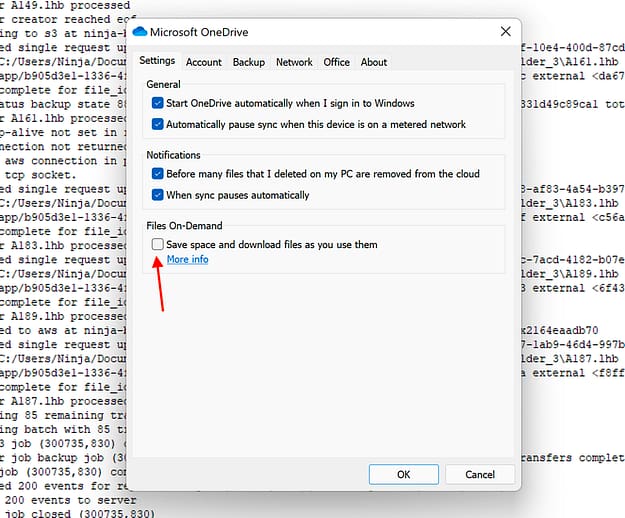
There may be a setting in OneDrive blocking NinjaOne Backup from backing up those files. Please check to ensure that the setting under "Files on Demand" is unchecked in order to back up the directory.
Can I back up a file/folder whose path changes?
No—only static file/folder paths can be backed up.
General FAQs
- How can I back up different servers under the same organization in different ways—such as one server with full image and one with file/folder?
- How does NinjaOne determine whether a device is a workstation or a server?
- Whose technology do you use to power NinjaOne Backup?
- Which NinjaOne users are able to configure, view, and manage NinjaOne Backup?
- Will changing permissions cause revisions?
- Does NinjaOne always save the permissions for a file/folder or is this optional?
- What type of backups does NinjaOne Backup run?
- Are NinjaOne Backups immutable?
- Does the system automatically free up disk space following a backup?
- How do the backups handle incremental changes? For example, does a backup of a 100GB system occupy 300GB if there are three (3) copies of the data in NinjaOne?
- Does NinjaOne ever remove or overwrite old backup files?
- How does NinjaOne Backup compress files?
- How is encryption handled by NinjaOne Backup?
- If a hybrid backup job is run, is the local backup or Cloud backup performed first?
- Are mapped network drives included in backups?
- What is the minimum amount of bandwidth required to back up files?
- Does the bandwidth throttling configured in the organization settings apply to the entire organization, or each respective device under the organization?
- Are there any limits or restrictions imposed on download speed?
- How are frequently changing files (such as PST files) backed up with NinjaOne Backup?
- How can I configure NinjaOne to send me notifications regarding activities related to NinjaOne Backup?
- What happens if a backup job is interrupted by the computer shutting down or being rebooted?
- What happens when a device is offline when a backup is scheduled to start?
- How does NinjaOne Backup handle files that are open and being edited on the device at the time when a backup job is running?
- Can I generate reports with NinjaOne Backup data?
- Can I modify the default exclusions that NinjaOne currently has in place?
- What happens if I attempt to back up an excluded file/folder?
- Can I initiate a download for multiple files at the same time?
- How can I delete data that I no longer need from my backup storage to ensure I don't get billed for it?
- How can I restore backup data from a device that has been deleted from NinjaOne?
- How is the progress of a backup job or restore measured?
- Is there a maximum size for File/Folder backups?
- How many times can an image authorization key be used?
- What is the definition of "Trim revisions" within the backup plan?
- Within the plan, if limit revisions and trim revision are both disabled, what data is deleted?
- Is there a way to know if the backup failed or did not run?
How can I back up different servers under the same organization in different ways—such as one server with full image and one with file/folder?
You can do this through device level overrides, which allows you to assign different policies to devices that share the same organization. See Policies: Change Device Policy for more information.
How does NinjaOne determine whether a device is a workstation or a server?
This is determined by the device's OS.
Whose technology do you use to power NinjaOne Backup?
NinjaOne Backup is a proprietary backup solution built in-house by NinjaOne engineers.
Which NinjaOne users are able to configure, view, and manage NinjaOne Backup?
Currently, only NinjaOne system administrators have the ability to enable or disable NinjaOne Backup. However, custom users can be granted different levels of NinjaOne Backup permissions—check out our NinjaOne Backup: Setup Guide for more information about granting these permissions.
Will changing permissions cause revisions?
No; Only the latest permissions for all files/folders in the Backup job are retained.
Does NinjaOne always save the permissions for a file/folder or is this optional?
NTFS permission backup is optional and can be activated at the policy level under Backups > Folders. 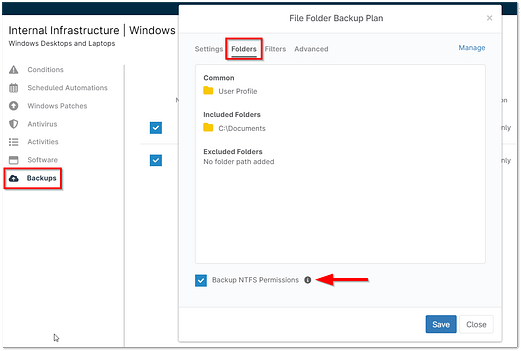
What type of backups does NinjaOne Backup run?
NinjaOne Backup uses incremental block-level backup technology, which copies only modified parts of the files or backup.
Are NinjaOne Backups immutable?
NinjaOne Cloud Backups can only be trimmed by our retention tool and customer delete requests. With the 5.4 release, multi-factor authentication is required to delete as well as hold data for 3 days.
Does the system automatically free up disk space following a backup?
NinjaOne retains enough information to ensure that all revisions can be restored. There may be "phantom" revisions retained until the revisions that depend on them are phased out. For more information, please refer to Ninja Backup: Image Backup Plans.
How do the backups handle incremental changes? For example, does a backup of a 100GB system occupy 300GB if there are three (3) copies of the data in NinjaOne?
NinjaOne Backup creates an initial full backup and then perform delta backups until the delta backup's data makes up greater than 75% of the full backup data. After this criterion is met, NinjaOne performs a new full backup. For more information, please refer to Ninja Backup: Image Backup Plans.
Does NinjaOne ever remove or overwrite old backup files?
NinjaOne Backup is based on revision settings that are configured in the policy. If the policy is set to never trim any revisions, then NinjaOne will not touch any backup data for deletion—the user must initiate it on their end.
How does NinjaOne Backup compress files?
Backup data is compressed and encrypted on the agent machine as it is uploaded. The compression rate averages between 2:1 and 5:1 for most files.
How is encryption handled by NinjaOne Backup?
NinjaOne Backup encrypts data using AES-256 encryption in transit and at rest. Encryption keys are generated using hardware security module clusters. You can only access keys through the Ninja console. Users do not have the ability to bring their own keys.
If a hybrid backup job is run, is the local backup or Cloud backup performed first?
The local backup job runs first, followed by a sync to the Cloud.
What is the minimum amount of bandwidth required to back up files?
While there is no minimum required speed, we recommend at least 1 Mbps for each machine.
Does the bandwidth throttling configured in the organization settings apply to the entire organization, or each respective device under the organization?
The bandwidth throttling configured in the organization settings applies to each individual device under that organization.
Are there any limits or restrictions imposed on download speed?
No, we do not impose any rate limits or restrictions.
How are frequently changing files (such as PST files) backed up with NinjaOne Backup?
Files that change regularly and may be in constant flux due to their nature are backed up using Volume Shadow Copy Service (VSS).
How can I configure NinjaOne to send me notifications regarding activities related to NinjaOne Backup?
You can enable notifications for NinjaOne Backup activities under the policy editor > Activities > Backup. For more information about this, please see NinjaOne Backup: File/Folder Backup Plans.
What happens if a backup job is interrupted by the computer shutting down or being rebooted?
The backup resumes uploading from the last file it stopped on but does not resume uploading partially uploaded files. For example, if the job had sent 100/300 files and is currently in the middle of uploading file #101 when the system reboots, NinjaOne restarts the upload process for file #101 when the backup job resumes.
What happens when a device is offline when a backup is scheduled to start?
This depends on whether the "Run plan immediately if missed" option is selected in the backup plan settings. If this setting is enabled, the backup plan(s) will run when the device comes back online.
How does NinjaOne Backup handle files that are open and being edited on the device at the time when a backup job is running?
- Whatever data was included in the most recent save for that file will be backed up when NinjaOne Backup reaches the file in question.
- If a file is open, NinjaOne attempts to use VSS to back up the current version of the file; unsuccessful backups are logged as a Warning. The job may fail if there are more than 10% of files in an open state or the files are not VSS compatible.
Can I generate reports with NinjaOne Backup data?
To generate a PDF report, you can use the NinjaOne Backup Summary report. Check out Reporting: Types of Reports and Reporting: Create and View Reports for more information. Additionally, if you'd like to create a CSV report with information about your backup data, this can be done under the Usage section of the Backup dashboard at either the system or organization level. Check out Dashboards: NinjaOne Backup for more information.
Can I modify the default exclusions that NinjaOne currently has in place?
Yes—some of the default exclusions can be modified under the Advanced tab when configuring a file/folder backup plan. For more information, please see NinjaOne Backup: File/Folder Backup Plans.
What happens if I attempt to back up an excluded file/folder?
The excluded file/folder will not be backed up.
Can I initiate a download for multiple files at the same time?
While you can only initiate a download for one file at a time, you can opt to download an entire folder (which will initiate the download of all files within that folder).
How can I delete data that I no longer need from my backup storage to ensure I don't get billed for it?
Please see NinjaOne Backup: Deleting Backup Data for information about deleting backup data.
How can I restore backup data from a device that has been deleted from NinjaOne?
This can be done from the Usage section of the NinjaOne Backup dashboard: Select the device in question and then click Manage at the top of the page.
How is the progress of a backup job or restore measured?
The percentage completed is based on the size of the job in progress. The number of files can impact the speed of the job.
Is there a maximum size for File/Folder backups?
There is a maximum of 5 TB for a single compressed file. This means that no individual file being uploaded to the S3 bucket in the cloud can exceed 5TB in size.
How many times can an image authorization key be used?
An image authorization key can only be used one time. Once an authorization key has been used to grab the backup data, it cannot be used again.
What is the definition of "Trim revisions" within the backup plan?
In our usage, we will delete all the revisions up to the latest that meet the criteria for being removed. If this number changes, the data will be trimmed according to the new limit. If revisions are limited to a smaller number than what is currently backed up, NinjaOne Backup will delete old revisions until it is compliant with the new limit. There may be slightly more data than the limit is set to, but this is expected behavior intended to ensure access to data.
Within the plan, if limit revisions and trim revision are both disabled, what data is deleted?
If limit revisions and trim revisions are both disabled, backup data will not ever be deleted.
Is there a way to know if the backup failed or did not run?
Yes. From the NinjaOne system or organization dashboard, open the Backup tab and select Overview. From there, you can filter for "Last failure." You can also set up notifications for a number of different events through the Policy > Activities. 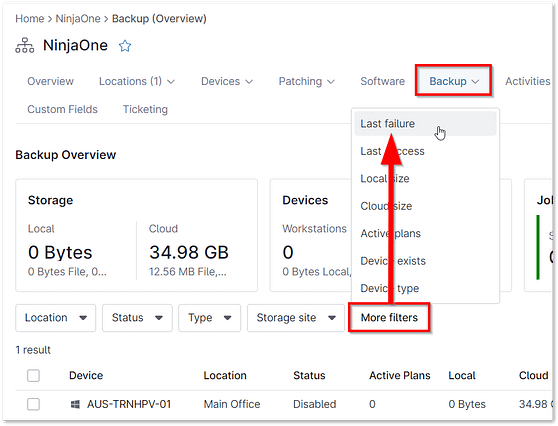
Deployment FAQs
Is the NinjaOne Backup Agent standalone from the NinjaOne Agent?
While the NinjaOne Backup agent is a separate Agent, it requires the original NinjaOne agent to run. The NinjaOne Backup agent runs as the Lockhart service, so you will see two services running on a machine: NinjaOne agent and Lockhart.
Is the installer for NinjaOne Backup silent?
Yes, the NinjaOne Backup installer is silent.
Transitioning Backup Tools FAQs
Will my Cloudberry backup plans transfer over for use with NinjaOne Backup?
No. You will need to configure new backup plans for use with NinjaOne Backup.
If I am transitioning from Cloudberry to Ninja Backup, can my backup data be transferred?
No, the backup data is not transferable.
How do I transition from Cloudberry to NinjaOne Backup?
Once NinjaOne Backup has been enabled for your account, you can simply follow the steps in the Ninja Backup: Setup Guide. When you switch your organizations' backup settings from Cloudberry to NinjaOne Backup, the Cloudberry Agent will be automatically uninstalled, and the NinjaOne Backup Agent will be deployed.
Image Backup and Restore FAQs
What size must the destination disk be for an imager restore?
The destination disk must be larger than the original partition size.
Can I use your backup to push an image to my eSXi server?
You can restore an image to a virtual machine.
Does image backup to a local NAS allow for single file downloads/Cloud mounting?
No, Cloud mounting/downloading single files is only available for Cloud-only/Hybrid plans.
Is it possible to use image backup option of NinjaOne in a universal fashion? (e.g., once the NinjaOne client is installed, a template backup of "golden image" downloads and flashes to the computer.)
NinjaOne Backup is not designed as an image deployment tool and cannot apply the golden image automatically after the NinjaOne Agent is installed. NinjaOne does support the use of golden images, however—if you use a third-party tool, please use the following documentation to add NinjaOne to their golden image: How do I clone a device with NinjaOne installed?
Does NinjaOne have its own bootable media to restore image backup?
Yes—please refer to the following article for more information: NinjaOne Backup Image Restores.
Does NinjaOne allow Remote Image Deployment?
No, NinjaOne does not allow Remote Image Deployment at this time.
Is there a maximum size for individual image backups?
5TB is the maximum size for an individual image backup.
Is it possible to download a single file out of an image backup?
Yes, it is possible to download a single file from an image backup by mounting to a Cloud only/Hybrid backup.
Can I use the Image restore tool on an Azure VM?
Due to the Azure VM environment not allowing ISO to be bootable, we currently do not support restores on Azure VMs.
Why are certain files grayed out in NinjaOne (and unable to be selected for file/folder backups)?
These are files that can only be backed up using an Image Backup plan.
Can NinjaOne do a system state backup?
Yes, image backup includes system state.
Mac FAQs
Which versions of Mac does NinjaOne Backup support?
NinjaOne Backup supports macOS Monterey.
Why does NinjaOne Backup need Full Disk access?
In order to complete a successful backup, NinjaOne Backup needs full access to your files. This allows the backup service to perform all backup related tasks including traversing folders and reading files to be able to back them up.
Why isn’t Full Disk access granted automatically?
As of MacOS 10.14 and higher, Apple requires the user to approve access to anything privacy related—including disk access for backups.
What is the name of the app that needs to be added?
The NinjaOne Backup service is named "Lockhart" and runs as a MacOS daemon.
What is Lockhart?
"Lockhart" is the codename for the NinjaOne Backup service. It is named that way for future white-labeling purposes.
Are we able to back up Mac devices to a network-attached storage/local storage device?
No, at this time Mac file/folder can only back up to Cloud.
Does NinjaOne support Image backup for Mac devices?
No, NinjaOne only supports file/folder backup for Mac devices at this time.
Why am I getting the error "309 No full disk access" on apple devices even though the NinjaOne agent should have all the access?
Backup runs via the "Lockhart" agent. Please refer to this article.
Disaster Recovery and Ransomware FAQ
Does NinjaOne have hardware installed onsite for advanced disaster recovery?
NinjaOne is agent-based, so we do not have an appliance. However, we do offer full Bare Metal restore and the ability to restore a server image. We recommend testing the restore process and engaging our Support Team to learn from experts the best way to restore based on your specific needs.
How fast is NinjaOne's disaster recovery?
This may depend on a variety of factors, such as how much data needs to download from AWS, how fast your internet speed is, how fast your LAN network for local restores is, etc. We recommend to always run a test first and learn the restore capabilities.
What stops a threat actor from deleting all backups if they get access to RMM and pushing ransomware?
If a threat gains access to the console:
- The actual deletion of the data requires MFA as a second layer of protection. Without the correct MFA Response no data gets deleted from backup as long as they are using a cloud or hybrid solution.
- Additionally, while attempting a mass deletion, a user is prompted for multi-factor authentication (MFA) for "EVERY" data deletion, requiring a new MFA response every sixty seconds.
- Deleted backups are also held for 72 hours on every deletion providing buffer in case someone attempted to delete them.
How is the NinjaOne backup tool protected against ransomware?
Once NDP backs up the data to the Cloud, that data is then completely inaccessible except for restores. Please note, it is up to the customer to protect their local storage.