
Topic
This document describes the minimum system requirements for using NinjaOne network monitoring system (NMS) with your network.
Environment
NinjaOne NMS
Description
To begin using a Microsoft Windows device as a network probe, ensure your computer meets the minimum system requirements outlined in this article.
Select a topic to learn more:
- NMS Agent Architecture
- Scalability
- Hardware and Software System Requirements
- Host Server System Requirements
- Firewall Exceptions and Allowed Programs
- System Requirements for Collecting Traffic and Log Data
- Using NinjaOne NMS on a Virtual Machine
- Additional Resources
NMS Agent Architecture
To use NinjaOne's network management suite, deploy the NinjaOne NMS agent separately for every customer whose SNMP-capable devices you want to monitor. The NMS agent performs network discovery manually and adds the associated devices to the system.
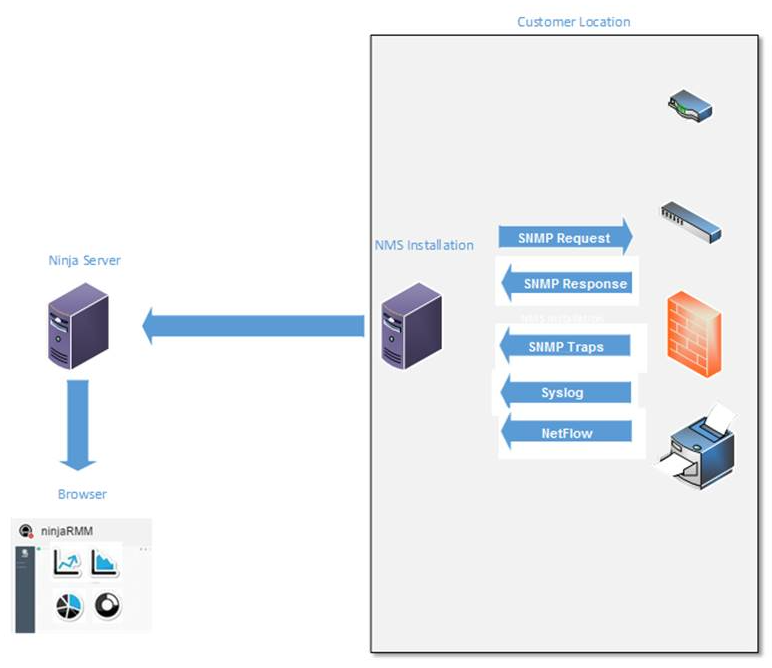
Figure 1: NMS agent dataflow (click to enlarge)
Scalability
A basic NinjaOne NMS installation with the default monitor settings will perform well on a system with a quad-core processor and 8 GB of RAM.
Adjusting policies to monitor larger networks or using the Network Traffic Flow module to monitor SNMP traps or Syslog may require higher system specifications. The minimum system requirements depend on the number of devices you are monitoring. Refer to the tables below for additional information.
Scalability Considerations
- Number of monitored devices: If you monitor 100 or more devices, you may need to tune your system's performance.
- Amount of data collected for each device: If you increase the number of monitors on a device, the amount of data collected will spike.
- Changing the default time intervals: If you set a time interval to collect data every five minutes, We recommend using a high-performance server to complete the data collection efficiently.
Optimization For Traffic Analysis
To optimize performance when collecting traffic analysis data, we recommend you use a dedicated high-performance server when the following conditions exist:
- You configure the application to collect traffic flow data from multiple routers or switches.
- There is a large amount of traffic conversations.
- You set up the application to monitor more than 100 devices.
- You plan to monitor SNMP traps or syslog messages.
- You plan to capture configuration backups.
Hardware and Software System Requirements
The following minimum requirements apply to install the default configuration. Increasing the device monitoring intervals and network traffic collection may require increasing your RAM and CPU power.
Make and Model Support
NinjaOne NMS supports the most common Cisco, Dell, HP, and NETGEAR models and devices that support the standard MIB-2 protocol. However, certain makes/models may not display data because they deviate from the standard OIDs for components such as CPU, memory, or network adapters. To monitor such devices, you must add custom OIDs. Refer to NinjaOne NMS: Custom SNMP to learn more.
Host Server System Requirements
OS Requirements
Because of the heavy system load that can occur with Network Discovery, log capture, and SNMP monitoring, We recommend a Windows Server OS.
Supported Windows Operating Systems
| Operating System | Supported Versions |
|---|---|
| Windows 10 |
|
| Windows 11 |
|
| Windows Server 2016 | v.1607 |
| Windows Server 2019 | v.1809 |
| Windows Server 2022 | v.21H2 |
Windows Versions Not Supported
NinjaOne NMS does not support the following Windows Operating systems:
- Windows 7
- Windows 8
- Windows Server 2012 and earlier.
Delegates On Devices Running Unsupported Operating Systems
If you have a delegate installed on a now-unsupported OS, this is because NinjaOne allowed the device to remain during migration to a new version of the delegate. If you remove the delegate from that device, you will not be able to reinstall it unless you upgrade the device to a supported operating system.
Hardware Requirements
- CPU: Quad-core, 3.0 GHz or higher.
- Memory: 8 GB RAM (16 GB recommended).
- Hard Drive Space: 50 GB.
- NIC (network interface controller): 100BASE-T minimum.
- Network Adapter: We recommend an advanced network adapter for network monitoring (required for larger networks).
System Requirements for Device Monitoring
Use this table to determine the minimum system requirements for your infrastructure needs.
| Component | CPU Cores | Memory (in Gb) | NIC | Disk Space (In Gb) |
|---|---|---|---|---|
| 1-20 monitored devices | 4 | 8 | 100BASE-T | 12 |
| 21–50 monitored devices | 6 | 12 | 1000BASE-T | 20 |
| 51–100 monitored devices | 8 | 16 | 1000BASE-T | 25 |
| Netflow/SFlow monitoring | The number of cores + 50% | 16 | 1000BASE-T | Total fee space + 100% |
Firewall Exceptions and Allowed Programs
NinjaOne automatically configures the following ports during installation:
- 161 (UDP): SNMP trap collector
- 69 (UDP): TFTP server
- 514 (UDP): Syslog collector
- 2055 (UDP): NetFlow collector
- 4739: NetFlow v10/IPFIX collector
- 6343 (UDP): sFlow collector
- 9995, 9996 (UDP): NetFlow alternative port #3 collector
System Requirements for Collecting Traffic and Log Data
- Operating system: 8 GB
- Additional RAM per NetFlow device: 1 GB
Important Considerations
- You may need to increase the amount of memory allocated based on the volume of data collected through tools such as NetFlow and syslog.
- A minimum of 3 GB of free drive space is necessary to install the SNMP MIB Library.
- If you increase your retention settings, you may need to allocate more hard drive space to accommodate the additional data stored.
- We recommend a machine with 8 GB RAM or above.
- SSH is required, and must only be available on the default port (22).
Using NinjaOne NMS on a Virtual Machine
Due to the intense input/output (I/O) requirements and high additional hardware specifications, we do not recommend using a NinjaOne NMS delegate on a virtual machine in a production environment.
Hardware and software system requirements for the NinjaOne NMS Delegate on a virtual machine (VM):
- VM System Requirements: Follow the System Requirements chart above, which outlines the minimum requirements for optimal performance.
- Operating System: Because of the heavy system load that can occur with Network Discovery, log capture, and SNMP monitoring, We recommend a Windows Server OS.
- CPU: Do not use hyper-threading cores.
- Disk: Ensure that your VM uses a physical partition rather than a virtual hard disk.