
Issue
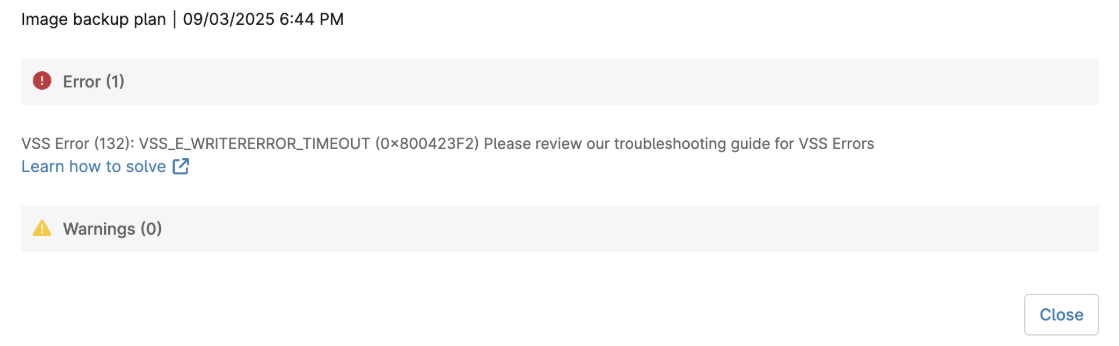
This article provides troubleshooting steps to follow when backups for a protected endpoint fail in an error state that begins with the phrase "VSS Error (132)..."
Environment
NinjaOne Backup
Cause
Error messages of this nature indicate that an issue with the Volume Shadow Copy Service (VSS) caused the backup to fail. VSS is a feature in Microsoft Windows that allows backup applications to create snapshots of computer files or volumes. This issue can occur during the preparation of the backup job or during the backup process. VSS errors can occur at the beginning, middle, or end of a backup job and often need specialized troubleshooting based on the specific error code.
Resolution
VSS errors are not caused by the NinjaOne solution. They are Windows system errors that can have various causes, each requiring different resolutions. You should start with general troubleshooting steps, then proceed to more specific measures based on the error message.
For general guidelines and troubleshooting steps for VSS writers, review NinjaOne Backup: Unstable VSS Writer Alerts. To triage a specific VSS 132 error message, select a topic to continue.
- VSS_E_BAD_STATE (0x80042301)
- VSS_E_UNEXPECTED (0x80042302)
- VSS_E_PROVIDER_NOT_REGISTERED (0x80042304)
- VSS_E_PROVIDER_VETO (0x80042306)
- VSS_E_PROVIDER_IN_USE (0x80042307)
- VSS_E_OBJECT_NOT_FOUND (0x80042308)
- VSS_S_ASYNC_PENDING (0x00042309)
- VSS_S_ASYNC_CANCELLED (0x0004230B)
- VSS_E_VOLUME_NOT_SUPPORTED (0x8004230C)
- VSS_E_VOLUME_NOT_SUPPORTED_BY_PROVIDER (0x8004230E)
- VSS_E_OBJECT_ALREADY_EXISTS (0x8004230D)
- VSS_E_KEY_DELETED (0x800703fa)
- VSS_E_UNEXPECTED_PROVIDER_ERROR (0x8004230F)
- VSS_E_CORRUPT_XML_DOCUMENT (0x80042310)
- VSS_E_INVALID_XML_DOCUMENT(0x80042311)
- VSS_E_MAXIMUM_NUMBER_OF_VOLUMES_REACHED (0x80042312)
- VSS_E_FLUSH_WRITES_TIMEOUT (0x80042313)
- VSS_E_HOLD_WRITES_TIMEOUT (0x80042314)
- VSS_E_UNEXPECTED_WRITER_ERROR (0x80042315)
- VSS_E_SNAPSHOT_SET_IN_PROGRESS (0x80042316)
- VSS_E_MAXIMUM_NUMBER_OF_SNAPSHOTS_REACHED (0x80042317)
- VSS_E_WRITER_INFRASTRUCTURE (0x80042318)
- VSS_E_WRITER_NOT_RESPONDING (0x80042319)
- VSS_E_WRITER_ALREADY_SUBSCRIBED (0x8004231A)
- VSS_E_UNSUPPORTED_CONTEXT (0x8004231B)
- VSS_E_VOLUME_IN_USE (0x8004231D)
- VSS_E_MAXIMUM_DIFFAREA_ASSOCIATIONS_REACHED (0x8004231E)
- VSS_E_INSUFFICIENT_STORAGE (0x8004231F)
- VSS_E_WRITER_STATUS_NOT_AVAILABLE (0x80042409)
- VSS_E_REBOOT_REQUIRED (0x80042327)
- VSS_E_VOLUME_NOT_LOCAL (0x8004232D)
- VSS_E_CLUSTER_TIMEOUT (0x8004232E)
- VSS_E_WRITERERROR_INCONSISTENTSNAPSHOT (0x800423F0)
- VSS_E_WRITERERROR_OUTOFRESOURCES (0x800423F1)
- VSS_E_WRITERERROR_TIMEOUT (0x800423F2)
- VSS_E_WRITERERROR_RETRYABLE (0x800423F3)
- VSS_E_WRITERERROR_NONRETRYABLE (0x800423F4)
- VSS_E_WRITERERROR_RECOVERY_FAILED (0x800423F5)
- VSS_E_LEGACY_PROVIDER (0x800423F7)
- VSS_E_MISSING_DISK (0x800423F8)
- VSS_E_MISSING_HIDDEN_VOLUME (0x800423F9)
- VSS_E_MISSING_VOLUME (0x800423FA)
- VSS_E_DYNAMIC_DISK_ERROR (0x800423FC
- VSS_E_CLUSTER_ERROR (0x80042400)
- VSS_E_UNSELECTED_VOLUME (0x8004232A)
- VSS_E_SNAPSHOT_NOT_IN_SET (0x8004232B)
- VSS_E_NESTED_VOLUME_LIMIT (0x8004232C)
- VSS_E_NOT_SUPPORTED (0x8004232F)
- VSS_E_WRITERERROR_PARTIAL_FAILURE (0x80042336)
Error Specific Causes and Resolutions
VSS_E_BAD_STATE (0x80042301)
The system made a function call when the object was in an incorrect state. This error indicates that Microsoft's VSS framework or the VSS writers are in a bad state. A reboot may resolve this issue temporarily, but this error could also be caused by raw volumes being present in the server in an offline state. This issue can also happen when CSV storage is not deployed to Microsoft standards.
VSS_E_UNEXPECTED (0x80042302)
A Volume Shadow Copy Service (VSS) component encountered an unexpected error. This error is typically associated with file system damage. Perform chkdsk /F on impacted volumes followed by SFC and DISM scans.
VSS_E_PROVIDER_NOT_REGISTERED (0x80042304)
The Volume Shadow Copy Provider is not registered in the system. The registry needs repair. The Shadow Copies tab in Disk Properties will also not load.
VSS_E_PROVIDER_VETO (0x80042306)
Windows could not perform a shadow copy at this time. The provider was unable to perform the request. Ensure no other backup providers are installed, and the system has enough snapshot space in the volume being backed up, and multiple backup types are not in use for the server. This error may sometimes be transient.
VSS_E_PROVIDER_IN_USE (0x80042307)
The shadow copy provider is currently in use and cannot be unregistered. Commonly seen in VM backups where the host cannot quiesce the guest. Ensure that no third-party backup software is installed and that no other backups or Windows updates are running during backups.
VSS_E_OBJECT_NOT_FOUND (0x80042308)
The specified object was not found. This error means that Microsoft VSS failed to take a snapshot of your file systems and that the backup job will be unable to back up any files that are opened exclusively by other applications. Ensure that VSS has not been disabled on one or more volumes that are part of the backup. Ensure there are no problems with VSS DLL registration.
VSS_S_ASYNC_PENDING (0x00042309)
The asynchronous operation is pending. This error sometimes occurs on database servers. Verify no other critical operations are happening at the same time as the backup.
VSS_S_ASYNC_FINISHED (0x0004230A)
The asynchronous operation has completed. Your next backup should resolve this error.
VSS_S_ASYNC_CANCELLED (0x0004230B)
The asynchronous operation has been cancelled. Your next backup should resolve this error.
VSS_E_VOLUME_NOT_SUPPORTED (0x8004230C)
Shadow copying the specified volume is not supported.
Verify that shadow copies have not been inactivated on any volumes included in the backup.
VSS_E_VOLUME_NOT_SUPPORTED_BY_PROVIDER (0x8004230E)
The shadow copy provider does not support shadow copying the volume. This error may indicate non-Microsoft shadow copy providers. Remove any additional third-party backup software products that should not be in use.
VSS_E_OBJECT_ALREADY_EXISTS (0x8004230D)
The object already exists. This error may indicate non-Microsoft shadow copy providers. Remove any additional 3rd party backup software products that should not be in use.
VSS_E_KEY_DELETED (0x800703fa)
An attempt was made to perform an illegal operation on a registry key that has been marked for deletion. A reboot of the Windows machine may resolve this error.
VSS_E_UNEXPECTED_PROVIDER_ERROR (0x8004230F)
The shadow copy provider had an unexpected error while trying to process the specified operation. This error may indicate non-Microsoft shadow copy providers.
Remove any additional third-party backup software products that should not be in use.
VSS_E_CORRUPT_XML_DOCUMENT (0x80042310)
The XML document is invalid. It is either incorrectly formed XML or does not match the schema. Windows updates may be running or have failed.
Ensure updates and any other driver or application installations have completed successfully, and Windows is in a clean reboot state.
VSS_E_INVALID_XML_DOCUMENT(0x80042311)
The XML document is invalid. It is either incorrectly formed XML or does not match the schema. Windows updates may be running or have failed.
Ensure updates and any other driver or application installations have completed successfully, and Windows is in a clean reboot state.
VSS_E_MAXIMUM_NUMBER_OF_VOLUMES_REACHED (0x80042312)
The maximum number of volumes for this operation has been reached. This condition is potentially unsafe as it means older shadow copies are not being properly removed.
Ensure all old snapshots have been safely removed. Check that antivirus scanning activity is not interrupting operations. Remove any additional 3rd party backup software products that should not be in use. Check for incomplete Windows updates. This error can also indicate too frequent backups on a system with limited resources.
VSS_E_FLUSH_WRITES_TIMEOUT (0x80042313)
The shadow copy provider timed out while flushing data to the volume being shadow copied. This error can be caused by excessive activity on the volume. Try again later when the volume is not being used so heavily. This error is more common on systems with limited resources or slow disks.
VSS_E_HOLD_WRITES_TIMEOUT (0x80042314)
The shadow copy provider timed out while holding writes to the volume being shadow copied. This error can be caused by excessive activity on the volume. Try again later when the volume is not being used so heavily. This error may be more common on systems with limited resources or slow disks.
VSS_E_UNEXPECTED_WRITER_ERROR (0x80042315)
VSS encountered problems while sending events to writers. This error can occur if other backup products are installed, or if multiple shadow copies are running concurrently, or if backups are run too frequently without sufficient cleanup time after a previous job. Check for limited server resources.
VSS_E_SNAPSHOT_SET_IN_PROGRESS (0x80042316)
Another shadow copy creation is already in progress. Wait a few minutes, then try again. Ensure no other backup products are installed, that multiple types of backups are not being attempted for the same server, and that backups are not too frequent for the available system resources.
VSS_E_MAXIMUM_NUMBER_OF_SNAPSHOTS_REACHED (0x80042317)
The specified volume has already reached its maximum number of shadow copies, or the volume has been added to the maximum number of shadow copy sets. The specified volume was not added to the shadow copy set. Verify that there is sufficient free disk space on the drive where the locked file is located. Verify that no other software is already using the shadow volume for the drive. Restart the computer and try again.
VSS_E_WRITER_INFRASTRUCTURE (0x80042318)
An error was detected in the VSS. The problem occurred while trying to contact VSS writers. This error typically requires ensuring the default Microsoft system writer is forced. Commonly seen if other backup providers are installed.
VSS_E_WRITER_NOT_RESPONDING (0x80042319)
A writer did not respond to a GatherWriterStatus call. The writer might have terminated, or is stuck. Verify there is enough available free space for shadow copies. If space is sufficient, check for disk corruption by running chkdsk /f
VSS_E_WRITER_ALREADY_SUBSCRIBED (0x8004231A)
The writer has already successfully called the subscribe function. It cannot call subscribe multiple times. There could be backups scheduled too frequently for this system, or multiple backup types being tried concurrently.
VSS_E_UNSUPPORTED_CONTEXT (0x8004231B)
The shadow copy provider does not support the specified shadow copy type. Shadow space on the volume may be too small, or could be redirected to an alternate volume that is not part of the backup scope or does not support VSS operations.
VSS_E_VOLUME_IN_USE (0x8004231D)
The specified shadow copy storage association is in use and so can't be deleted. This may occur if shadows were in use when the volume was added to a cluster, or failed over with a shadow in use, or if another system is sharing the disk and has its own snapshot in use. Manual snapshot removal is typically necessary to resolve this issue.
VSS_E_MAXIMUM_DIFFAREA_ASSOCIATIONS_REACHED (0x8004231E)
The maximum number of shadow copy storage associations has already been reached. Ensure that multiple backups are not in use and that third-party software is uninstalled. Remove existing snapshots and verify snapshot storage space is sufficient.
VSS_E_INSUFFICIENT_STORAGE (0x8004231F)
Insufficient storage is available to create either the shadow copy storage file or other shadow copy data. Reassess snapshot storage space use. Delete stale snapshots. This issue is common when volumes have less than the Microsoft-recommended 10% free space.
VSS_E_WRITER_STATUS_NOT_AVAILABLE (0x80042409)
Writer status is not available for one or more writers. A writer might have reached the limit to the number of available backup-restore session states. Ensure that too-frequent backups or multiple backup types are not being used. Common on SQL and Hyper-V servers with multiple parallel backups, as well as in clusters. Care must be taken to limit the number of concurrent backups against a cluster.
VSS_E_REBOOT_REQUIRED (0x80042327)
A reboot is required after completing this operation. Windows update or MSIExec has a snapshot in use. Any updates or installations must be finished, and the server must be rebooted before snapshots can be used.
VSS_E_VOLUME_NOT_LOCAL (0x8004232D)
The volume being backed up is not mounted on the local host. This can occur when attempts are made to back up a virtual machine (VM) that is part of a cluster or when a cluster volume is included in a backup that fails over to another host after the backup is initiated. This can also occur in some cases with iSCSI or Fibre Channel-connected mounts, where the storage system uses third-party VSS providers.
VSS_E_CLUSTER_TIMEOUT (0x8004232E)
A timeout occurred while preparing a cluster shared volume for backup. This error commonly occurs when the cluster configuration does not meet Microsoft requirements or best practices. Ensure you are using the correct type of backup for your cluster and are protecting the cluster through the active node. This error is commonly seen on Hyper-V clusters where guests from different hosts are in the same CSV, which must be corrected.
VSS_E_WRITERERROR_INCONSISTENTSNAPSHOT (0x800423F0)
The shadow copy set only contains a subset of the volumes needed to correctly back up the selected components of the writer. Check for file system corruption. Perform a chkdsk /F on impacted volumes followed by SFC and DISM scans.
VSS_E_WRITERERROR_OUTOFRESOURCES (0x800423F1)
A resource allocation failed while processing this operation. Windows ran out of memory. Reassess server requirements and ensure applications are not causing memory leaks or hangs. A reboot is usually a short-term resolution for this issue.
VSS_E_WRITERERROR_TIMEOUT (0x800423F2)
The writer's timeout expired between the freeze and the thaw events. This error is typically not observed on patched servers, but was an issue that existed years ago on unpatched systems. If the Security Accounts Manager registry writer has pending tasks during snapshot consolidation, this error can occur.
VSS_E_WRITERERROR_RETRYABLE (0x800423F3)
The writer experienced a transient error. Retry the backup. Check for sufficient resource allocation. Make sure there are no concurrent snapshot operations from other backups, too frequent backups, or backups and Windows updates running concurrently. Rebooting may temporarily resolve the problem.
VSS_E_WRITERERROR_NONRETRYABLE (0x800423F4)
The writer experienced a non-transient error. Reboot the machine. Check for incomplete Windows updates or conflicting multiple backups. Check for sufficient server resources.
VSS_E_WRITERERROR_RECOVERY_FAILED (0x800423F5)
The writer experienced an error while trying to recover the shadow copy volume. This error can be caused by Excessive resource usage in Windows or conflicting backup providers. Ensure no other backup software is installed, and multiple backups of the same machine are not in use.
VSS_E_LEGACY_PROVIDER (0x800423F7)
This version of the hardware provider does not support this operation. SAN storage vendors often add hardware providers for VSS. Ensure you are not using SAN snapshot technology in conjunction with backups, and that your SAN drivers are up to date.
VSS_E_MISSING_DISK (0x800423F8)
An expected disk did not arrive in the system. Some IPKVM systems offer pass-through storage to Windows, which can appear as a local disk rather than a removable disk. This can also occur when a cluster has not failed over cleanly. Ensure that all disks present at the start of the backup are still connected. May require failover and failback or a complete cluster restart to resume normal operation.
VSS_E_MISSING_HIDDEN_VOLUME (0x800423F9)
An expected hidden volume did not arrive in the system. This is a bug encountered in Windows 2019 and newer systems related to a defect Microsoft has since patched. Check the Application event log for more information and verify Windows is patched and up to date.
VSS_E_MISSING_VOLUME (0x800423FA)
An expected volume did not arrive in the system. It may be seen with clusters in an unhealthy state. Check the Application event log for more information. Ensure all drives in the backup are online. Check for clusters and drives in an unhealthy state.
VSS_E_DYNAMIC_DISK_ERROR (0x800423FC)
An error occurred in processing the dynamic disks involved in the operation. Dynamic disks are no longer supported by Microsoft and should not be used except for OS disk mirroring.
VSS_E_CLUSTER_ERROR (0x80042400)
The clustered disks could not be enumerated or put into cluster maintenance mode. Check the System event log for cluster-related events and the Application event log for VSS-related events.
VSS_E_UNSELECTED_VOLUME (0x8004232A)
The requested operation would overwrite a volume that is not explicitly selected. For more information. Check the Application event log. Verify that volume synchronization, clustering, and Active Directory Federation Services (ADFS) are all functioning properly.
VSS_E_SNAPSHOT_NOT_IN_SET (0x8004232B)
The shadow copy ID was not found in the backup components document for the shadow copy set. Check for outdated shadow copies still on the system.
VSS_E_NESTED_VOLUME_LIMIT (0x8004232C)
The volume is nested too deeply to participate in the VSS operation. This occurs on a Hyper-V host-level backup when a VM's internal OS, through the Disk Manager, mounts a VHD/VHDX file directly that is part of the storage the host OS is snapshotting. Use Hyper-V as an alternative to connect the VHD to the VM from the host level.
VSS_E_NOT_SUPPORTED (0x8004232F)
The requested operation is not supported. indicates that the disk or critical objects in the disk are excluded from VSS via the registry, but were attempted to be included in a backup. This error may be seen on third-party database servers and usually indicates that direct backup of the application is not supported.
VSS_E_WRITERERROR_PARTIAL_FAILURE (0x80042336)
The writer experienced a partial failure. Produced by Hyper-V VSS writer. Typically, it indicates a VM prevented snapshot, commonly when migrating between storage owned by a different VM host or where CSV cluster architecture best practices and VM separation have not been followed. Check the component-level error state for more information.
VSS_E_BAD_STATE (0x80042301)
A function call was made when the object was in an incorrect state. This indicates that Microsoft's VSS framework or the VSS writers are in a bad state. A reboot may resolve this issue temporarily, but this error could also be caused by raw volumes being present in the server in an offline state. This can also happen when CSV storage is not deployed to Microsoft standards.
VSS_E_UNEXPECTED (0x80042302)
A Volume Shadow Copy Service (VSS) component encountered an unexpected error. This error is typically associated with file system damage. Perform chkdsk /F on impacted volumes followed by SFC and DISM scans. VSS_E_PROVIDER_NOT_REGISTERED (0x80042304) The volume shadow copy provider is not registered in the system. The registry needs repair. The Shadow Copies tab in Disk Properties will also not load.
VSS_E_PROVIDER_VETO (0x80042306)
Windows could not perform a shadow copy at this time. The provider was unable to perform the request. Ensure no other backup providers are installed, and the system has enough snapshot space in the volume being backed up, and multiple backup types are not in use for the server. This may sometimes be a transient issue.
VSS_E_PROVIDER_IN_USE (0x80042307)
The shadow copy provider is currently in use and cannot be unregistered. Commonly seen in VM backups where the host cannot quiesce the guest operating system. Ensure that no third-party backup software is installed and that no other backups or Windows updates are running during VM backups.
VSS_E_OBJECT_NOT_FOUND (0x80042308)
The specified object was not found. This error means that Microsoft VSS failed to take a snapshot of your file systems and that the backup job will be unable to back up any files that are opened exclusively by other applications. Ensure that VSS has not been inactivated on one or more of the volumes that are part of the backup. Ensure there are no problems with VSS DLL registration.
VSS_S_ASYNC_PENDING (0x00042309)
The asynchronous operation is pending. This error sometimes occurs on database servers. Verify no other critical operations are happening at the same time as the backup.
VSS_S_ASYNC_FINISHED (0x0004230A)
The asynchronous operation has completed. Your next backup should resolve this error.
VSS_S_ASYNC_CANCELLED (0x0004230B)
The asynchronous operation has been cancelled. Your next backup should resolve this error.
VSS_E_VOLUME_NOT_SUPPORTED (0x8004230C)
Shadow copying the specified volume is not supported. Verify that shadow copies have not been disabled on any volumes included in the backup.
VSS_E_VOLUME_NOT_SUPPORTED_BY_PROVIDER (0x8004230E)
The shadow copy provider does not support shadow copying the volume. This may indicate non-Microsoft shadow copy providers. Remove any additional third-party backup software products that should not be in use.
VSS_E_OBJECT_ALREADY_EXISTS (0x8004230D)
The object already exists. This may indicate non-Microsoft shadow copy providers. Remove any additional 3rd party backup software products that should not be in use.
VSS_E_KEY_DELETED (0x800703fa)
An attempt was made to perform an illegal operation on a registry key that has been marked for deletion. A reboot of the Windows machine may resolve this error.
VSS_E_UNEXPECTED_PROVIDER_ERROR (0x8004230F)
The shadow copy provider had an unexpected error while trying to process the specified operation. This may indicate non-Microsoft shadow copy providers. Remove any additional Third-party backup software products that should not be in use.
VSS_E_CORRUPT_XML_DOCUMENT (0x80042310)
The XML document is invalid. It is either incorrectly formed XML or does not match the schema. Windows updates may be running or have failed to install. Ensure updates and any other driver or application installations have completed. successfully, and Windows is in a clean reboot state.
VSS_E_INVALID_XML_DOCUMENT(0x80042311)
The given XML document is invalid. It is either incorrectly formed XML or does not match the schema. Windows updates may be running or have failed. Ensure updates and any other driver or application installations have completed. successfully, and Windows is in a clean reboot state.
VSS_E_MAXIMUM_NUMBER_OF_VOLUMES_REACHED (0x80042312)
The maximum number of volumes for this operation has been reached. This condition is potentially unsafe as it means older shadow copies are not being properly removed. Ensure all old snapshots have been safely removed. Check that antivirus scanning activity is not interrupting operations. Remove any additional 3rd party backup software products that should not be in use. Check for incomplete Windows updates. This error may also indicate that too many backups are being performed on a system with limited resources.
VSS_E_FLUSH_WRITES_TIMEOUT (0x80042313)
The shadow copy provider timed out while flushing data to the volume being shadow copied. This error can be caused by excessive activity on the volume. Try again later when the volume is not being used so heavily. This error may be more common on systems with limited resources or slow disks.
VSS_E_HOLD_WRITES_TIMEOUT (0x80042314)
The shadow copy provider timed out while holding writes to the volume being shadow copied. This error can be caused by excessive activity on the volume. Try again later when the volume is not being used so heavily. This error is more common on systems with limited resources or slow disks.
VSS_E_UNEXPECTED_WRITER_ERROR (0x80042315)
VSS encountered problems while sending events to writers. This error can occur if other backup products are installed, or if multiple shadow copies are running concurrently, or if backups are run too frequently without sufficient cleanup time after a previous job. Check for limited server resources.
VSS_E_SNAPSHOT_SET_IN_PROGRESS (0x80042316)
Another shadow copy creation is already in progress. Wait a few minutes, then try again. Ensure no other backup products are installed, that multiple types of backups are not being attempted for the same server, and that backups are not too frequent for the available system resources.
VSS_E_MAXIMUM_NUMBER_OF_SNAPSHOTS_REACHED (0x80042317)
The specified volume has already reached its maximum number of shadow copies, or the volume has been added to the maximum number of shadow copy sets. The specified volume was not added to the shadow copy set. Verify that there is sufficient free disk space on the drive where the locked file is located. Verify that no other software is already using the shadow volume for the drive. Restart the computer and try again.
VSS_E_WRITER_INFRASTRUCTURE (0x80042318)
An error was detected in the VSS. The problem occurred while trying to contact VSS writers. This typically requires ensuring the default Microsoft system writer is forced. Commonly seen if other backup providers are installed.
VSS_E_WRITER_NOT_RESPONDING (0x80042319)
A writer did not respond to a GatherWriterStatus call. The writer might have terminated, or it might be stuck. Verify there is enough available free space for shadow copies. If space is sufficient, check for disk corruption by running chkdsk /f
VSS_E_WRITER_ALREADY_SUBSCRIBED (0x8004231A)
The writer has already successfully called the subscribe function. It cannot call subscribe multiple times. There could be backups scheduled too frequently for this system, or multiple backup types being tried concurrently.
VSS_E_UNSUPPORTED_CONTEXT (0x8004231B)
The shadow copy provider does not support the specified shadow copy type. Shadow space on the volume may be too small, or could be redirected to an alternate volume that is not part of the backup scope or does not support VSS operations.
VSS_E_VOLUME_IN_USE (0x8004231D)
The specified shadow copy storage association is in use and so can't be deleted. This may occur if shadow copies were in use when the volume was added to a cluster, or failed over with a shadow copy in use, or if another system is sharing the disk and has its own snapshot in use. Manual snapshot removal is typically necessary to resolve this issue.
VSS_E_MAXIMUM_DIFFAREA_ASSOCIATIONS_REACHED (0x8004231E)
The maximum number of shadow copy storage associations has already been reached. Ensure that multiple backups are not in use and that third-party software is uninstalled. Remove existing snapshots and verify that the snapshot storage space is sufficient.
VSS_E_INSUFFICIENT_STORAGE (0x8004231F)
Insufficient storage is available to create either the shadow copy storage file or other shadow copy data. Reassess snapshot storage space use. Delete stale snapshots. This issue is common when volumes have less than the Microsoft-recommended 10% free space.
VSS_E_WRITER_STATUS_NOT_AVAILABLE (0x80042409)
Writer status is not available for one or more writers. A writer might have reached the limit at the number of available backup-restore session states. Ensure that too-frequent backups or multiple backup types are not being used. Common on SQL and Hyper-V servers with multiple parallel backups, as well as in clusters. You may need to limit the number of concurrent backups against a cluster.
VSS_E_REBOOT_REQUIRED (0x80042327)
A reboot is required after completing this operation. Windows Update or MSIExec has a snapshot in use. Any updates or installations must be finished, and the server must be rebooted before snapshots can be used.
VSS_E_VOLUME_NOT_LOCAL (0x8004232D)
The volume being backed up is not mounted on the local host. This error can occur when you attempt to back up a VM that is part of a cluster, or a cluster volume is included in a backup that fails over to another host after the backup starts. This issue can also occur in some cases with iSCSI or Fibre Channel-connected mounts, where the storage system uses third-party VSS providers.
VSS_E_CLUSTER_TIMEOUT (0x8004232E)
A timeout occurred while preparing a cluster shared volume for backup. This error commonly occurs when the cluster configuration does not meet Microsoft requirements or best practices. Ensure you are using the correct type of backup for your cluster and are protecting the cluster through the active node. You may also encounter this error on Hyper-V clusters where guests from different hosts are in the same CSV, which must be corrected.
VSS_E_WRITERERROR_INCONSISTENTSNAPSHOT (0x800423F0)
The shadow copy set only contains a subset of the volumes needed to correctly back up the selected components of the writer. Check for file system corruption. Perform a chkdsk /F on impacted volumes followed by SFC and DISM scans.
VSS_E_WRITERERROR_OUTOFRESOURCES (0x800423F1)
A resource allocation failed while processing this operation. Windows ran out of memory. Reassess server requirements and ensure applications are not causing memory leaks or hangs. A reboot is usually a short-term resolution for this issue.
VSS_E_WRITERERROR_TIMEOUT (0x800423F2)
The writer's timeout expired between the freeze and the thaw events. This error is typically not observed on patched servers, but it was an issue that existed years ago on unpatched systems. If the Security Accounts Manager registry writer has pending tasks during snapshot consolidation, this error can occur.
VSS_E_WRITERERROR_RETRYABLE (0x800423F3)
The writer experienced a transient error. Retry the backup. Check for sufficient resource allocation. Make sure there are no concurrent snapshot operations from other backups, too frequent backups, or backups and Windows updates running concurrently. Rebooting may temporarily resolve the problem.
VSS_E_WRITERERROR_NONRETRYABLE (0x800423F4)
The writer experienced a non-transient error. Reboot the machine. Check for incomplete Windows updates or conflicting multiple backups. Check for sufficient server resources.
VSS_E_WRITERERROR_RECOVERY_FAILED (0x800423F5)
The writer experienced an error while trying to recover the shadow copy volume. This error can be caused by Excessive resource usage in Windows or conflicting backup providers. Ensure that no other backup software is installed and that multiple backups of the same machine are not in use.
VSS_E_LEGACY_PROVIDER (0x800423F7)
This version of the hardware provider does not support this operation. SAN storage vendors often add hardware providers for VSS. Ensure you are not using SAN snapshot technology in conjunction with backups, and that your SAN drivers are up to date.
VSS_E_MISSING_DISK (0x800423F8)
An expected disk did not arrive in the system. Some IPKVM systems offer pass-through storage to Windows, which may appear as a local disk rather than a removable disk. This error can also occur when a cluster has not failed over cleanly. Ensure that all disks present at the start of the backup are still connected. May require failover and failback or a complete cluster restart to resume regular operation.
VSS_E_MISSING_HIDDEN_VOLUME (0x800423F9)
An expected hidden volume did not arrive in the system. This error is the result of a bug in Windows 2019 and newer systems related to a defect Microsoft has since patched. Check the Application event log for more information and verify Windows is patched and up to date.
VSS_E_MISSING_VOLUME (0x800423FA)
An expected volume did not arrive in the system. You may encounter this error in clusters that are in an unhealthy state. Check the Application event log for more information. Ensure all drives in the backup are online. Check for clusters and drives in an unhealthy state.
VSS_E_DYNAMIC_DISK_ERROR (0x800423FC
An error occurred in processing the dynamic disks involved in the operation. Microsoft no longer supports dynamic disks, and you should not use them except for OS disk mirroring.
VSS_E_CLUSTER_ERROR (0x80042400)
The clustered disks could not be enumerated or put into cluster maintenance mode. Check the System event log for cluster-related events and the Application event log for VSS-related events.
VSS_E_UNSELECTED_VOLUME (0x8004232A)
The requested operation would overwrite a volume that is not explicitly selected. For more information. Check the Application event log. Verify that volume synchronization, clustering, and Active Directory Federation Services (ADFS) are all functioning correctly.
VSS_E_SNAPSHOT_NOT_IN_SET (0x8004232B)
The shadow copy ID was not found in the backup components document for the shadow copy set. Check for outdated shadow copies still on the system.
VSS_E_NESTED_VOLUME_LIMIT (0x8004232C)
The volume is nested too deeply to participate in the VSS operation. This error occurs during a Hyper-V host-level backup when a VM's internal OS, through the Disk Manager, mounts a VHD/VHDX file directly that is part of the storage the host OS is snapshotting. Use Hyper-V as an alternative to connect the VHD to the VM from the host level.
VSS_E_NOT_SUPPORTED (0x8004232F)
The requested operation is not supported. This error indicates that the disk or critical objects in the disk are excluded from VSS via the registry, but were attempted to be included in a backup. This error may be seen on third-party database servers and usually indicates that direct backup of the application is not supported.
VSS_E_WRITERERROR_PARTIAL_FAILURE (0x80042336)
The writer experienced a partial failure. Produced by Hyper-V VSS writer. This error typically indicates that a VM has prevented snapshotting, commonly when migrating between storage owned by a different VM host or where CSV cluster architecture best practices and VM separation have not been followed. Check the component-level error state for more information.
Additional Resources
For additional troubleshooting guidance, refer to the following articles: